What makes a retrospective board lead to change
A retrospective board leads to change when it opens with last time's actions and ends with few new ones, each with one owner and a date. Here is how to run it.
Open your team’s last six retro boards and read them in order. If the same complaints keep coming back with new sticky notes around them, the notes were never the problem.
Quick AnswerA retrospective board leads to change when the session opens with last time’s actions, ends with no more than three new ones, and gives each one a single owner and a date. The format, sailboat or anything else, only prompts the conversation. Follow-through is what changes how a team works.
Start the retrospective board with last time’s actions
Before anyone writes a new note, put the previous actions at the top of the board and read them out. Each one gets one of three answers: done, not done, or dropped on purpose.
That takes five minutes, and it sets the terms for the rest of the session. A team that reads back its actions first learns that what it agrees today will be read back in two weeks. A team that opens with fresh notes learns the opposite.
Then ask the harder question about the ones marked done: did it work? The release checklist got automated, but does a release still take all afternoon? An action can be finished and still be the wrong one, so ask whoever felt the problem, not only the action’s owner.
If most of last time’s actions were not done, we would skip the format altogether and spend the session on why. Maybe there were too many, or the owners had no time, or the actions were wishes to begin with. Write the reason on the board, so the next retro can check whether it changed.
The format is only a prompt
A format gets people talking about things they would otherwise leave out, and that is all it does. Teams often change format when retros feel flat, because it feels like doing something. A new format can freshen the notes, but it cannot rescue actions that never happen.
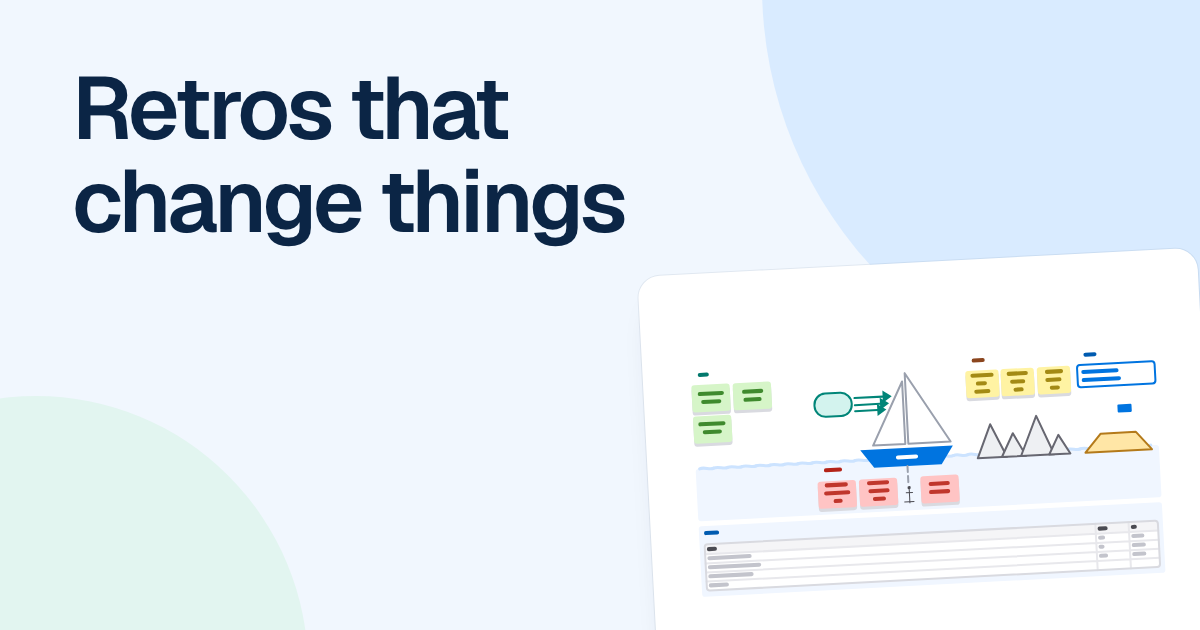
The sailboat is still a good one, because it looks forward as well as back. The boat is the team. The island is where you are heading, wind is what pushes you there, anchors are what slow you down, and rocks are the risks ahead.
FlowDraw’s “Sailboat retrospective” template comes filled in with an example: a mobile team aiming to ship version 5.3 by September 3.
| Area | Notes on the board |
|---|---|
| Wind | Clear goals in the product brief. Code reviews within a day. Beta testers reply within hours. |
| Anchors | Manual release checklist takes 2 hours. Waiting on API changes from backend. Flaky UI tests block merges. |
| Rocks | New OS version lands in September. Two engineers on leave in August. Store review delays near launch. |
Nine notes give you a fair picture of the team, and none of them is a plan yet. The template’s note on actions is a rule worth stealing: one for the biggest anchor, one for each rock you can steer around. It sets the number of actions for you and stops the meeting from trying to fix everything. As with any template, rename or remove whatever does not suit your team.
Leave with few actions, each with an owner and a date
Three at most, and one or two for a small team. Every action competes with work already planned, so a list of eight is really a list of eight wishes.
Each action has to pass one test: in two weeks, could someone tell whether it happened? Here is what that looks like for the mobile team, with names added for illustration.
| Weak action | What is wrong with it | Action you can check |
|---|---|---|
| Improve the release process | No end point | Mark automates the release checklist by August 6 |
| Talk to backend more | No owner, nothing to observe | Lisa agrees API freeze dates with backend by July 23 |
| Watch out for August | A worry, not a task | Chris writes the cover plan for the August leave by July 30 |
The owner is one person, because “the team” cannot be asked how it went. The owner does not have to do all the work, but they are the one who answers when the action is read back.
Copy the actions into whatever your team already plans from, in the same hour. FlowDraw does not connect to Jira or other trackers and will not remind anyone of a date, so the board alone will not carry them. If your team plans on a board anyway, a kanban board can hold them where people will see them.
A running order that fits in an hour
Read back last time’s actions
Five minutes. Done, not done or dropped, and whether the done ones worked.
Add notes alone
Ten minutes, in silence, so the loudest person does not set the topic.
Group the notes and choose
Fifteen minutes. Drag duplicates together, then have each person put their initials beside the anchor they would fix first. FlowDraw has no built-in timer or voting, so a phone keeps the time and initials do the voting.
Agree on actions
Twenty minutes. Write them in the template’s table, which has columns for action, owner and due date, and read each one back to its owner.
Set up the next retro
Five minutes. Use “Duplicate” on this board, clear the notes and move the actions table to the top, then name the new board so it sorts by date.
FAQ
Three at most, and one or two for a small team. Every action competes with work already planned, so a longer list tends to go undone. Each one needs a single owner and a date.