How to draw a UML class diagram
Learn to draw a UML class diagram: what the boxes, lines and multiplicities mean, how to choose a relationship, and a permissions model worked through.
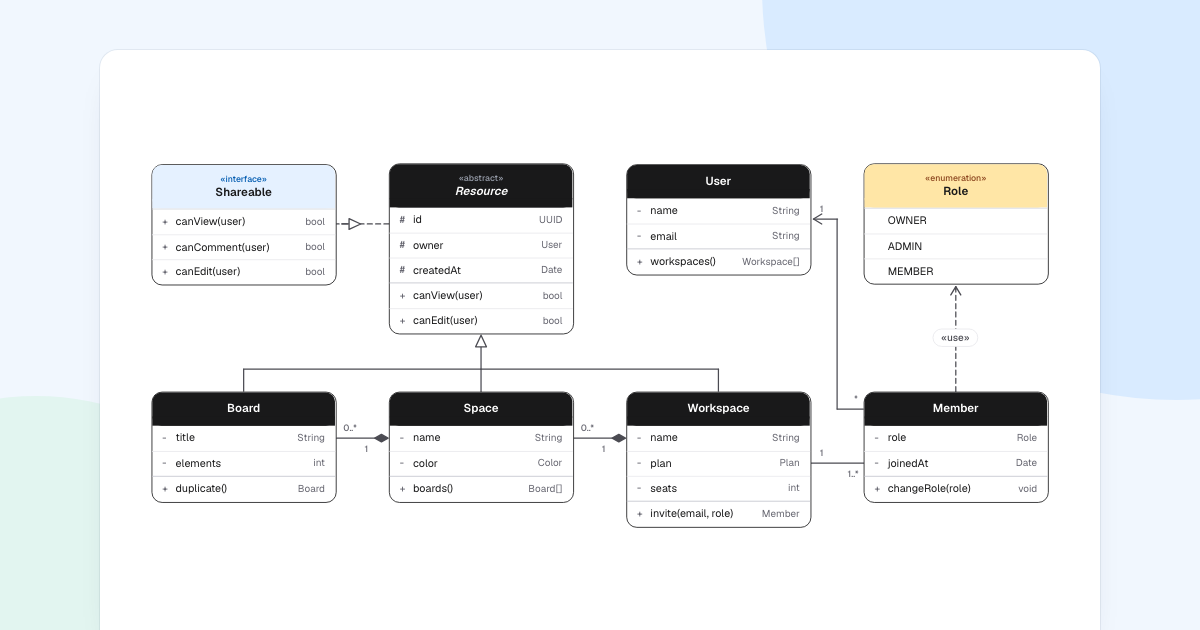
A UML class diagram shows the types in a system and how they relate. Learn the box and a few lines, and you can read most of them. To draw your own UML class diagram, you also need to know what to leave out.
Quick AnswerA UML class diagram shows classes as boxes with a name, attributes and methods, joined by lines for inheritance, association and ownership. To draw one, choose a narrow scope, name the classes, add only the members that matter, pick a relationship for each pair, then add multiplicities.
What is a UML class diagram?
It is the main structure diagram of UML, the modeling language maintained by the Object Management Group, whose specification is public. It shows what exists and how things connect, not what happens when.
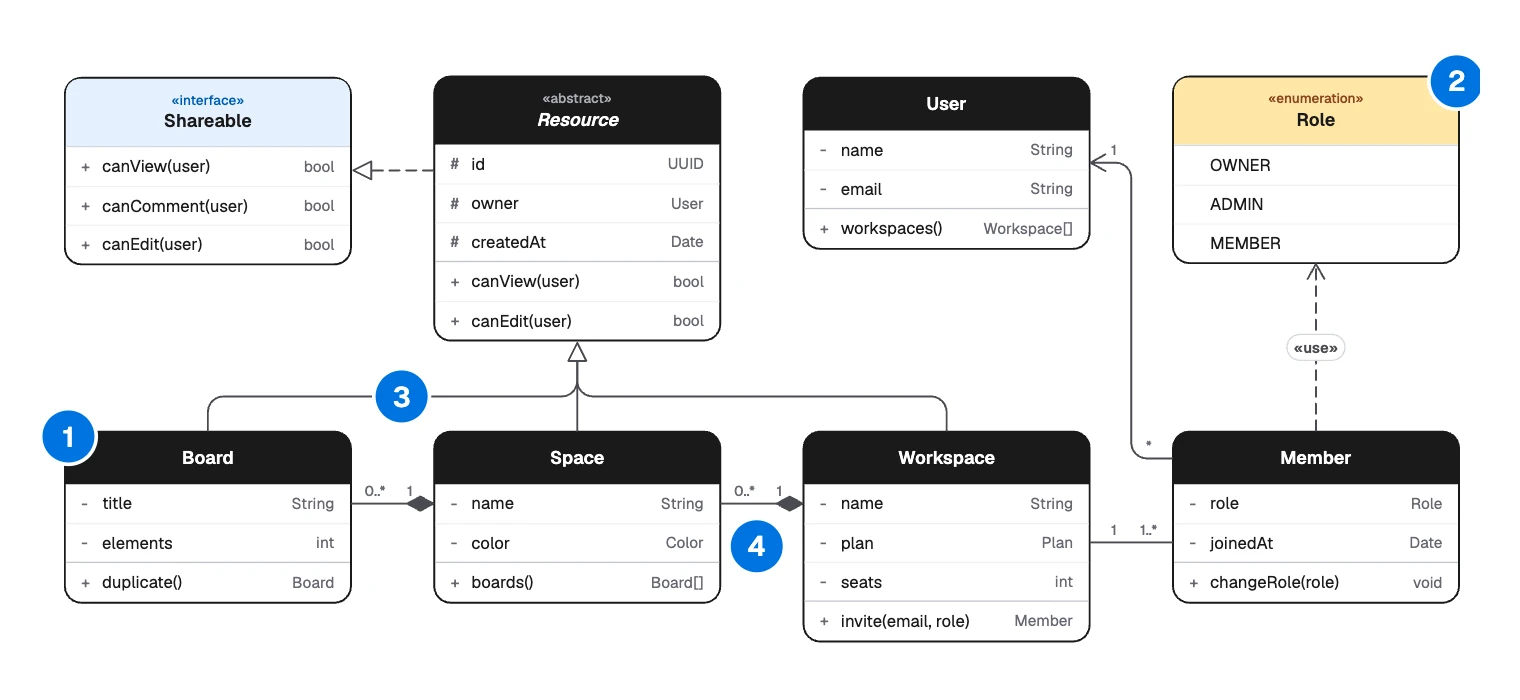
- Class: a box for one type.
- Keyword: says what kind of box it is, here «enumeration».
- Line: how two classes relate.
- Multiplicity: how many on each end of a line.
Use it to agree on a design before coding, or to explain a module to a new teammate. For stored tables and foreign keys, an ER diagram is the better fit. For what happens over time, draw a sequence diagram.
The parts of a class
A class box has three compartments. From the top: the name, the attributes and the methods.
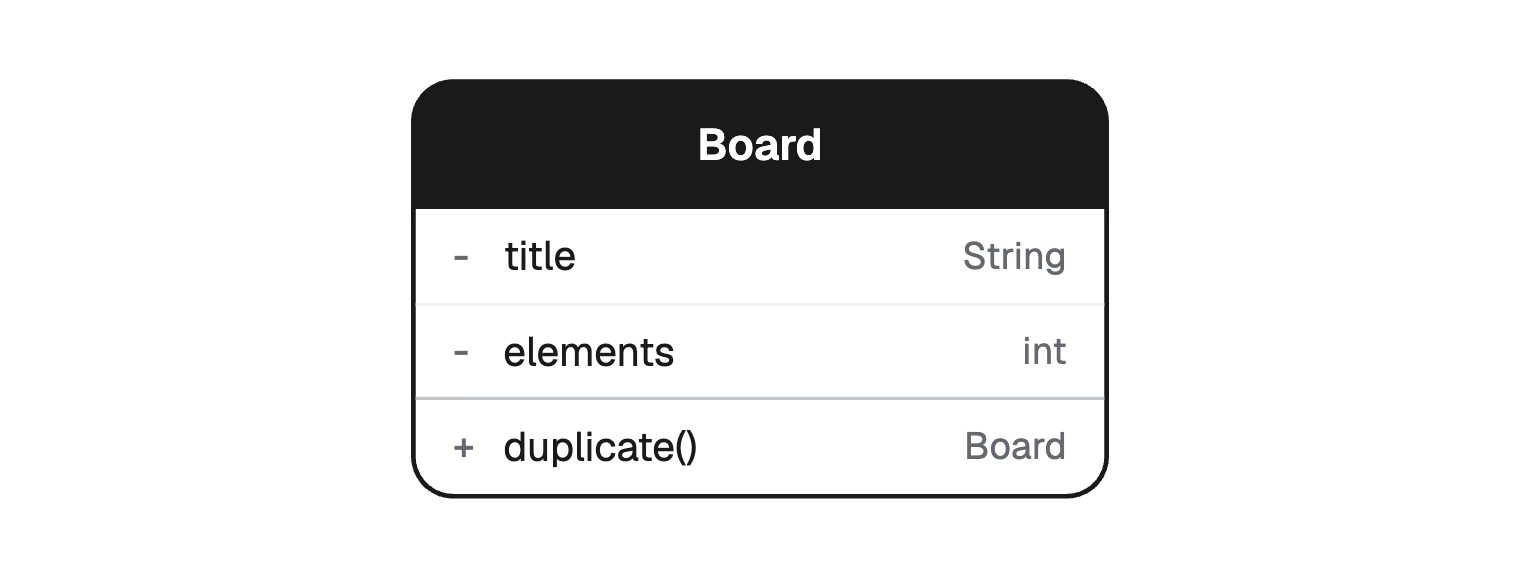
Each member can carry a visibility mark:
| Mark | Visibility | Who can use the member |
|---|---|---|
+ | Public | Any class |
- | Private | Only this class |
# | Protected | This class and its subclasses |
~ | Package | Classes in the same package |
A keyword in guillemets changes what the box means:
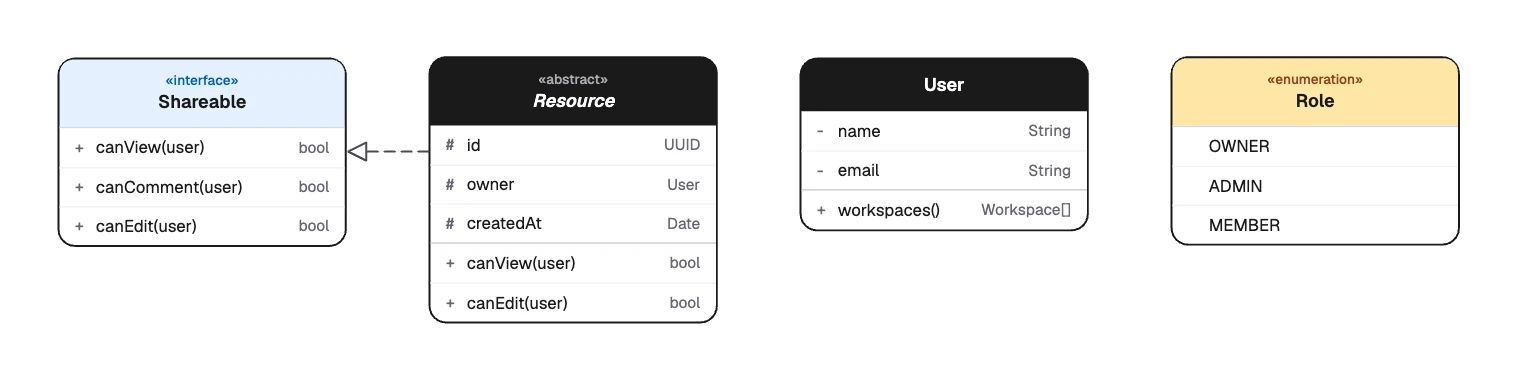
- «interface» is a contract that other classes promise to meet.
- «abstract» cannot be created directly, and its name is set in italics.
- «enumeration» lists fixed values:
OWNER,ADMIN,MEMBER.
UML class diagram relationships
| Relationship | Line | Read it as | In the example |
|---|---|---|---|
| Association | Solid line | Knows about | “Workspace” and “Member” |
| Directed association | Solid, open arrow | Knows about, one way | “Member” to “User” |
| Inheritance | Solid, hollow triangle at the parent | Is a kind of | “Board” to “Resource” |
| Realization | Dashed, hollow triangle at interface | Promises to do | “Resource” to “Shareable” |
| Dependency | Dashed, open arrow | Uses | “Member” to “Role”, marked «use» |
| Aggregation | Solid, hollow diamond at the whole | Has, part can live alone | Not used here |
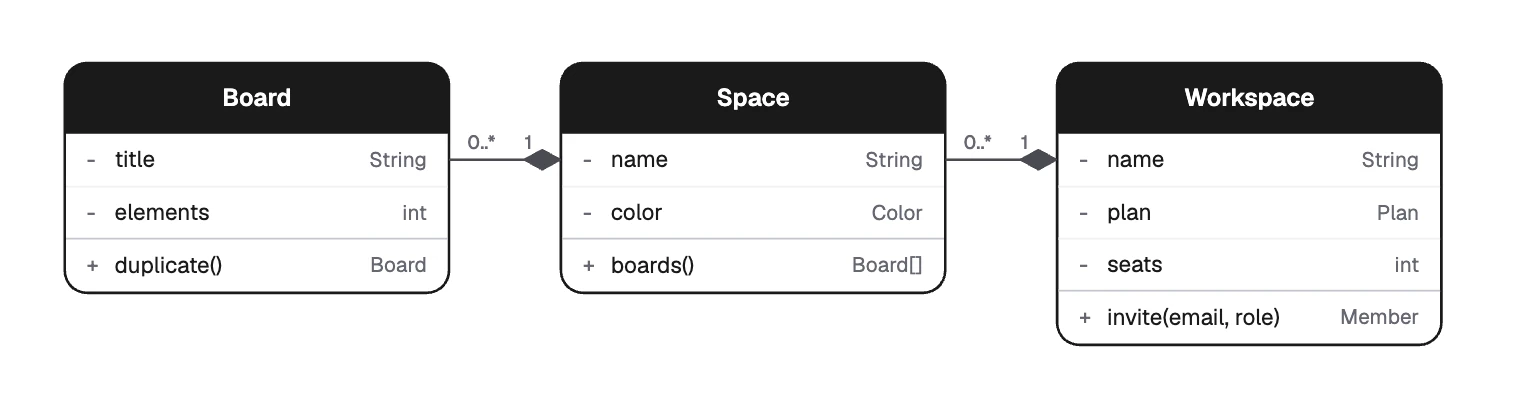
| Composition | Solid, filled diamond at the whole | Owns, part goes with it | “Board” in “Space” |
Numbers at the ends of a line are multiplicities. 1 means exactly one, 0..1 means optional, 0..* or * means any number, and 1..* means at least one.
Which line should I use?
Ask these in order and stop at the first yes:
- Is A a kind of B, in every situation? Use inheritance.
- Does A promise to meet the contract of interface B? Use realization.
- Does B exist only inside A, and go when A goes? Use composition.
- Does A keep a lasting reference to B? Use an association, with an arrow if only one side knows.
- Does A only touch B in passing, such as a parameter? Use a dependency.
Aggregation is missing on purpose. The UML specification leaves its exact meaning to the modeler, so many teams use a plain association instead.
How to draw a UML class diagram
Start with a question, not a codebase. The example answers one: who is allowed to do what to a board?
List the nouns in the question. Keep those with their own data or rules: “Board”, “Space”, “Workspace”, “Member”, “User”.
Look for what they share. “Board”, “Space” and “Workspace” all have an owner and can be shared, so they inherit from “Resource”.
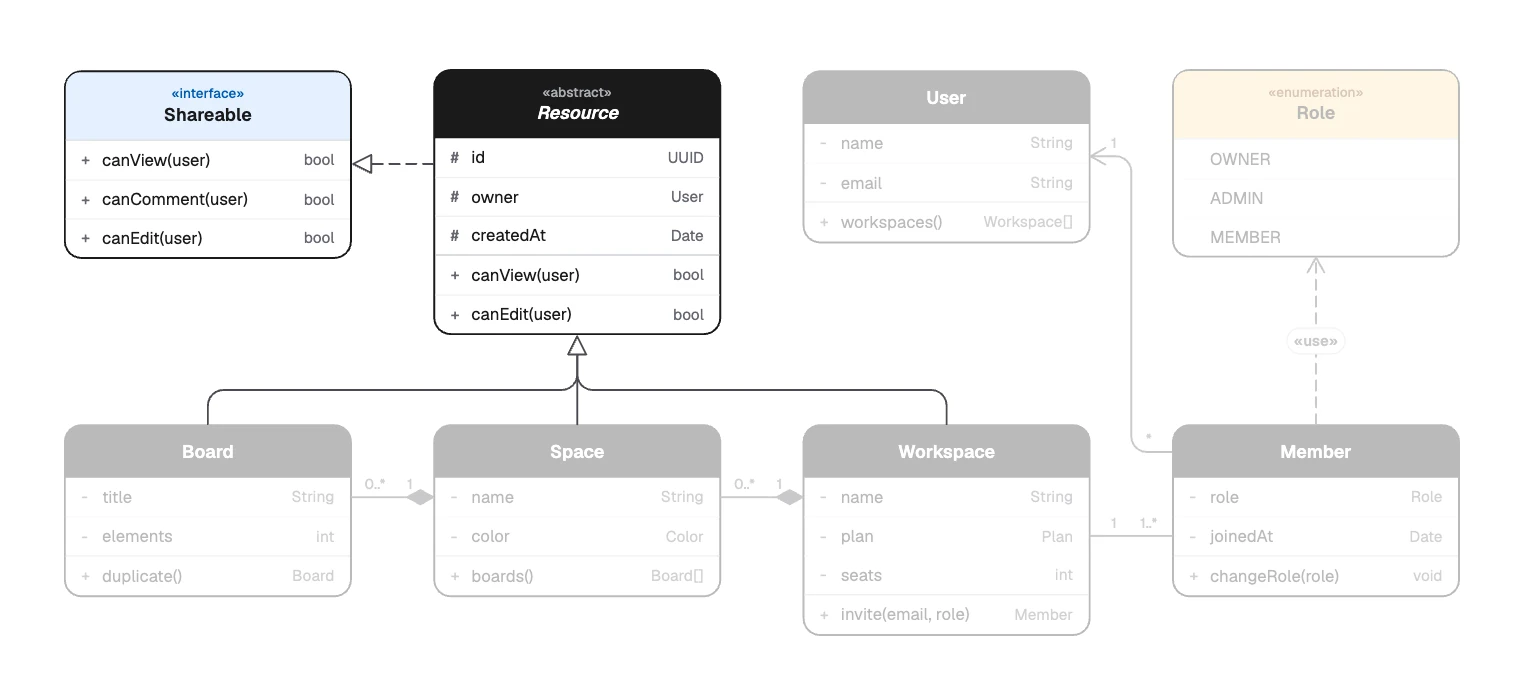
What the classes share moves up to Resource Add the members that explain the design.
canEdit(user)is the point of this diagram. Getters and setters are not.Draw the lines, strongest relationships first, using the questions above.
Add multiplicities and read each line aloud: “a workspace has one or more members”. If the sentence sounds wrong, so is the line.
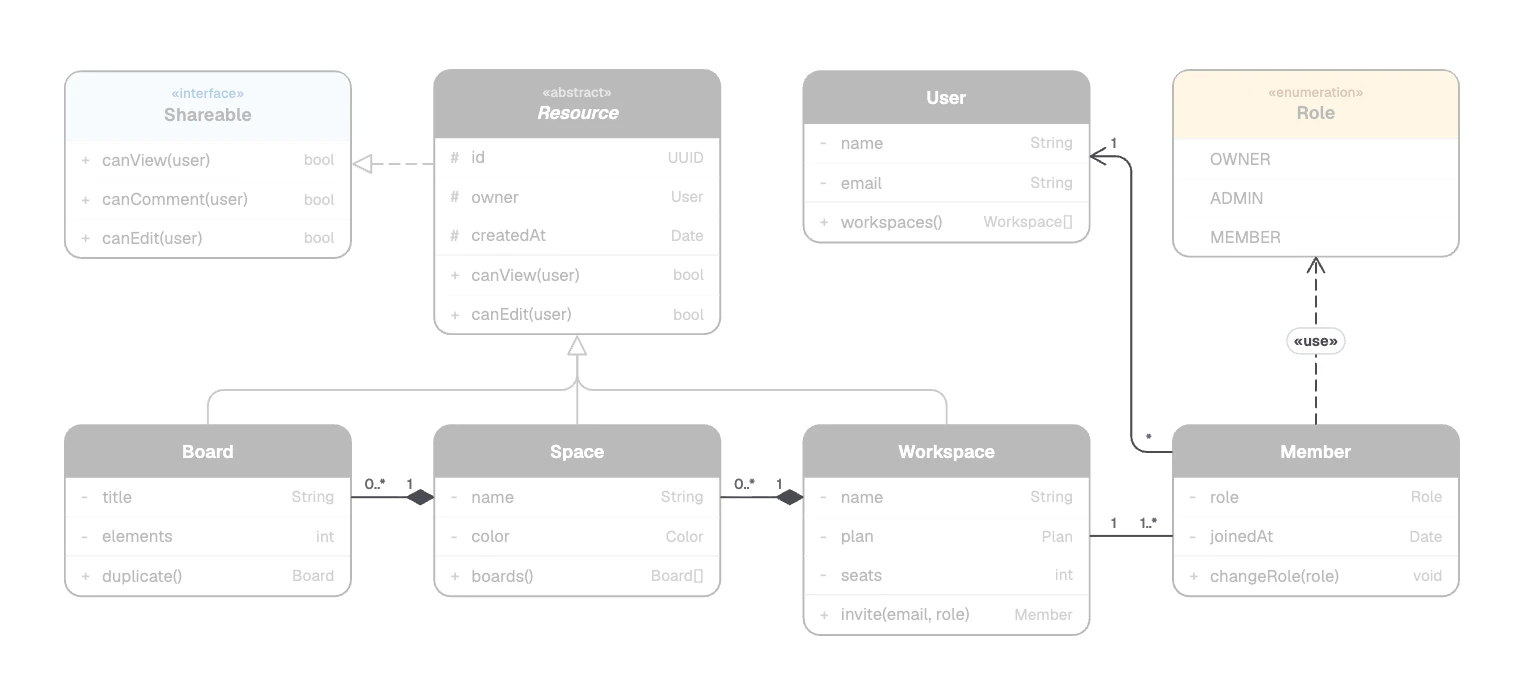
The remaining lines, with their multiplicities
Build a class diagram in FlowDraw
The “UML class” template, dock tool and UML library come with Pro or Team. On Free they open a dialog with “Maybe later” and “Upgrade to Pro”.
On Free, you can still draw the same picture. Make each class a “Table” from “More tools”, with one column and three rows. “Ends” in “Line properties” offers “Hollow triangle”, “Diamond”, “Hollow diamond” and “Open arrow”, and “Dashed” sets the line style.
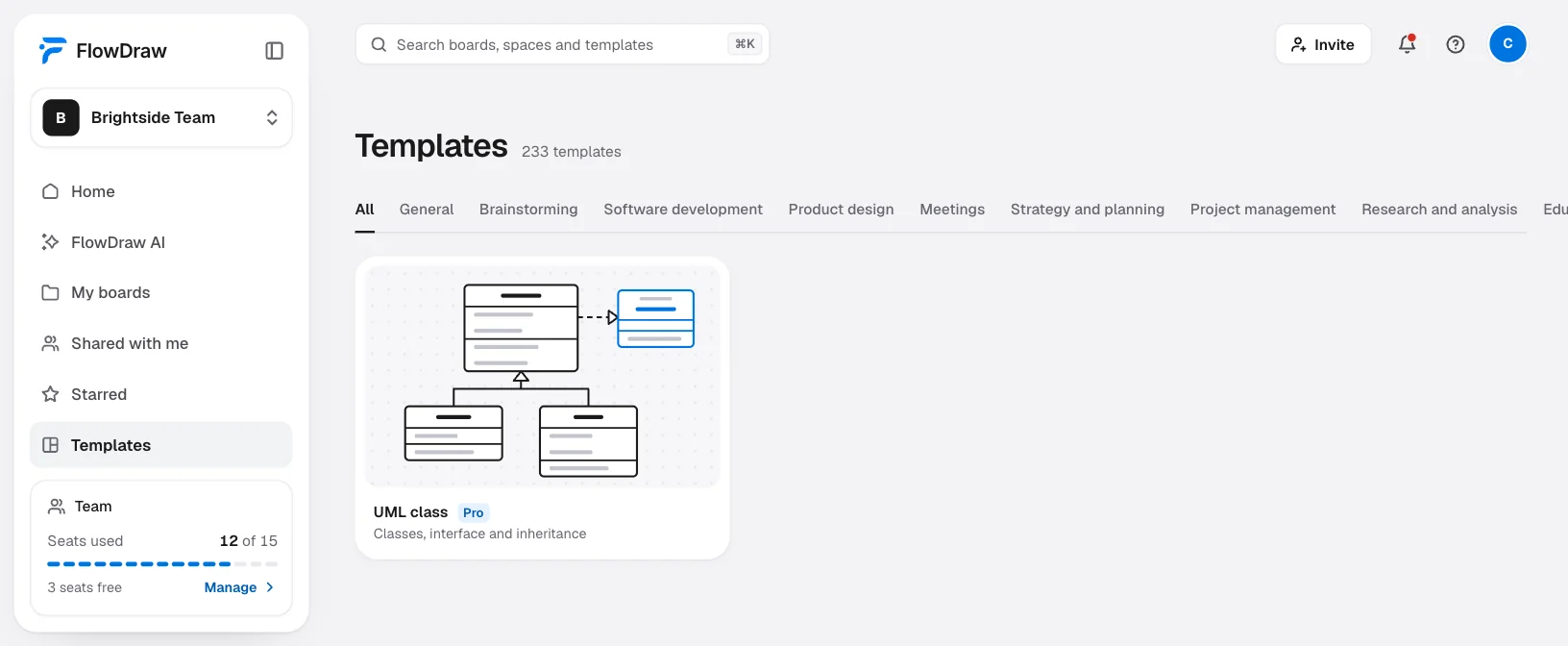
Open the template
On Home, click the “UML class” tile, or search for it under “Templates” and click “Use template”. To start blank, open a “Blank board” and click “UML class” in the dock. The UML section of “Shape library” adds “Abstract class”, “Enumeration”, “Package” and “Note”.
Set the type
Select a class. “Stereotype” in the side panel switches it between “Class”, “Abstract”, “Interface” and “Enum”.
Add members
Under “Attributes” and “Methods”, click “Add attribute” or “Add method”, then pick the visibility and type the name and type.
Draw the relationships
With nothing selected, press L and drag from one class to another: child to parent, part to whole. Select the line and pick from “Relationship” in “Line properties”. “Swap ends” flips a line drawn the wrong way around.
Write the multiplicities
“Add a label” writes to the middle of a line, so use the “Text” tool to place a small number beside each end. The end labels on the template’s own lines cannot be edited, so draw a new line where one needs to change.
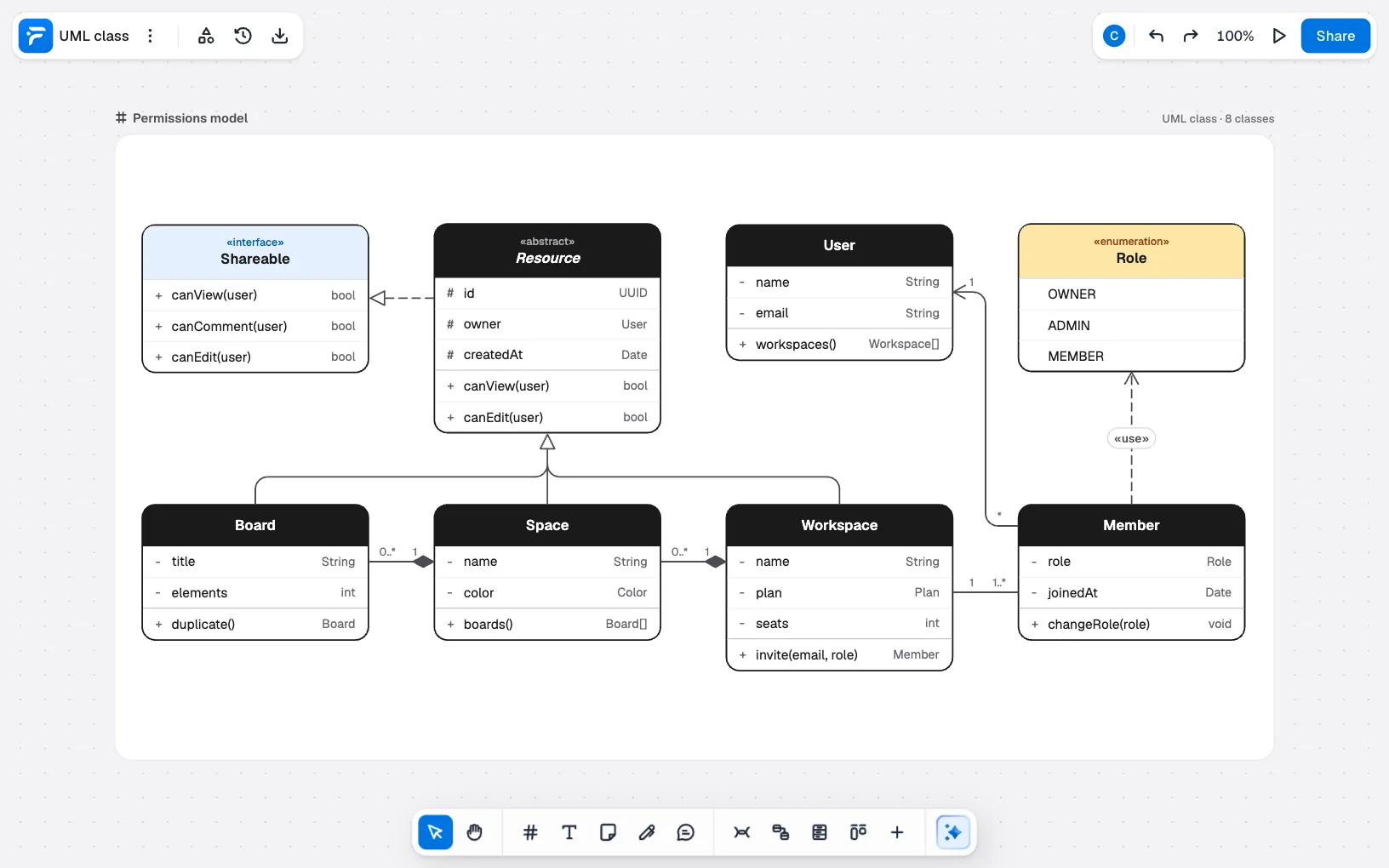
With AI, on Pro and Team, click “FlowDraw AI”, set “Diagram” to “UML class” and describe the model, or paste a few classes into the prompt:
UML class diagram of a permissions model. Board, Space and Workspace inherit from an abstract Resource that implements a Shareable interface. A workspace has members, and each member links to a user and has a role.
Check the arrow directions on the new board and add multiplicities where they matter.
Mistakes that make a class diagram misleading
- Modeling the whole codebase. A diagram of every class answers nothing. Draw one question per diagram.
- Inheritance to share code. If “is a kind of” sounds wrong out loud, use an association or composition.
- Composition everywhere. Removing a member should not delete the user, which is why “Member” points at “User” with a plain arrow.
- Marks at the wrong end. The triangle goes at the parent and the diamond goes at the whole.
- Getters, setters and framework noise. They bury the members that matter.
- No multiplicities. Whether a board sits in one space or many is often the very question.
Not on Pro yet? Start with a free account and try the table version.
FAQ
They show visibility. A plus is public, a minus is private, a hash is protected and a tilde is package. You can leave them out on an early sketch.