What is a C4 container diagram?
A container diagram is level two of the C4 model. It opens up one software system and shows the separately running parts inside: web apps, mobile apps, back-end services, databases, queues. In C4 a “container” is anything that has to be running for the system to work. The word has nothing to do with container images.
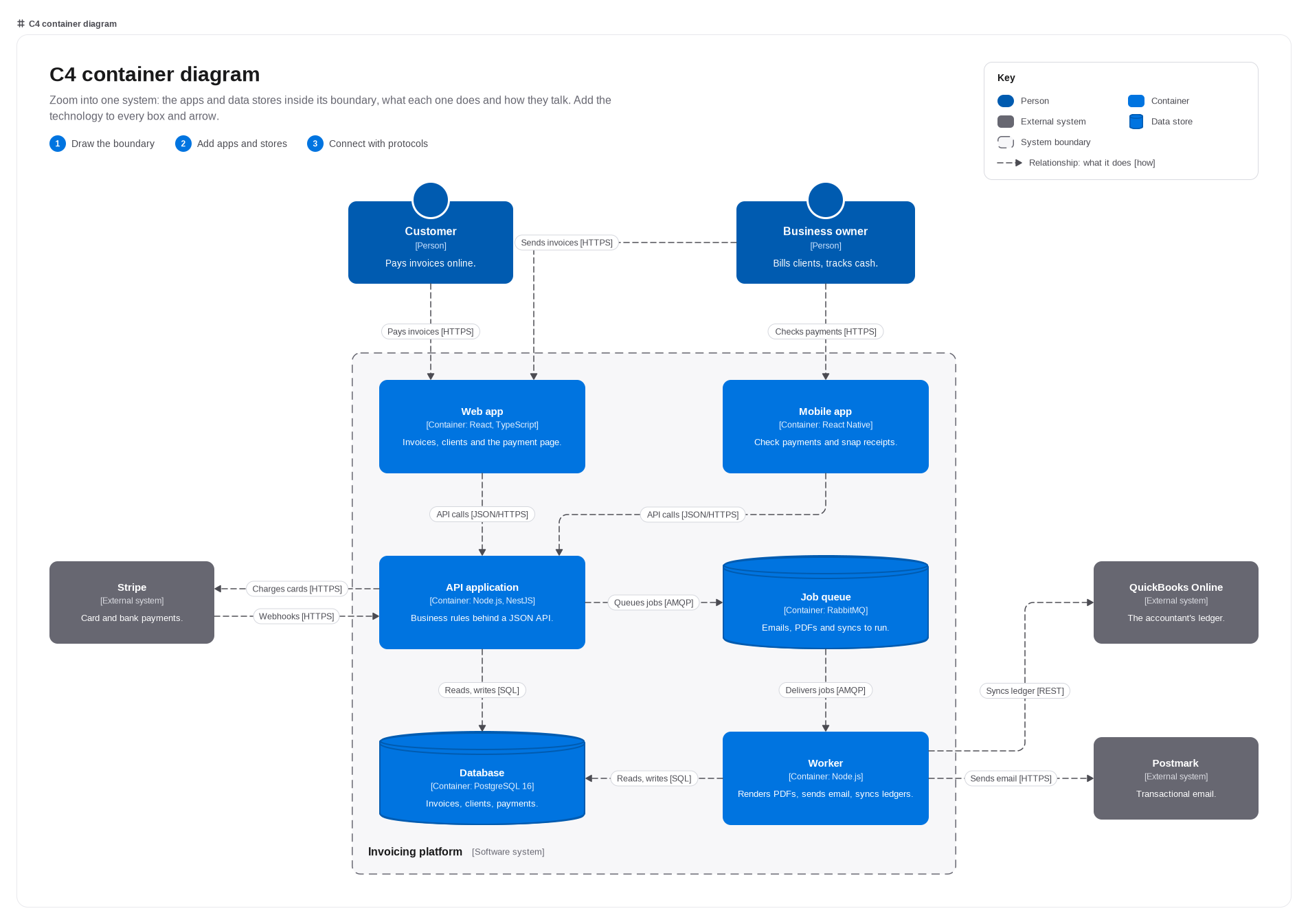
This template zooms into an invoicing platform. A dashed boundary holds six containers. Two kinds of user sit above it and three outside systems around it. Every box says what it is built with, and every arrow says how the two ends talk.
People and the apps they touch
Two people stand above the boundary: the Customer, who “Pays invoices online”, and the Business owner, who “Bills clients, tracks cash”. Their arrows end on the two containers that have a screen.
The Web app is described as “Invoices, clients and the payment page”, and both people use it. One arrow reads “Pays invoices [HTTPS]” and the other “Sends invoices [HTTPS]”. The Mobile app, “Check payments and snap receipts”, is used only by the business owner, over “Checks payments [HTTPS]”. Already the diagram answers a product question: customers never need the mobile app.
Inside the boundary: API, queue, worker, database
Both apps call one API application, “Business rules behind a JSON API”, with arrows labeled “API calls [JSON/HTTPS]”. Behind it are three more containers:
- Database: “Invoices, clients, payments.” The API reaches it over “Reads, writes [SQL]”.
- Job queue: “Emails, PDFs and syncs to run.” The API “Queues jobs [AMQP]”.
- Worker: “Renders PDFs, sends email, syncs ledgers.” The queue “Delivers jobs [AMQP]” to it, and it reads and writes the same database.
The queue and the database are drawn as cylinders, the shape the key assigns to a data store. The label under the boundary names the system, “Invoicing platform [Software system]”, so the frame ties back to the single box on the context diagram.
Where the system meets the outside
Three gray boxes marked [External system] sit outside the dashed line. On the left is the payment provider, for “Card and bank payments”. Two arrows connect it to the API, one in each direction: “Charges cards [HTTPS]” going out and “Webhooks [HTTPS]” coming back. Drawing both matters, because the inbound one means the API must expose a public endpoint.
On the right, the Worker has two outbound arrows: “Sends email [HTTPS]” to the email service and “Syncs ledger [REST]” to the accounting package that holds the accountant’s ledger. Notice which container owns each integration. Email and ledger sync belong to the worker, so they can be slow or retried without holding up a user’s request.
Put technology on every box and arrow
The summary on the board ends with the rule that separates this level from the context diagram: “Add the technology to every box and arrow.” Each container has a second line in square brackets, of the form [Container: technology], naming its framework or database engine and version. Each arrow ends with its protocol: HTTPS, JSON/HTTPS, AMQP, SQL or REST.
A good box therefore has three lines: a name, the technology, and one sentence of responsibility. If the third line is hard to write, the container may be doing two jobs. The Key lists the six symbols used: person, container, external system, data store, system boundary, and the relationship arrow in the form “what it does [how]”.
How to use the C4 container diagram template
- Draw the boundary. Open the template and rename the label under the dashed box to your system. Everything your team deploys goes inside.
- Add apps and stores. One box per thing that runs on its own. Use a cylinder for anything that keeps data. Fill in all three lines of each box.
- Connect with protocols. For every arrow write the purpose first and the protocol in brackets. Draw two arrows where calls go both ways, as with the webhooks.
These are the three steps under the title. Then move the people and external systems over from your context diagram, so the two levels agree.
When to use it, and neighboring diagrams
This is the diagram developers use most: for design reviews, for onboarding, and for deciding where a new feature should live. Draw it once the big picture is agreed and before anyone argues about classes.
If you have not yet drawn the outside view, start with the C4 context diagram for the same invoicing platform. To go inside a single container, a component diagram shows its modules. When the containers are many small services with their own databases, the microservices template lays them out more clearly.
Questions about the C4 container diagram template
Is a C4 container the same as a software container image?
No. In C4 a container is any separately runnable or deployable unit: a web app, a mobile app, an API, a database, a queue. Some of them may be packaged as container images in production, but a managed database is a C4 container too.
How many containers should one diagram have?
Most systems fit in five to fifteen. The example has six. If you pass twenty, the system probably consists of several systems, and each deserves a boundary and a diagram of its own.
Should databases appear as separate boxes?
Yes. A data store runs on its own and is deployed on its own, so it is a container. The template draws the database and the job queue as cylinders and labels the arrows into them with the protocol, such as SQL.
Is the C4 container diagram template free to edit?
Yes. The board has 92 elements and opens on the Free plan, where one person edits and others can view and comment. On the Team plan several people can edit the diagram at the same time during a design review.