What is a flowchart?
A flowchart draws a process as steps and decisions joined by arrows. A reader starts at one end and follows the arrows to the other, so nobody has to guess what happens first or who decides.
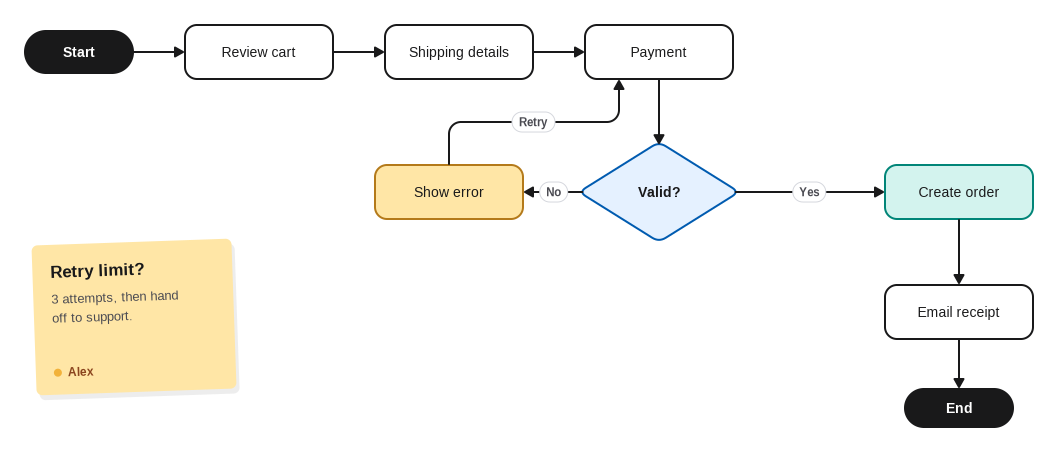
This template is a finished chart of an online checkout. It has a Start, three steps along the top, a Valid? decision, a short error path that loops back, and two closing steps before End. Every shape can be renamed, so the same skeleton works for a refund, a sign-up or an approval.
The main path, left to right
The top row is the path most buyers take. A rounded Start marks where the process begins, and three rectangles follow: Review cart, Shipping details and Payment.
Two habits in this row are worth copying:
- One shape, one action. “Shipping details” is a single screen the buyer fills in. It is not split into street, city and ZIP code.
- One direction. The steps run left to right in the order they happen, so the eye never doubles back along the row.
The decision and the retry loop
Under Payment sits the only diamond on the board: Valid? A diamond is a question with more than one way out. Here a valid payment moves right to Create order, and a failed one moves left to Show error.
The error step does not end the chart. Its arrow climbs back to Payment, which makes a loop: the buyer sees what went wrong and tries again. Most real processes have a loop like this, and most first drafts leave it out. If you only draw the path where everything works, the chart cannot answer the question people actually bring to it, which is “what happens when it fails?”
Park open questions on a sticky note
The yellow note in the corner is not part of the flow. It reads “Retry limit? 3 attempts, then hand off to support.” Someone reviewing the chart asked how many times the loop may run, and the answer was written where everyone will see it.
Use notes this way while a chart is still being agreed. A rule that is not yet a step, a number someone has to confirm, a case nobody has decided: put each on a note beside the shape it concerns. When the rule is settled, turn the note into a real step or a second diamond and delete it.
How to use the flowchart template
- Open it as a new board. Use this template copies the checkout chart into your workspace.
- Rename the top row. Double-click Review cart, Shipping details and Payment and type the three or four steps your own process always goes through.
- Reword the diamond as a yes-or-no question. “Valid?” becomes “Approved?” or “In stock?”. Check that each exit leads somewhere.
- Decide where the failure goes. Keep the loop back if people may retry, or point Show error at a new closing step if they may not.
- Finish at one End. Rename Create order and Email receipt to your closing steps, and bring every branch to the same final shape.
If the process already exists as a written description, FlowDraw AI can draw the first version and you correct it on the board.
When a flowchart fits, and when to pick another diagram
A flowchart suits a process that one person or one system carries out: a checkout, a password reset, a rule for approving expenses. It is also the fastest way to explain a process to a new teammate.
When the work passes between teams, the same steps read better in a swimlane diagram, which gives each team a row. When the chart is mostly decisions with a value on each ending, use a decision tree. For a formal process model with events and gateways, start from the BPMN template. The guide on how to make a flowchart covers the method step by step.
Questions about the Flowchart template
What do the shapes in a flowchart mean?
A rounded shape marks the start or the end. A rectangle is a step somebody or something performs. A diamond is a decision with one arrow in and two or more out. This template uses only those three, which is enough for most everyday processes.
Is the flowchart template free to use?
Yes. It opens on the Free plan, which includes three boards with up to 150 elements each. The checkout example is a small chart, so there is plenty of room to add your own steps.
How many steps should one flowchart have?
Aim for what fits on one screen, roughly ten to twenty shapes. If a step hides a whole process of its own, give that process a separate chart and keep a single box for it here.
Can I export the finished flowchart?
Yes. Export the board as PNG, SVG or PDF to place it in a document or a slide, or as JSON to keep a copy of the board data.