What is an event-driven architecture diagram?
In an event-driven system, services do not call each other directly. One service publishes a fact, such as “an order was placed”, to a topic. Any service that cares subscribes and reacts when it is ready. The diagram of such a system shows who publishes what, who listens, and what happens to a message nobody could process.
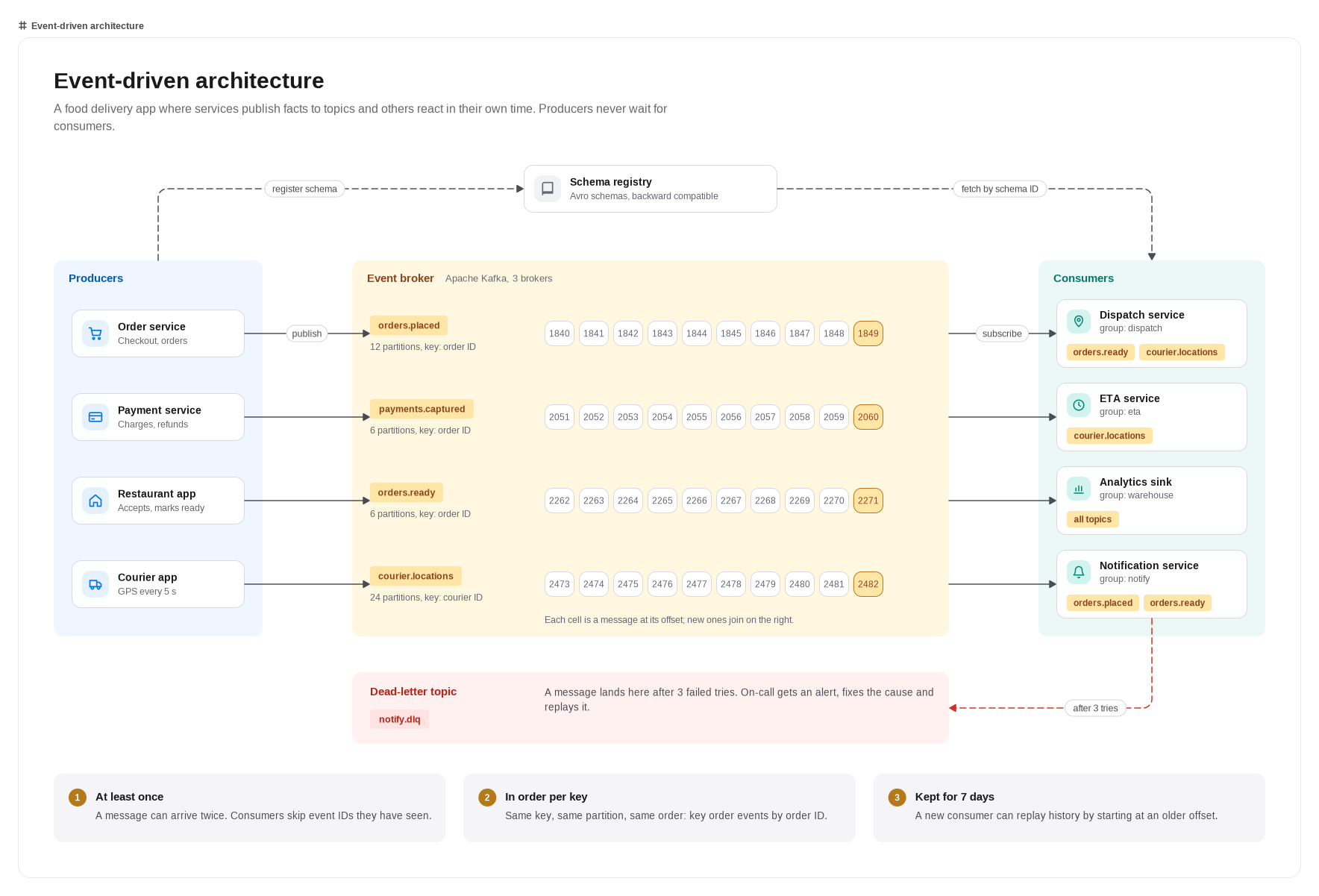
This template draws that picture for a food delivery app. Its subtitle states the main idea: producers never wait for consumers. Three columns carry the flow from left to right, a schema registry sits above them, a dead-letter topic sits below, and three numbered cards at the bottom spell out the delivery rules.
Producers and the topics they write to
The left column lists four producers, each with a line to one topic in the broker:
- Order service (checkout, orders) publishes to orders.placed.
- Payment service (charges, refunds) writes payments.captured.
- Restaurant app accepts orders and marks them ready on orders.ready.
- Courier app sends GPS every 5 s to courier.locations.
Inside the broker, every topic is drawn as a row of cells. A caption explains them: each cell is a message at its offset, and new ones join on the right. That one drawing choice shows that a topic is a log you append to, not a queue that empties.
Consumers and their groups
The right column holds the services that react. Each card names its consumer group and carries a chip for every topic it reads:
- Dispatch service, group dispatch, reads orders.ready and courier.locations to match a ready meal with a nearby courier.
- ETA service, group eta, reads only courier.locations.
- Analytics sink, group warehouse, reads all topics.
- Notification service, group notify, reads orders.placed and orders.ready.
Two services read courier.locations without knowing about each other. That is the gain of this style: adding the ETA service needed no change to the courier app.
The schema registry above the flow
A message is only useful if the reader knows its shape. The card at the top is the schema registry. Producers register a schema there, and consumers fetch it by schema ID when a message arrives. The card notes that schemas are backward compatible, which means a producer can add a field without breaking a consumer that has not been updated yet.
If your system has no registry, keep the card and write where the event shapes are agreed instead: a shared package, a folder of JSON files, a wiki page.
Where failed messages go
Below the broker is the dead-letter topic, named notify.dlq. A line runs to it from the Notification service with the label “after 3 tries”. The text beside it finishes the story: a message lands here after 3 failed tries, on-call gets an alert, fixes the cause and replays it.
Most architecture drawings stop at the happy path. Drawing the failure path answers the first question in any design review, and it shows that one bad message will not block the ones behind it.
Name events as facts, and give them a key
Look at the topic names: orders.placed, payments.captured, orders.ready. Each is a thing and a verb in the past tense. An event says what happened. It does not tell anyone what to do, which is why any number of consumers can use it.
Under each name the board gives two details that decide how the topic behaves: the partition count and the key. orders.placed has 12 partitions keyed by order ID, so all events of one order stay in sequence. courier.locations has 24 partitions keyed by courier ID, because it carries far more messages.
How to use the event-driven architecture template
- Start a board from the template. The delivery app stays in place as a guide while you work.
- List your events first. Rename the four topic rows to the facts your system produces, and set each one's partitions and key.
- Put one producer beside each topic. If two services write to one topic, ask whether it is really two events.
- Add consumers and their chips. Give every consumer a group name and one chip per topic it reads.
- Rewrite the three rules. The cards at the bottom say at least once, in order per key, and kept for 7 days. Change them to what your broker is set to.
FlowDraw AI can sketch the producers and consumers from a short description if you want a faster start.
When this template fits, and when it does not
Use it when you design a system around a broker, when you add a consumer and need to see what else reads the same topic, or when you explain to a new engineer why a notification can arrive twice.
If services mostly call each other and wait for an answer, draw microservices instead. To follow one request through time, step by step, a sequence diagram is clearer. For nightly batch loads into a warehouse, see the ETL data pipeline.
Questions about the Event-driven architecture template
What is the difference between an event and a command?
An event states something that already happened, like orders.placed, and its sender does not care who reads it. A command asks one specific service to do something and expects it done. Event-driven diagrams show events on topics; commands belong on direct calls.
Why can a message arrive twice?
With at-least-once delivery, the broker sends a message again if it did not get a confirmation, even when the work was done. The board's first rule gives the usual fix: every event has an ID, and consumers skip IDs they have seen.
Which plan do I need for this template?
The board has 177 elements, more than the 150 a Free board can hold, so it needs the Pro or Team plan. Most of the count comes from the message cells; a simpler version with fewer cells would fit a Free board.
How many topics should one diagram show?
Four to eight. Past that, the lines to consumers cross and the board stops being readable. Split a larger system by domain, for example one board for orders and one for couriers, and repeat shared consumers on both.