What is a Kubernetes deployment diagram?
A Kubernetes deployment diagram shows what runs in a cluster and how a request reaches it: the workloads, the pods each one keeps alive, the nodes those pods land on, and the services and ingress in front of them. It answers the questions a manifest file makes you piece together, such as where the copies of the API are and what happens if one zone goes down.
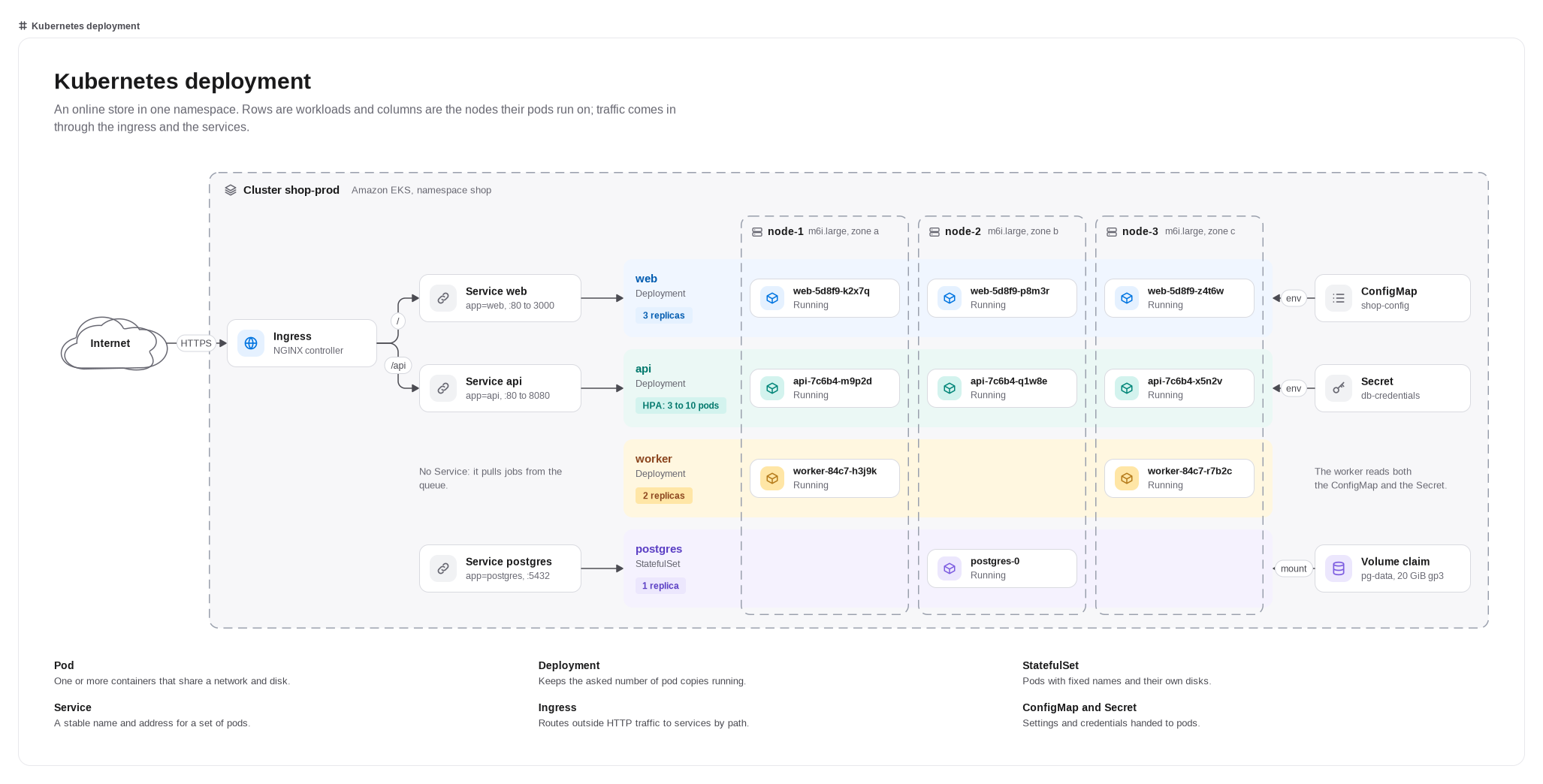
This template draws one namespace of a cluster called shop-prod, home to an online store. Everything sits inside a dashed cluster border, with the internet outside it on the left. A legend along the bottom defines the six kinds of object used, so a teammate new to Kubernetes can read the board without a glossary.
Workloads in rows, nodes in columns
The middle of the board is a grid. Each row is a workload and each column is a node, so a pod sits where its row and its node cross.
- web is a Deployment with 3 replicas: one pod on each of node-1, node-2 and node-3.
- api is a Deployment too, scaled by a rule: “HPA: 3 to 10 pods”. It also has one pod per node.
- worker runs 2 replicas, on node-1 and node-3.
- postgres is a StatefulSet with 1 replica, the pod postgres-0 on node-2.
The three nodes are in zones a, b and c. Read down a column and you see what a node failure takes out. Losing node-2 costs one web pod and one api pod, which the others cover, but it also takes the only database pod. The grid makes that risk visible at a glance.
How a request gets in
Left of the grid is the path traffic takes. The internet reaches the cluster over HTTPS at a single Ingress. The ingress routes by path: “/” goes to Service web and “/api” goes to Service api.
Each Service is a stable name in front of a changing set of pods. The card says how it finds them and which ports it maps: Service web selects app=web and sends port 80 to 3000, Service api selects app=api and sends 80 to 8080, and Service postgres listens on 5432 for traffic from inside the cluster.
The worker row has a note in place of a card: “No Service: it pulls jobs from the queue.” Saying why something is absent stops a reviewer from asking whether it was forgotten.
Settings, secrets and storage
The right side of the cluster holds what the pods are handed at start. A ConfigMap named shop-config goes to web as environment values. A Secret named db-credentials goes to api the same way. A Volume claim called pg-data, 20 GiB, is mounted by postgres, which is why that pod can restart without losing the store's orders.
The lines are labelled “env” and “mount”, so you can tell a value that is read once from a disk that stays attached. One note covers the lines the board does not draw: the worker reads both the ConfigMap and the Secret.
Write what the cluster would tell you
The example is useful because its labels match what a command line would print. Pods carry generated names such as web-5d8f9-k2x7q and a status, “Running”. Services show their selector and ports. Replica counts are numbers, not “a few”.
Keep that habit when you redraw it. A row should state the kind of workload and how many copies you asked for. If autoscaling is on, give the range, as the api row does. If a pod is failing or pending, change its status text and color so the board shows the trouble spot.
How to use the Kubernetes deployment template
- Open it as a new board. You get a copy of the store's cluster that you can edit freely.
- Rename the rows. List your own Deployments and StatefulSets, one per row, with the replica count you run in production.
- Set the columns to your nodes. Add or remove node columns and write each node's zone, then move the pod cards to where they are scheduled.
- Redraw the way in. Give the ingress your real paths and each service its selector and ports. Delete the service card of any workload that takes no traffic.
- Attach config and disks. Link each ConfigMap, Secret and volume claim to the row that uses it.
If you would rather start from a description, FlowDraw AI can draw a first version for you to correct.
When this diagram helps, and when to pick another
Use it to review a deployment before it ships, to walk a new on-call engineer through production, or to plan a move to more nodes or zones. It suits one namespace or one product. A cluster with dozens of workloads needs one board per team.
This board shows where things run, not how code gets there. For the build and release steps, use the CI/CD pipeline. To show managed databases, queues and networks around the cluster, the cloud architecture template fits better, and microservices shows how services call each other regardless of where they are scheduled.
Questions about the Kubernetes deployment template
What is the difference between a Deployment and a StatefulSet?
A Deployment keeps a number of identical pod copies running and replaces them freely. A StatefulSet gives each pod a fixed name and its own disk, which a database needs. On the board, web, api and worker are Deployments and postgres is a StatefulSet.
Should I draw every pod?
Draw every pod when there are a handful, as in the example, because their spread across nodes is the point. Above ten or so per workload, draw one card per node with a count on it, such as “4 pods”.
Does the template fit a Free board?
Yes. It has 141 elements and a Free board holds up to 150, so there is little room to grow. If you add several nodes or workloads you will need the Pro plan, or you can delete the legend to free some space.
Can I show more than one namespace?
Yes. Copy the dashed cluster border, shrink both copies and label each with its namespace. Keep shared parts such as the ingress outside the two borders so it is clear that both use it.