What is card sorting?
Card sorting is a research method for testing how people expect content to be grouped. You write each topic or task on a card, ask participants to put the cards into groups, and count where the cards land. The result shows which menu labels match what people already think and which ones make them guess.
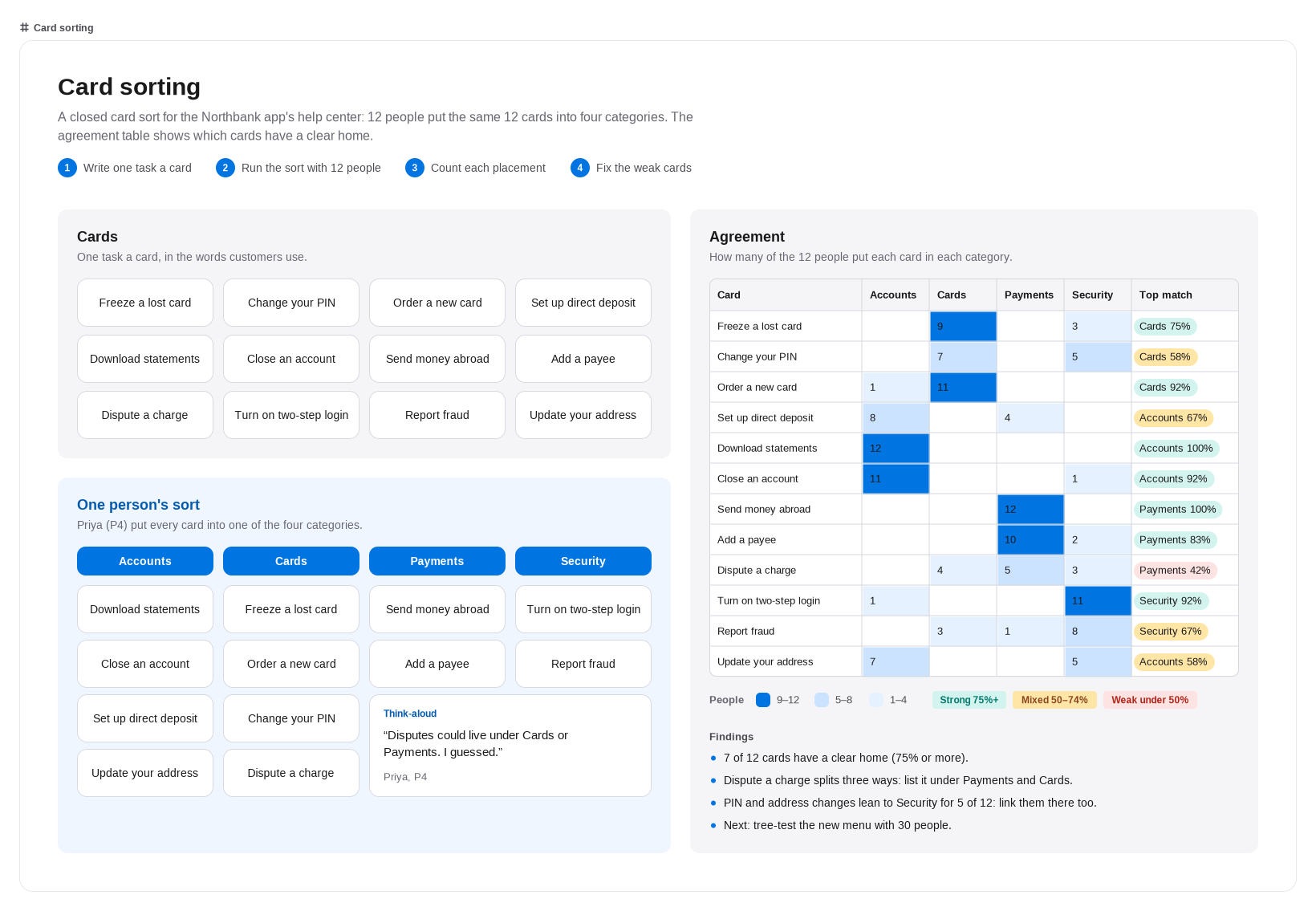
This template holds a closed sort, where the categories are fixed in advance. The example is the help center of a banking app called Northbank: 12 people each put the same 12 cards into four categories. The board shows the deck, one person’s finished sort and a table of how everyone’s placements add up.
The deck: one task a card
The top-left panel is the deck. Each card names one thing a customer wants to do, written the way a customer would say it: “Freeze a lost card”, “Send money abroad”, “Dispute a charge”, “Turn on two-step login”. There are twelve, in three rows of four.
Tasks work better than feature names. A card that says “Report fraud” tests where people look when something has gone wrong. A card that reads like an internal team name tests nothing, because participants have never heard it.
One person’s sort
Below the deck is a single participant’s result. Priya, participant P4, placed every card under one of the four headings: Accounts, Cards, Payments and Security. Her Accounts column has four cards, including “Download statements” and “Update your address”. Payments has two: “Send money abroad” and “Add a payee”.
Beside the two short columns sits a think-aloud quote: “Disputes could live under Cards or Payments. I guessed.” Keep quotes like this one. A count can tell you a card is split, but only the quote says why.
The agreement table
The right side counts all 12 sorts. Each row is a card, each column a category, and each cell says how many people put that card there. The last column, Top match, names the winning category and its share.
- Strong, 75% or more. “Download statements” went to Accounts for all 12 people, and “Send money abroad” went to Payments for all 12.
- Mixed, 50 to 74%. “Change your PIN” got 7 placements under Cards and 5 under Security.
- Weak, under 50%. “Dispute a charge” split 4, 5 and 3 across Cards, Payments and Security, so its top match is only 42%.
The cells are shaded in three bands by how many people chose them, so the clear homes stand out before you read a single number.
Turn the counts into findings
Under the table are four findings, each a sentence a designer can act on. “7 of 12 cards have a clear home” says most of the menu is safe. The weak card gets a decision: list “Dispute a charge” under both Payments and Cards. The mixed cards get cross-links, because 5 of 12 people looked for PIN and address changes under Security.
The last line names the follow-up: tree-test the new menu with 30 people. A sort shows where people put things. Whether they can find them again in a real menu is a separate question, and the board says so.
How to use the card sorting template
- Copy the board. Use this template puts the Northbank example in your workspace, ready to overwrite.
- Rewrite the deck. Type one task on each card in your customers’ words, and rename the four category headings to the ones you want to test.
- Run the sort. Have each participant place every card, and record at least one full sort in the panel on the left with what the person said while hesitating.
- Count each placement. Fill the agreement table by hand from the sorts, then mark each row strong, mixed or weak.
- Fix the weak cards. Write one finding for each problem card: rename it, move it or list it twice.
To draft a first deck from a description of your product, try FlowDraw AI and edit the cards afterwards.
When card sorting helps, and what to use next
Run a card sort before you redesign a menu, a help center or a settings page, when the question is “where would people look for this?”. Twelve cards and four categories make a small sort; the same layout carries a longer deck if you add rows.
If you have not settled on categories yet, group raw notes on an affinity diagram first. Once the groups are agreed, draw the structure as a sitemap. And if the question is whether people can finish a task on a built screen, log the sessions on a usability test findings board instead.
Questions about the Card sorting template
What is the difference between an open and a closed card sort?
In an open sort, participants make their own groups and name them, which helps when you do not know the categories yet. In a closed sort, like the example on this template, the categories are fixed and you test whether people agree on where each card belongs.
How many more cards fit on a Free board?
The example uses 109 of the 150 elements a Free board allows, so there is room for a few more cards and table rows. A much longer deck with a row for every card needs the Pro or Team plan.
What counts as agreement on a card?
The board uses three bands: strong when 75% or more of people choose the same category, mixed from 50 to 74%, and weak under 50%. Decide your own cut-offs before you count, so the results cannot bend to fit a menu you already like.
Can participants move the cards themselves?
On the Team plan several people edit a board at once, so a participant can drag cards while you watch. On the Free and Pro plans one person edits: the facilitator moves each card where the participant says, and observers can view and comment.