What is a technical design doc?
A technical design doc describes a change to a system before anyone builds it: the problem, the plan, the options that were rejected and the risks. It lets other engineers find the flaw in an afternoon of reading, not in a month of code. Some teams call it an RFC or a design proposal.
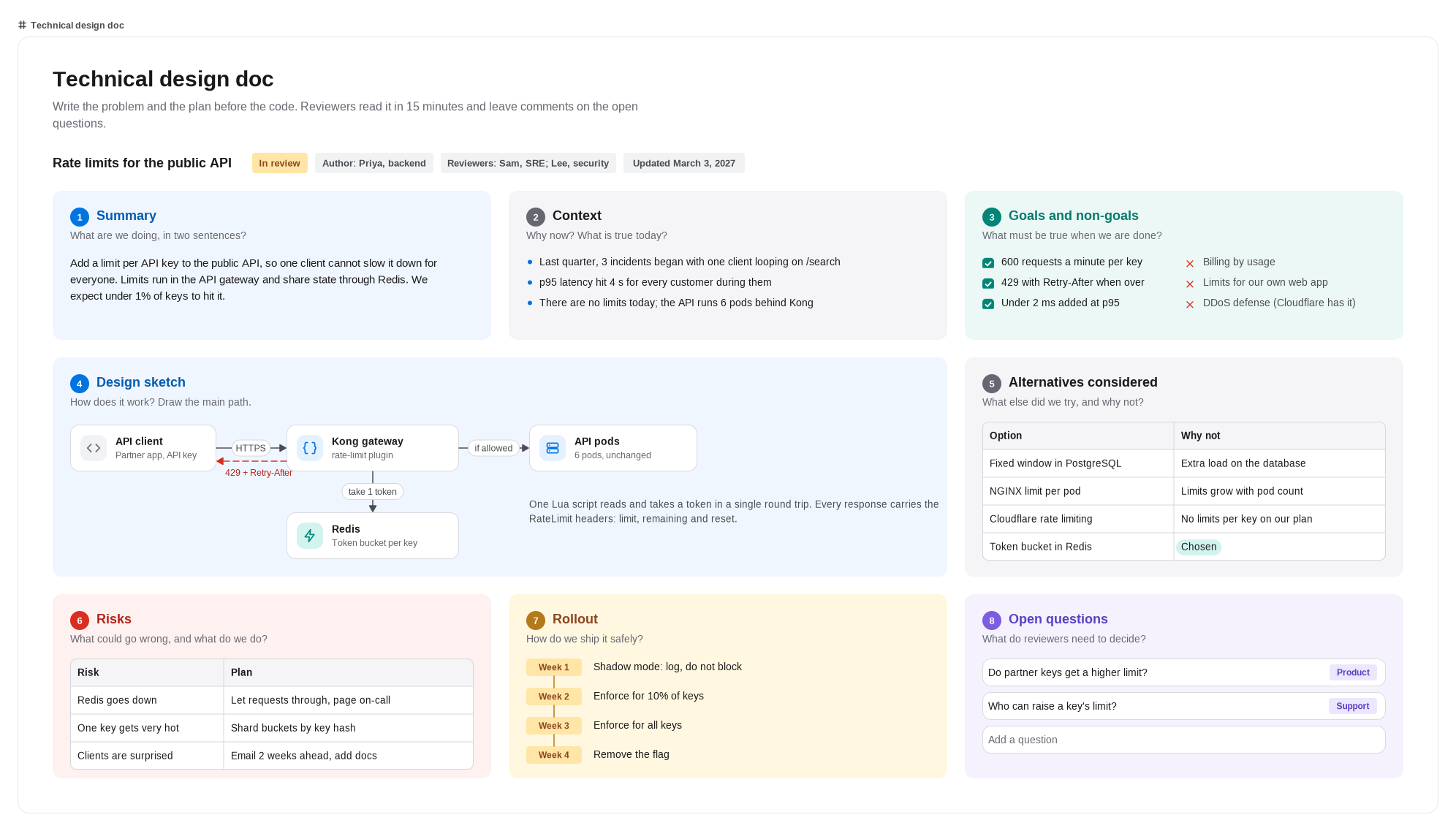
This template lays the document out as eight cards, each with a number, a title and the question it answers. A strip under the title carries the doc's name, “Rate limits for the public API”, its status, “In review”, the author, the reviewers and the date of the last update. The subtitle sets the target: reviewers read it in 15 minutes and leave comments on the open questions.
Summary and context: the case for the change
Card 1 asks, “What are we doing, in two sentences?” The example answers in three short ones: add a limit per API key so one client cannot slow the API down for everyone, run the limits in the gateway with shared state, and expect under 1% of keys to hit it. A reader who stops here still knows the plan.
Card 2 asks, “Why now? What is true today?” Its three bullets are evidence, not opinion. Last quarter, 3 incidents began with one client looping on /search. During them, p95 latency hit 4 s for every customer. And there are no limits today. If your context card has no number or incident in it, reviewers will ask why the work matters.
Goals and non-goals
Card 3 has two columns. On the left, three goals a test could confirm: 600 requests a minute per key, a 429 response with Retry-After when a client goes over, and under 2 ms added at p95.
On the right, three non-goals: billing by usage, limits for the company's own web app, and defense against traffic floods, which another layer already handles. Non-goals are the most useful lines in a design doc. They stop a review from drifting into “while you are there, could you also” and they tell the next team exactly where this work ends.
The design sketch
Card 4 is the widest, because it holds a drawing. Four boxes show the main path. An API client, a partner app with an API key, calls the gateway over HTTPS. The gateway's rate-limit plugin asks a shared store to “take 1 token” from a token bucket kept per key. If allowed, the request goes on to the API pods, labelled “6 pods, unchanged”. If not, the client gets “429 + Retry-After”.
A note beside the boxes adds the two details a reviewer would ask about: the token is read and taken in a single round trip, and every response carries the RateLimit headers for limit, remaining and reset. Draw only the main path here. Edge cases belong in the risks card.
Alternatives considered
Card 5 is a two-column table, “Option” and “Why not”. Three options were rejected, each for one stated reason. A fixed window counted in the main database would put extra load on it. A limit inside each pod would grow with the pod count. The edge provider's limiter offers no limits per key on the current plan. The fourth row, the token bucket, is marked “Chosen”.
This card saves the most review time. Without it, every reader suggests the option they would have picked, and the author explains the same trade-off four times in the comments.
Risks and rollout
Card 6 pairs each risk with a plan. If the token store goes down, let requests through and page on-call. If one key gets very hot, shard buckets by key hash. If clients are surprised, email them 2 weeks ahead and add docs. A risk without a plan next to it is only a worry.
Card 7 answers “How do we ship it safely?” with four weeks: shadow mode that logs and does not block, enforcement for 10% of keys, enforcement for all keys, and finally removing the flag. The last step is often forgotten, and writing it into the plan is how it gets done.
How to use the technical design doc template
- Create a board from the template and change the strip at the top: the doc's name, status, author and reviewers.
- Write cards 1 to 3 first. If you cannot fill in the summary, context and goals, it is too early to draw a design.
- Replace the sketch. Keep it to the main path, with a label on every arrow.
- List what you rejected and what could fail. One reason per alternative, one plan per risk.
- Put your real doubts in card 8. The example asks “Do partner keys get a higher limit?” and “Who can raise a key's limit?”, each tagged with the team that must answer. Share the board and ask reviewers to comment there.
For the sketch, FlowDraw AI can turn a few sentences into a first diagram.
When a design doc is worth writing
Write one when a change touches more than one team, is hard to undo, or costs more than a couple of weeks. Skip it for a bug fix or a change one reviewer can judge from the code.
The board is a summary, not a specification. To draw the system around your change in more depth, use the system architecture template. To detail the calls between services, add a sequence diagram. If the question is what to build and for whom, start with a PRD one-pager.
Questions about the Technical design doc template
How long should a technical design doc be?
Short enough to read in one sitting. The template aims for 15 minutes, which is why each card holds a few lines. If one section keeps growing, link to a separate board or file for the detail and keep the summary here.
What is the difference between a design doc and a PRD?
A PRD says what the product should do and why users need it. A design doc says how engineering will build it and what could go wrong. The PRD usually comes first, and the design doc's context card links back to it.
Who should review a design doc?
People who will live with the result: an engineer from each affected team, whoever runs the system in production, and security when data or access is involved. The example names two reviewers, one from operations and one from security.
How do reviewers give feedback on the board?
People you share the board with can view it and leave comments on any card, on every plan. On the Team plan several people can also edit at once, which helps when the author and a reviewer rework the sketch together.