What is a user persona?
A user persona is a one-page portrait of a type of person who uses your product. It gathers what research found about a group of users into one named, believable person, so a team can ask “would this work for her?” and reach the same answer.
This template gives the portrait seven areas: a profile card, background, goals, frustrations, behaviors, tools and channels, and what the person needs from you. The example is Maya, the kind of customer a meal service called Fresh Crate wants to win, so every area already shows the kind of entry that belongs in it.
The profile card
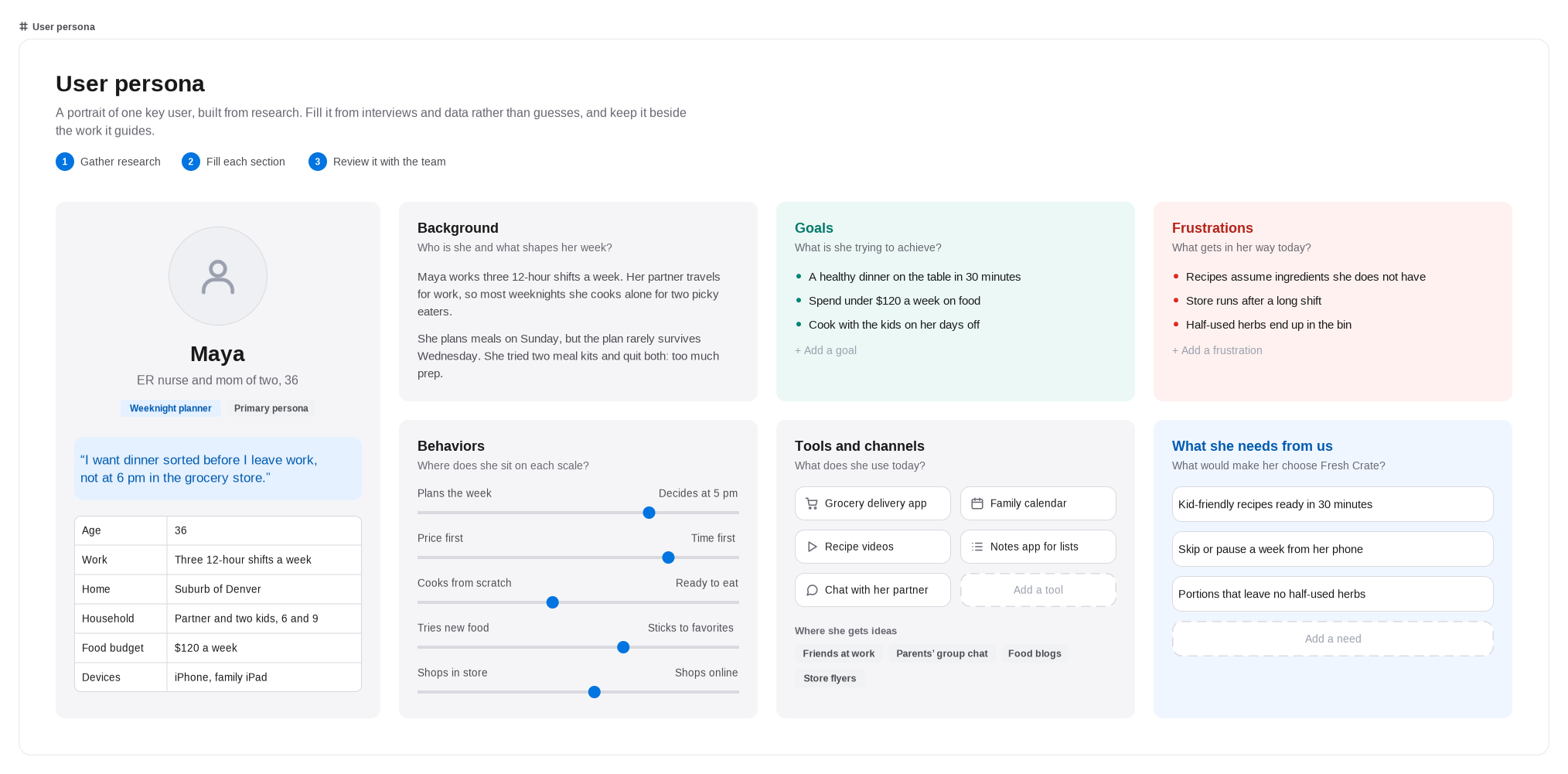
The left column is the part people remember. It holds a portrait, the name Maya, and one line that places her: “ER nurse and mom of two, 36”. Two tags sit under it. Weeknight planner names the pattern she stands for, and Primary persona tells the team she is the one to design for first.
Below the tags comes a quote in her own voice: “I want dinner sorted before I leave work, not at 6 pm in the grocery store.” A small table then lists the facts that shape her choices: three 12-hour shifts a week, a suburb of Denver, a partner and two kids aged 6 and 9, a food budget of $120 a week, an iPhone and a family iPad.
Keep only facts that change a design decision. Her shift pattern matters to a meal kit. Her favorite color does not.
Background, goals and frustrations
The top row tells her story in three cards, each with a question under its title.
- Background asks who she is and what shapes her week. Maya’s partner travels for work, so most weeknights she cooks alone. She plans meals on Sunday, but the plan rarely survives Wednesday, and she quit two meal kits because of the prep.
- Goals asks what she is trying to achieve: a healthy dinner on the table in 30 minutes, under $120 a week on food, and cooking with the kids on her days off.
- Frustrations asks what gets in her way today: recipes that assume ingredients she does not have, store runs after a long shift, and half-used herbs that end up in the bin.
Goals and frustrations each end with an “Add” line, so the lists can grow as interviews come in.
Behaviors and tools
The Behaviors card replaces adjectives with five scales. Each has two opposite habits at its ends and a dot for where Maya sits: “Plans the week” or “Decides at 5 pm”, “Price first” or “Time first”, “Cooks from scratch” or “Ready to eat”, “Tries new food” or “Sticks to favorites”, “Shops in store” or “Shops online”. Her dots sit close to “Decides at 5 pm” and “Time first”, which says more than the word “busy”. Drag each dot to match your own user.
Tools and channels lists what she already uses: a grocery delivery app, the family calendar, recipe videos, a notes app for lists and chat with her partner. A row of tags under it shows where she gets ideas, from friends at work to store flyers. Together they tell you where your product has to fit in and where she might first hear about it.
Tie every need to a frustration
The last card, What she needs from us, is where the persona turns into a brief. A good need answers something written elsewhere on the page. Maya throws away half-used herbs, so one need reads “Portions that leave no half-used herbs”. She wants dinner in half an hour, so another reads “Kid-friendly recipes ready in 30 minutes”. Her shifts change, so she needs to “Skip or pause a week from her phone”.
Check your own persona the same way. If a need has no goal or frustration behind it, it is probably a feature someone on the team wanted. If a frustration has no need beside it, you have found a gap worth a discussion.
How to use the user persona template
- Open it as a new board. Use this template copies the board into your workspace with Maya still on it.
- Gather research. Bring interview notes, survey answers and usage data. Mark what you heard from several people, because a persona describes a pattern and not one interviewee.
- Fill each section. Start with goals and frustrations, then set the five behavior dots. Write the quote last, using words a real user said.
- Review it with the team. Ask where the page disagrees with what support and sales hear, and settle it before anyone designs from it.
Starting from a blank page? FlowDraw AI can draft a persona from a description of your users, and you correct it against your research on the board.
When a persona helps, and when to pick another template
A persona earns its place when several people make decisions about the same users: before a redesign, when a new teammate joins, or when a roadmap debate keeps circling around “our users”. Give each key user type a board of its own.
A persona sums up a person, not a moment. To capture what one user says, thinks, does and feels in a single situation, use an empathy map. To follow her through an experience step by step, use a user journey map. If the team keeps arguing about demographics, a jobs to be done board studies the task and leaves the person out.
Questions about the User persona template
How many personas does a product need?
Usually two to four. Each one should stand for a group that behaves differently enough to need different design choices. If two personas would make the same choices on every scale of the Behaviors card, merge them. Mark one as the primary persona, as the example does with Maya.
What is the difference between a user persona and a buyer persona?
A user persona describes the person who uses the product day to day, with her goals and habits. A buyer persona describes the person who decides to pay for it. For a consumer product they are often the same person. For software sold to companies they usually differ, and each deserves its own board.
Can I build a persona without doing interviews?
You can draft one from what the team already believes, but label it as an assumption and list what you need to check. A persona built on guesses tends to describe the team’s wishes. Even five short interviews will change the goals and frustrations you wrote.
Is the user persona template free?
Yes. It opens on the Free plan and stays well under the limit of 150 elements on a board. You can change every text, move the dots on the scales and export the result as PNG, SVG or PDF.