What is an activity diagram?
An activity diagram is the UML way to draw a workflow. It shows the actions that happen, the order they happen in, the points where the path splits on a condition, and the points where several things run at once. That last part is what a plain flowchart cannot show cleanly.
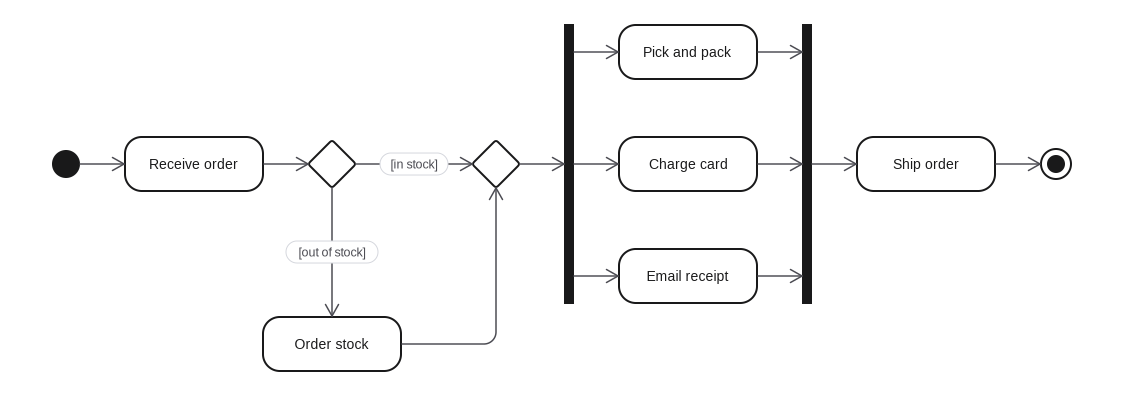
This template is a complete small example: an online order. It starts at a filled dot, passes through Receive order, checks stock, runs three actions in parallel and ends after Ship order. Every symbol you need is already on the board, so you edit a working diagram instead of starting from an empty page.
Start node, actions and the decision
The filled dot on the left is the initial node: the one place the activity begins. The rounded box after it, Receive order, is an action. Name actions with a verb and an object, so each box says what gets done.
The first diamond is a decision. One arrow comes in and two go out, and each outgoing arrow carries a guard in square brackets: [in stock] and [out of stock]. The second diamond is a merge. It does the opposite job: the two paths come back together there, and one arrow continues.
Fork and join: work that happens at the same time
After the merge, the arrow reaches a thick vertical bar. That bar is a fork. Everything that leaves it starts together: Pick and pack, Charge card and Email receipt. No arrow chooses between them, because all three happen for every order.
The second bar is a join. It waits. Ship order cannot start until all three actions have finished, which is exactly the rule a warehouse wants: nothing leaves before it is packed and paid for.
Do not confuse the two pairs. A decision takes one of its paths. A fork takes all of them.
Write guards that cover every case
Most mistakes in activity diagrams sit at the decision. Look at how the example handles stock. The two guards, [in stock] and [out of stock], cannot both be true, and between them they cover every order. An order always has exactly one way out of the diamond.
The out-of-stock path does not end the activity either. It runs through Order stock and then rejoins the main line at the merge, so the order still gets packed, charged and shipped. When you add a branch, ask the same two questions: can two guards be true at once, and is there a case no guard catches? If a third case exists, add a third arrow rather than stretching a label.
How to use the activity diagram template
- Open it as a new board. Use this template copies the order example into your workspace. It is a Pro template, so the workspace needs the Pro or Team plan.
- Rename the actions on the main line. Replace Receive order and Ship order with the first and last thing your process does, then fill in what lies between.
- Rewrite the guards. Change [in stock] and [out of stock] to your own condition and its opposite. Keep the square brackets.
- Decide what is truly parallel. Keep an action between the two bars only if it can start without waiting for the others. Move the rest onto the main line.
- End it once. Lead every path to the ringed dot on the right, so a reader can see the activity always finishes.
If you would rather start from a description, FlowDraw AI can draft the flow and you adjust the nodes on the board.
When an activity diagram fits, and when another one is better
Choose it when the order of work matters and some of that work overlaps: order handling, sign-up flows, approval chains, a build pipeline. It is also a good way to spell out one use case step by step before anyone writes code.
If nothing runs in parallel, a plain flowchart says the same thing with fewer symbols. If the question is who does each step, put the steps in lanes with a swimlane diagram. And if you are describing one object that changes over time, such as the order itself going from new to shipped, a state machine diagram is the better tool.
Questions about the Activity diagram template
What is the difference between an activity diagram and a flowchart?
Both show steps and decisions. An activity diagram adds notation for parallel work: a fork bar starts several actions together and a join bar waits for all of them. It also separates a decision from a merge and writes conditions as guards in square brackets. A flowchart has no standard way to say that three things happen at once.
What do the thick black bars mean?
They are the fork and the join. The fork has one arrow in and several out, and every outgoing path starts. The join has several arrows in and one out, and it continues only when all incoming paths have arrived. In the example they wrap Pick and pack, Charge card and Email receipt.
Can an activity diagram have more than one end?
Yes. UML allows several final nodes, and a long diagram is often easier to read with one per outcome, for example shipped and canceled. The template uses a single final node because every order in the example ends the same way. Whatever you choose, make sure no path stops without one.
Which plan do I need for this template?
The activity diagram is a Pro template, so it opens on the Pro and Team plans. Once it is on your board you can edit every node, export the diagram as PNG, SVG, PDF or JSON, and share it with people who view and comment.