What is a state machine diagram?
A state machine diagram follows one thing through its life. It lists the states that thing can be in and the events that move it from one state to the next. Anything that is not drawn is not allowed, which is the point: the diagram is a rulebook for what can happen and when.
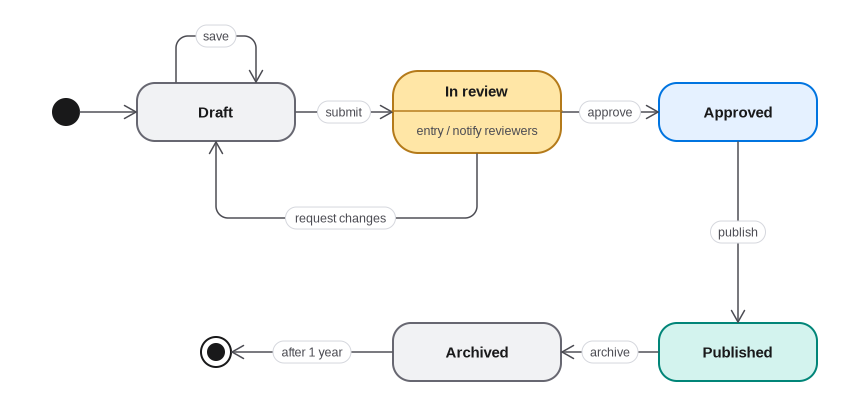
The template models a document in a publishing workflow. It begins as a Draft, goes to In review, becomes Approved, then Published, and ends up Archived. Each arrow is labeled with the event that causes the move, so you can read the board aloud as a series of sentences.
States, the start dot and the end dot
Each rounded box is a state: a condition the document stays in until something happens. Good state names are adjectives or short phrases that complete the sentence “the document is …”. Draft, In review and Approved all pass that test.
The filled dot on the left is the initial state. Its arrow has no label, because nothing has to happen for a new document to be a Draft. The ringed dot at the lower left is the final state. Once the document reaches it, the story is over and no arrow leads out.
Notice the small loop on top of Draft labeled save. An event can leave a state where it is. Saving changes the text, but the document is still a Draft.
Transitions and their triggers
An arrow is a transition, and the word on it is the trigger: the event that fires it. The example uses plain verbs: submit, approve, publish, archive. Read one arrow as a full sentence: when someone approves a document that is In review, it becomes Approved.
Direction matters as much as the label. There is no arrow from Draft straight to Published, so a draft cannot skip review. That missing arrow is a business rule, written without a single word.
One arrow runs backwards. From In review, request changes returns the document to Draft. Most real workflows need at least one such way back.
Put behavior inside the state
The In review box is taller than the others and split by a line. Under the name it reads entry / notify reviewers. That is an entry action: something that happens every time the document enters the state, no matter which arrow brought it there.
This is where a state machine earns its keep. A first submission and a second one after changes both land in In review, and the reviewers are told in both cases. You write the rule once, on the state, instead of on every arrow that points to it. Use the same pattern for your own states: entry / for what happens on the way in, exit / for the way out.
How to use the state machine diagram template
- Open it as a new board. Use this template adds the document example to your workspace. This is a Pro template and needs the Pro or Team plan.
- Pick the one object you are modeling. An order, a ticket, a subscription, a user account. Write its states over Draft, In review, Approved, Published and Archived, and add or delete boxes until the list is complete.
- Label every arrow with an event. Replace submit, approve and publish with what really triggers each move in your system. An arrow without a trigger is a question you have not answered yet.
- Add the ways back and the timed moves. The example has request changes, and its last arrow, after 1 year, fires on time alone rather than on a person’s action. Look for both kinds in your own process.
- Test it with a story. Walk one real case through the diagram. If it gets stuck in a state with no arrow out, you have found a missing transition.
The guide how to draw a state machine diagram covers guards and nested states when you need them.
When to use a state machine diagram
Use it whenever a status field is about to appear in a database or an interface. Drawing the states first settles arguments early: which statuses exist, who can change them, and which changes are forbidden. It is just as useful for a device, a game character or a support ticket.
It is the wrong diagram for a procedure. If you want to show the steps people take, draw an activity diagram. If several systems exchange messages in order, a sequence diagram shows the conversation. For a larger worked example of this same notation, see the order state machine.
Questions about the State machine diagram template
What is the difference between a state and a transition?
A state is a condition that lasts, such as Draft or Published. A transition is the instant move between two states, drawn as an arrow and labeled with the event that causes it. If you can say the object “is” something, that is a state. If you can say something “happens”, that is a transition.
How many states should a diagram have?
As many as the object really has, which is usually between four and nine. If two states allow exactly the same events and lead to the same places, merge them. If one state needs an “and” in its name, it is probably two.
Can a state point back to itself?
Yes. A self-transition handles an event without changing the state. In the template, save loops on Draft: the content changes but the document is still a Draft. Self-transitions are also the place to show retries and reminders.
Is a state machine diagram the same as a state diagram?
In everyday use, yes. UML calls it a state machine diagram, and many teams shorten that to state diagram or statechart. All three names mean boxes for states and labeled arrows for transitions.