What is a swimlane diagram?
A swimlane diagram is a flowchart cut into rows. Each row, or lane, belongs to one person, team or system, and every step is drawn in the lane of whoever carries it out. The arrows that cross from one lane to another are the handoffs, and handoffs are where work waits.
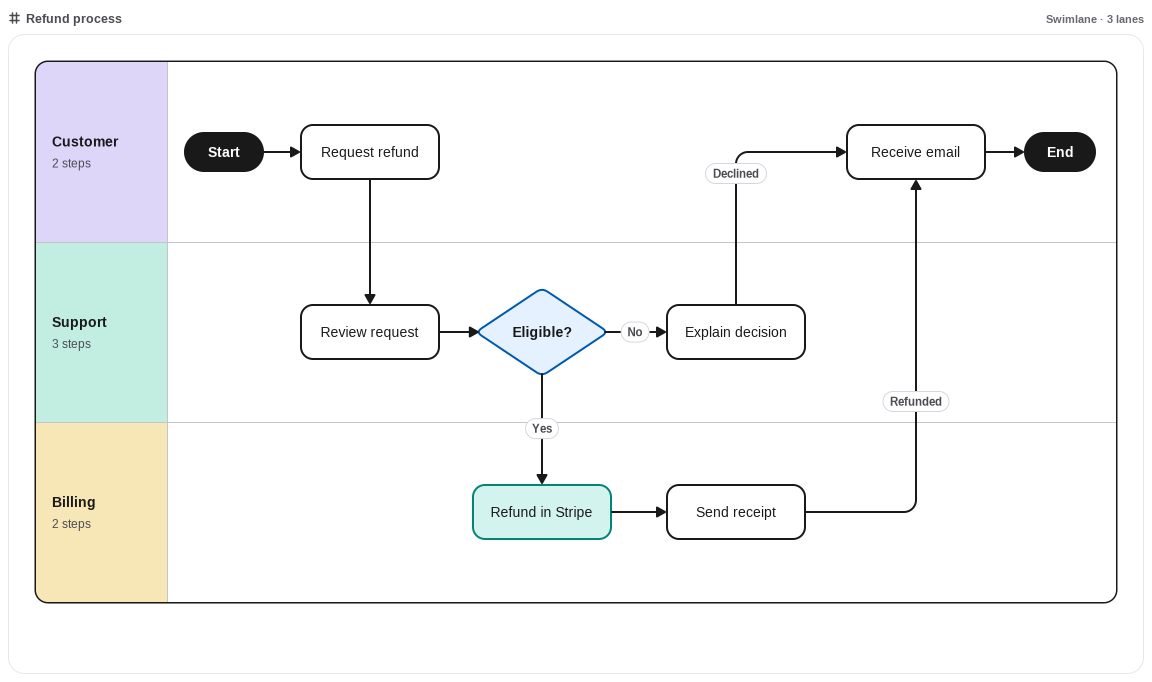
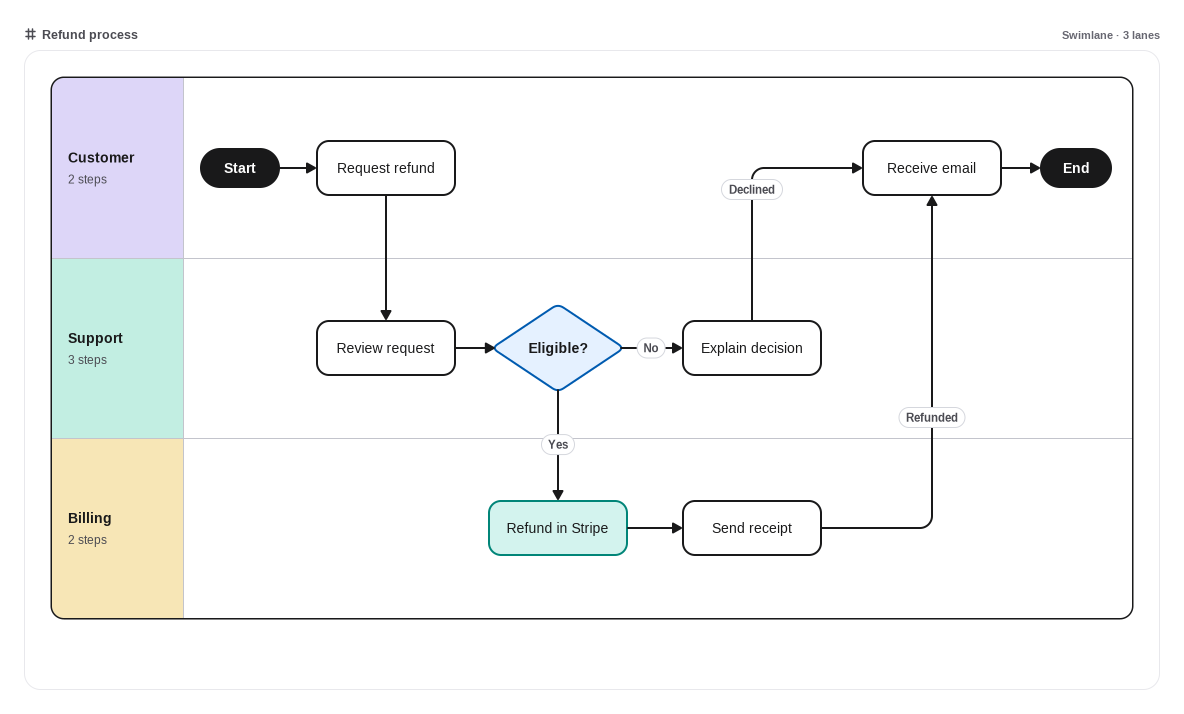
This template is called Refund process. It has three lanes, nine shapes and one decision. A customer asks for a refund, a second team reviews it, and a third pays it out. Both possible endings lead back to the customer, who gets an email either way.
The top lane: where the process starts and ends
The first lane belongs to the person the process serves. It holds four shapes: Start, Request refund, Receive email and End. Between the second and the third there is a wide gap, and that gap is the point of the diagram. Everything that fills it happens in the lanes below, out of the customer’s sight.
Putting the customer on top is a convention worth keeping. It lets you read the top lane alone and see the process as the customer lives it: one request, a wait, one email.
The middle lane: review and decide
The request drops into the second lane, where support picks it up. Three shapes sit here: Review request, the diamond Eligible? and Explain decision.
The diamond is in the lane of the team that makes the call. That placement answers a question a plain flowchart leaves open: who decides? If the answer is no, the flow stays in this lane for one more step, Explain decision, and then goes back up to the customer. A refusal never reaches the third lane at all, which you can see without reading a single label.
Count the handoffs
Follow the eligible path. From the diamond it crosses down into the third lane, where billing has two steps: the refund itself and Send receipt. Then it crosses two lanes back up to Receive email.
Count the lane crossings on that path: customer to support, support to billing, billing to customer. Three handoffs for one refund. Each one is a place where a request can sit in a queue, so each is worth a question. Does the next team know the work has arrived? How long does it usually wait? A diagram with many crossings is not wrong, but it shows you where to look first when the process is slow.
How to use the swimlane template
- Open it as a new board. You get the refund example with its three lanes.
- Name the lanes first. Write one role or team on each lane header. Add a lane for every party that touches the work, including systems that act on their own.
- Place the trigger and the result. Put the first and last steps in the lane of the person the process is for, as the example does with Request refund and Receive email.
- Drop each remaining step into its owner’s lane. If you cannot say which lane a step belongs in, you have found a gap in the process, not in the drawing.
- Bring every branch home. Check that each exit of a decision ends somewhere. In the example both the refusal and the refund finish at the same email.
When swimlanes help, and when they get in the way
Use lanes when a process involves two or more parties and the question is who does what: refunds, hiring, purchase approvals, incident handling. The article on what swimlanes reveal about handoffs explains why the crossings matter.
If one person does every step, lanes add nothing and a plain flowchart is easier to read. If you need lanes in both directions, for example teams down the side and phases across the top, open the cross-functional flowchart. For a process that must follow a formal notation with events and message flows, use the BPMN template.
Questions about the Swimlane template
What should each lane represent?
One party that does work in the process: a role, a team, a department or a system. Use the same kind for every lane where you can. Mixing a person’s name, a department and a software system in one diagram makes it hard to compare lanes.
Should lanes run horizontally or vertically?
Horizontal lanes, as in this template, suit processes with many steps, because the flow runs left to right like a sentence. Vertical lanes work when there are many parties and few steps. Pick one direction and keep it for the whole diagram.
How many lanes are too many?
Past six or seven lanes the arrows get long and the diagram stops fitting on a screen. Group minor parties into one lane, or split the process into two diagrams at a natural handoff.
Can I use the swimlane template on the Free plan?
Yes. The template opens on the Free plan, which includes three boards. One person edits, and anyone you share the board with can view it and comment on a step.