What is a business model canvas?
A business model canvas describes how a business creates value, delivers it and gets paid, on a single page. Alexander Osterwalder’s layout splits that story into nine blocks, so a gap in the model shows up as an empty box instead of hiding in a long plan. The business model canvas page covers the method in general.
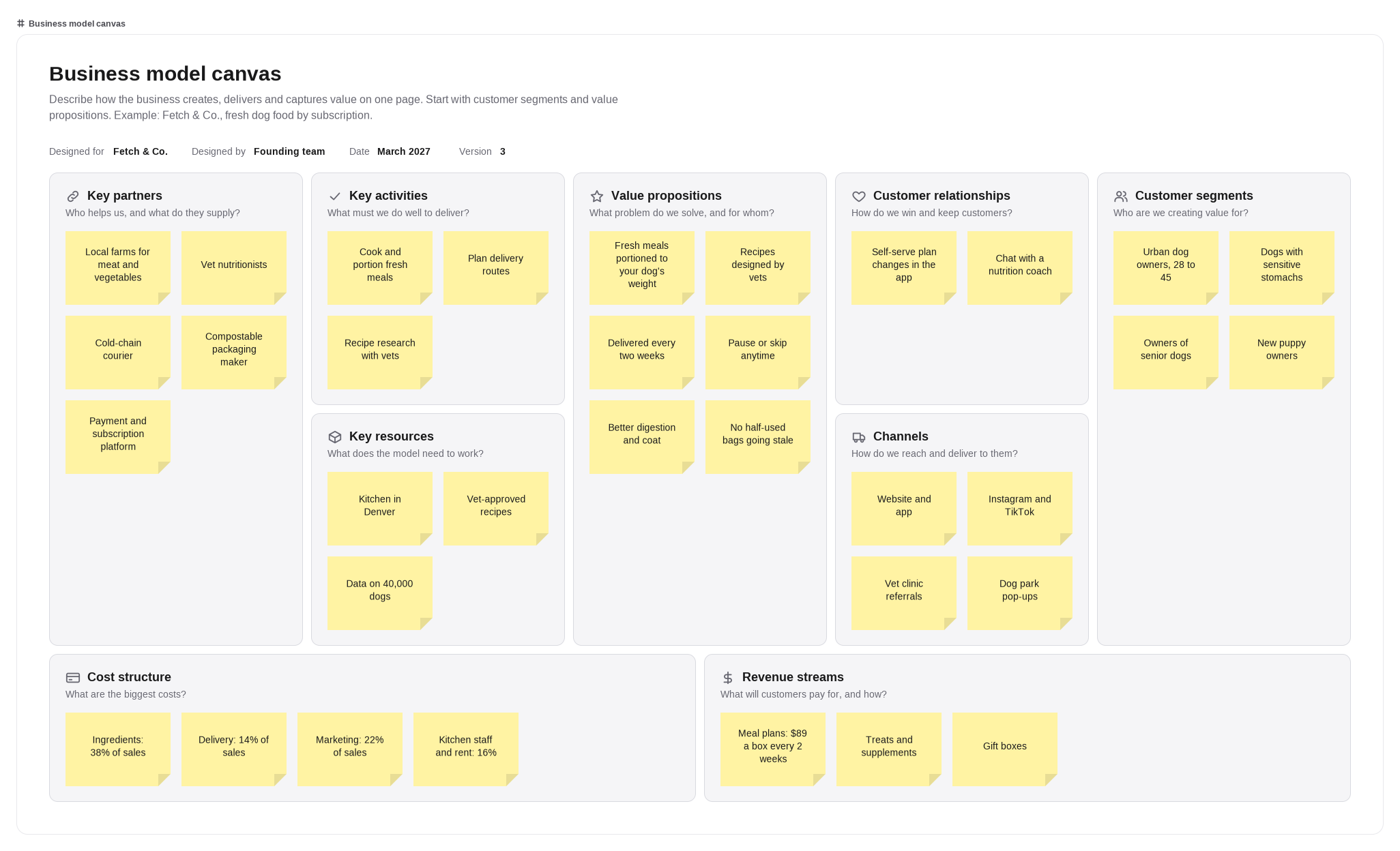
This template is the nine-block grid with a question printed under every title and a worked example in every block: Fetch & Co., a company that sells fresh dog food by subscription. A strip above the grid records who the canvas is for, who drew it, the date and the version. The example is already on version 3.
The right side: customers and what you offer them
Read the canvas from the right. The four blocks there describe the market side of the business, and the board’s own instructions say to start with customer segments and value propositions.
- Customer segments. Who you create value for. Fetch & Co. names four groups, from “Urban dog owners, 28 to 45” to “Owners of senior dogs”.
- Value propositions. The problem you solve for them. The center column holds six notes, such as “Fresh meals portioned to your dog’s weight” and “Pause or skip anytime”.
- Customer relationships. How you win and keep customers: “Self-serve plan changes in the app” and “Chat with a nutrition coach”.
- Channels. How you reach people and deliver: the website and app, social media, “Vet clinic referrals” and “Dog park pop-ups”.
Check the two outer blocks against each other. “Dogs with sensitive stomachs” is a segment, and “Better digestion and coat” is the promise that answers it.
The left side: what it takes to deliver
The left half is the machinery behind the promise. Fill it after the right side, because every note here should exist to serve a note there.
- Key activities. What you must do well: “Cook and portion fresh meals”, “Plan delivery routes” and “Recipe research with vets”.
- Key resources. What the model needs to work: a “Kitchen in Denver”, “Vet-approved recipes” and “Data on 40,000 dogs”.
- Key partners. Who helps, and what they supply: local farms, vet nutritionists, a cold-chain courier, a compostable packaging maker and a payment platform.
A partner does work you would otherwise have to do yourself. The cold-chain courier sits in partners while “Plan delivery routes” stays in activities: the company decides the routes and someone else drives them.
Put numbers in the bottom row
Cost structure and revenue streams run along the bottom, under everything that causes them. This is where a canvas most often stays vague, and where the example is most useful.
Each cost note is a share of sales: “Ingredients: 38% of sales”, “Delivery: 14% of sales”, “Marketing: 22% of sales” and “Kitchen staff and rent: 16%”. Added up, the four take 90% of sales, which says more about the model than any adjective. The main revenue note carries a price and a rhythm: “Meal plans: $89 a box every 2 weeks”.
Write your own notes the same way. A cost is a percentage or an amount. A revenue stream is a price and how often it is paid. If you do not know the number yet, write your best guess and label it as a guess.
How to use the business model canvas template
- Open it as a new board. Use this template copies the canvas into your workspace with the dog food example in all nine blocks.
- Fill in the strip at the top. Replace Fetch & Co. with your business, add your names and the date, and set the version to 1.
- Work right to left. Rewrite customer segments and value propositions first, then relationships and channels, then activities, resources and partners.
- Finish with the money. Add costs and revenue streams last, each with a number, and check that every cost traces back to a note above it.
- Raise the version when the model changes. Update the date too, so readers know which canvas is current.
Starting from nothing? FlowDraw AI can draft a canvas from a short description of the business, and the guide to filling in a business model canvas walks through each block.
When the canvas fits, and when to pick another
Use it when you need the whole business on one page: before a pitch, when a new partner joins, or when you compare two ways of running the same idea. It works best for a business that already has customers or a clear plan to get them.
For an untested idea, the lean canvas swaps partners and resources for problem, solution and key metrics. To go deeper on one segment and one offer, use the value proposition canvas. To judge the model against the market, follow it with a SWOT analysis.
Questions about the Business model canvas template
Is the business model canvas template free?
Yes. The board has 81 elements, well inside the 150 a Free board allows, and the Free plan includes three boards. Every note can be edited, and the finished canvas exports as PNG, SVG or PDF.
Which block should I fill in first?
Customer segments, then value propositions. The board’s instructions say the same. Once you know who you serve and what you promise, the other seven blocks become answers to one question: what does it take to keep that promise and earn from it?
How many notes belong in one block?
Two to six. The example keeps to that range: two notes on customer relationships, six on value propositions. When a block grows past six, the notes are usually tasks instead of parts of the model, so merge them or move them to a plan.
How often should the canvas be updated?
Whenever something you learn changes a block: a new segment, a price change, a partner that drops out. The header keeps a date and a version number for this reason. The example is on version 3, dated March 2027.