What is a cycle diagram?
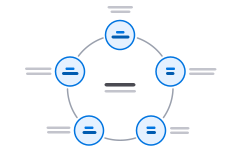
A cycle diagram arranges stages in a ring and joins them with arrows, so the last stage leads back to the first. Use it for any process that repeats: a planning rhythm, a life cycle, a feedback loop, a season. The ring says something a straight line cannot: there is no end, only the next round.
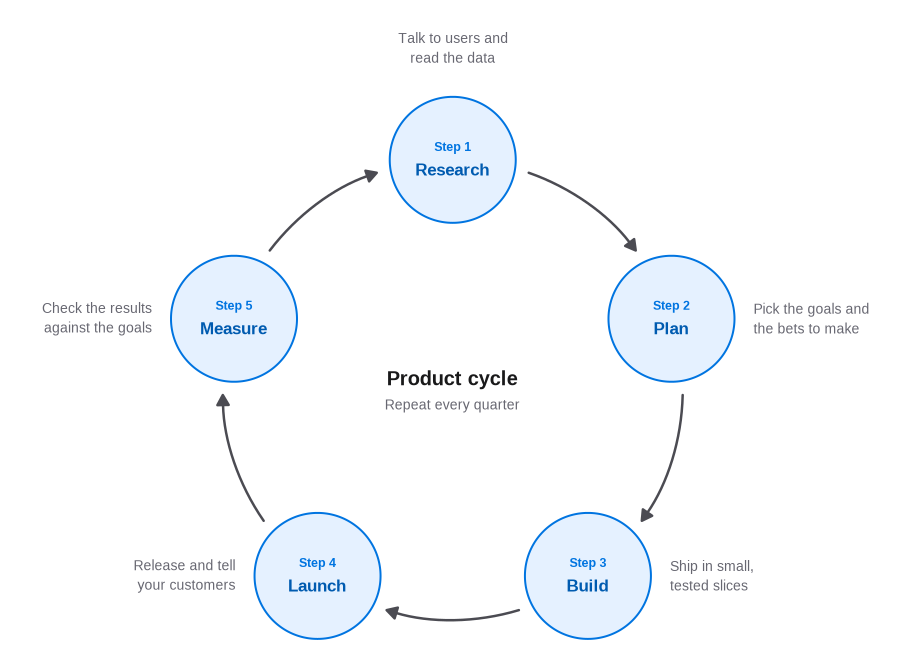
The template shows a product cycle in five stages. Circles for Research, Plan, Build, Launch and Measure sit around a center label, each numbered and each with a short description beside it.
Stages around the ring
Each stage is a circle with two lines inside. The small line is its position, Step 1. The larger line is its name, Research. Next to the circle, outside the ring, is a description: “Talk to users and read the data”.
Follow the arrow clockwise to Step 2, Plan: “Pick the goals and the bets to make”. The numbers matter even though the shape is a loop. A ring has no natural starting point, so the numbering tells a first-time reader where to begin, and the top position reinforces it.
The center: name the loop and its rhythm
The middle of the ring is not empty. It holds the title, Product cycle, and under it the line that makes this a cycle and not a one-off project: Repeat every quarter.
Most cycle diagrams leave that second line out, and it is the most useful fact on the board. A loop that turns every week is a different thing from one that turns every year, even with the same five stages. When you rename the center, state the period, or state the trigger if the loop is not on a clock: “Repeat after every release”.
Describe each stage by what it produces
The descriptions on this board are short, and each one starts with a verb. Build is “Ship in small, tested slices”. Launch is “Release and tell your customers”. Neither says how. They say what the stage is for, in words the next stage can rely on.
That is the standard to aim for. One line, an action, and an outcome someone else picks up. If a description needs a second sentence, the stage may be two stages. If two neighboring descriptions sound alike, they may be one.
How to use the cycle diagram template
- Open it as a new board. Use this template gives you the five-stage product cycle to edit.
- Name the loop first. Replace Product cycle in the center, and change Repeat every quarter to your own period or trigger.
- Rename the five stages in order. Start at the top with Step 1 and work clockwise. Use one word per stage where you can, as Research and Measure do.
- Write one line beside each circle. Begin with a verb and name the result the next stage needs.
- Check the handoff from last to first. Read Step 5 and then Step 1. If the first stage does not use what the last one produces, the ring is really a line.
When a cycle fits, and when a line is more honest
A ring is right when the output of the last stage is the input of the first. In the example, Measure checks the results against the goals, and those results are the data that Research reads in the next quarter. Review rhythms, improvement loops, life cycles in biology and maintenance schedules all work this way.
If the work ends, draw it as a timeline or a flowchart instead. A ring would suggest a return that never happens. For the specific loop of building and running software, the DevOps loop has its own shape, and for stages that stack on each other, see the pyramid diagram.
Questions about the Cycle diagram template
How many stages should a cycle diagram have?
Three to eight. The template has five. With fewer than three there is no ring to speak of, and with more than eight the circles get too small to label. If you need more, check whether some stages are really steps inside a larger one.
Does a cycle have to go clockwise?
No, but clockwise from the top is what most readers expect, so it needs no explanation. If you go the other way, the arrowheads and the step numbers have to do more work. The template runs clockwise and starts at the top.
Can I change the number of circles?
Yes. Delete a circle with its text and arrow, or duplicate one, then space the circles evenly around the center and renumber the steps. Every element on the board can be moved, so the ring can be rebuilt for three, four or six stages.
What is the difference between a cycle diagram and a flowchart?
A flowchart has a start and an end and can branch at decisions. A cycle diagram has neither: it is a single closed path where every stage always leads to the same next stage. If your loop has conditions or exits, a flowchart with a loop back is clearer.