What is the DevOps loop?
DevOps is a way of working in which the people who write software also ship it and run it. The DevOps loop is its best-known picture: a figure eight with development on one side and operations on the other. Work flows around both halves without stopping, and what the team learns in production becomes the next thing it plans.
This template draws the loop with its eight stages, Plan, Code, Build, Test, Release, Deploy, Operate and Monitor. It adds a numbered card for each stage, where you note the practice and the tool, and a row of four delivery metrics. The example is one product team’s setup.
The figure eight
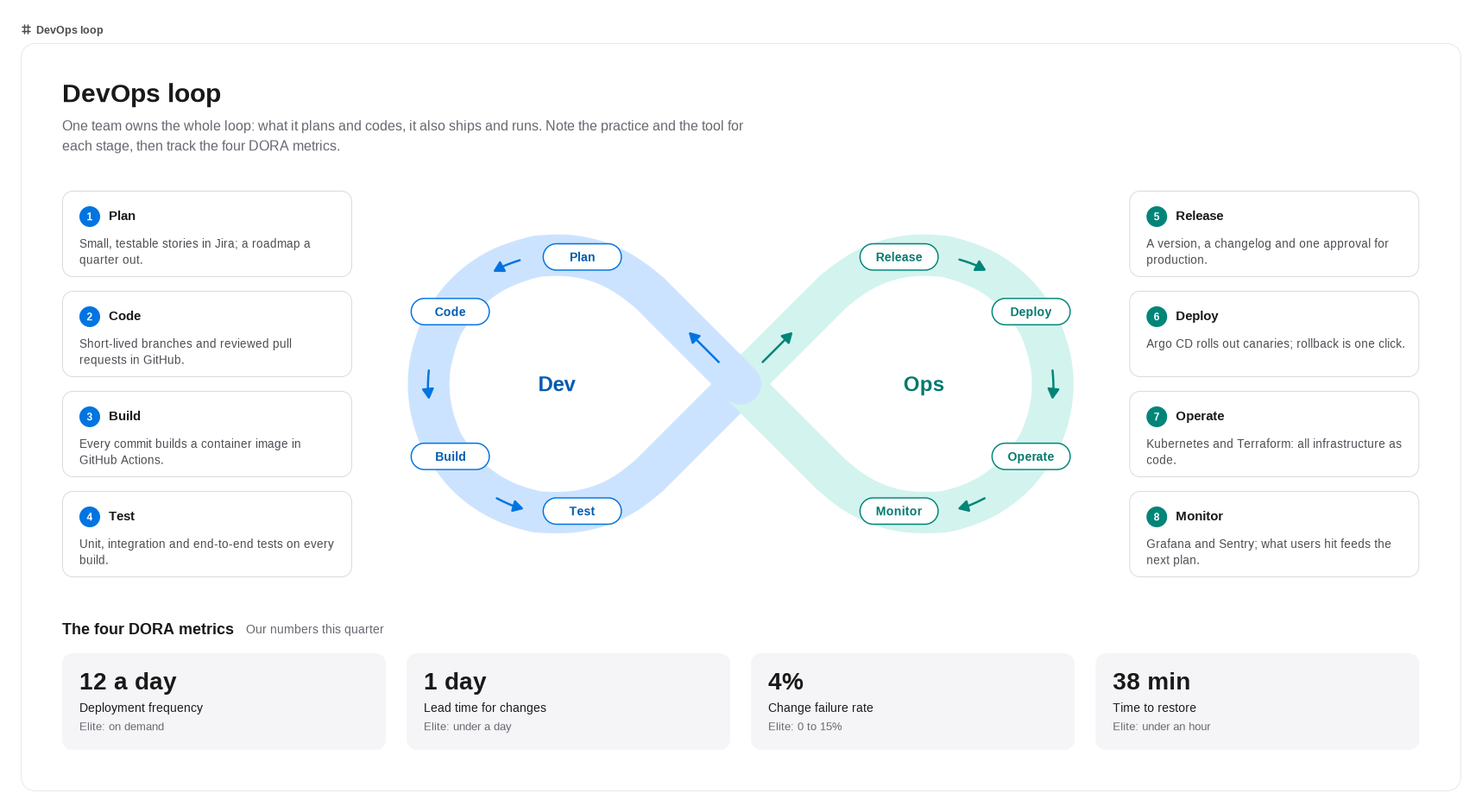
The left ring is labeled Dev and the right ring Ops. Four stage labels sit around each: Plan, Code, Build and Test on the left, Release, Deploy, Operate and Monitor on the right. Small arrows on the rings show the direction of travel, and the two rings cross in the middle.
That crossing is the point of the drawing. In the old model, development finished a version and passed it over a wall to an operations team. Here there is no wall to draw. The board’s summary puts it in one sentence: “One team owns the whole loop: what it plans and codes, it also ships and runs.”
The Dev half: plan, code, build, test
Cards 1 to 4 on the left say how this team does each stage. The wording is the useful part, because each card names a practice you could check:
- Plan. Small, testable stories, and a roadmap a quarter out.
- Code. Short-lived branches and reviewed pull requests.
- Build. Every commit builds a container image.
- Test. Unit, integration and end-to-end tests on every build.
Each card also names the tool the team uses for that stage. When you fill in your own, keep that pairing of one practice and one tool. A card that lists five tools and no practice describes a toolchain, not a way of working.
The Ops half: release, deploy, operate, monitor
Cards 5 to 8 continue on the right:
- Release. A version, a changelog and one approval for production.
- Deploy. Canary rollouts; rollback is one click.
- Operate. All infrastructure as code, on Kubernetes.
- Monitor. What users hit feeds the next plan.
The Monitor card closes the loop in words. Errors and slow pages seen in production are not only alerts for whoever is on call. They are input for card 1. If your monitoring never changes your plan, the loop on your board is really a line.
The four DORA metrics
Under the loop, a row titled The four DORA metrics carries the subtitle “Our numbers this quarter”. Each card shows the team’s figure in large type, the metric’s name and the elite benchmark:
- Deployment frequency: 12 a day. Elite: on demand.
- Lead time for changes: 1 day. Elite: under a day.
- Change failure rate: 4%. Elite: 0 to 15%.
- Time to restore: 38 min. Elite: under an hour.
The first two measure speed and the last two measure stability. Read them together. A team that deploys twelve times a day with a 40% failure rate is not doing well, and neither is one with no failures that ships twice a year.
How to use the DevOps loop template
- Open it as a new board and go around the loop with the whole team in one meeting.
- Rewrite the eight cards. For each stage ask what you really do today, not what you intend to do, and name the one tool that matters.
- Mark the weakest stage. Recolor the card where work waits longest. That is the stage to improve this quarter.
- Replace the four numbers with your own from the last three months. If you cannot measure one yet, write “unknown”, which is a finding in itself.
- Revisit it each quarter and keep the old board to compare.
When the loop helps, and when you need more detail
Use the loop to explain DevOps to a new team, to run a quarterly health check of your delivery, or to show leadership where an investment in tooling would land. It is a summary and names each stage in a single line.
For the build, test and deploy stages step by step, with gates and timings, open the CI/CD pipeline template. For the phases of a project from requirements to maintenance, see the software development lifecycle. And for what happens when Monitor raises an alarm, the incident response template covers the steps.
Questions about the DevOps loop template
What are the eight stages of the DevOps loop?
Plan, Code, Build and Test on the development side, then Release, Deploy, Operate and Monitor on the operations side. After Monitor the loop returns to Plan, because what the team observes in production shapes what it works on next.
What are the DORA metrics?
Four measures of software delivery from the DevOps Research and Assessment program: deployment frequency, lead time for changes, change failure rate and time to restore service. Two describe how fast a team ships and two describe how stable the result is.
Is DevOps a team or a practice?
A practice. The template’s summary says one team owns the whole loop. Some companies have a platform team that provides tools for the Ops half, but if that team alone deploys and runs everyone’s code, the wall between Dev and Ops is back.
Can I use the DevOps loop template for free?
Yes. The board has 85 elements and opens on the Free plan. Every label, card and number can be edited after you click Use this template, and the finished loop exports as PNG, SVG, PDF or JSON.