What is a decision matrix?
A decision matrix compares several options against the same list of criteria. Each criterion gets a weight that says how much it matters, each option gets a score on each criterion, and the weighted scores add up to one number per option. It replaces "I just prefer this one" with a table everybody can read and dispute line by line.
This template is the weighted kind. It holds the question, the scoring table, a totals card, the decision and a short list of checks. The example is Fernway Studio, a company of 60 people choosing where to move when its lease ends.
Start with the question and its limits
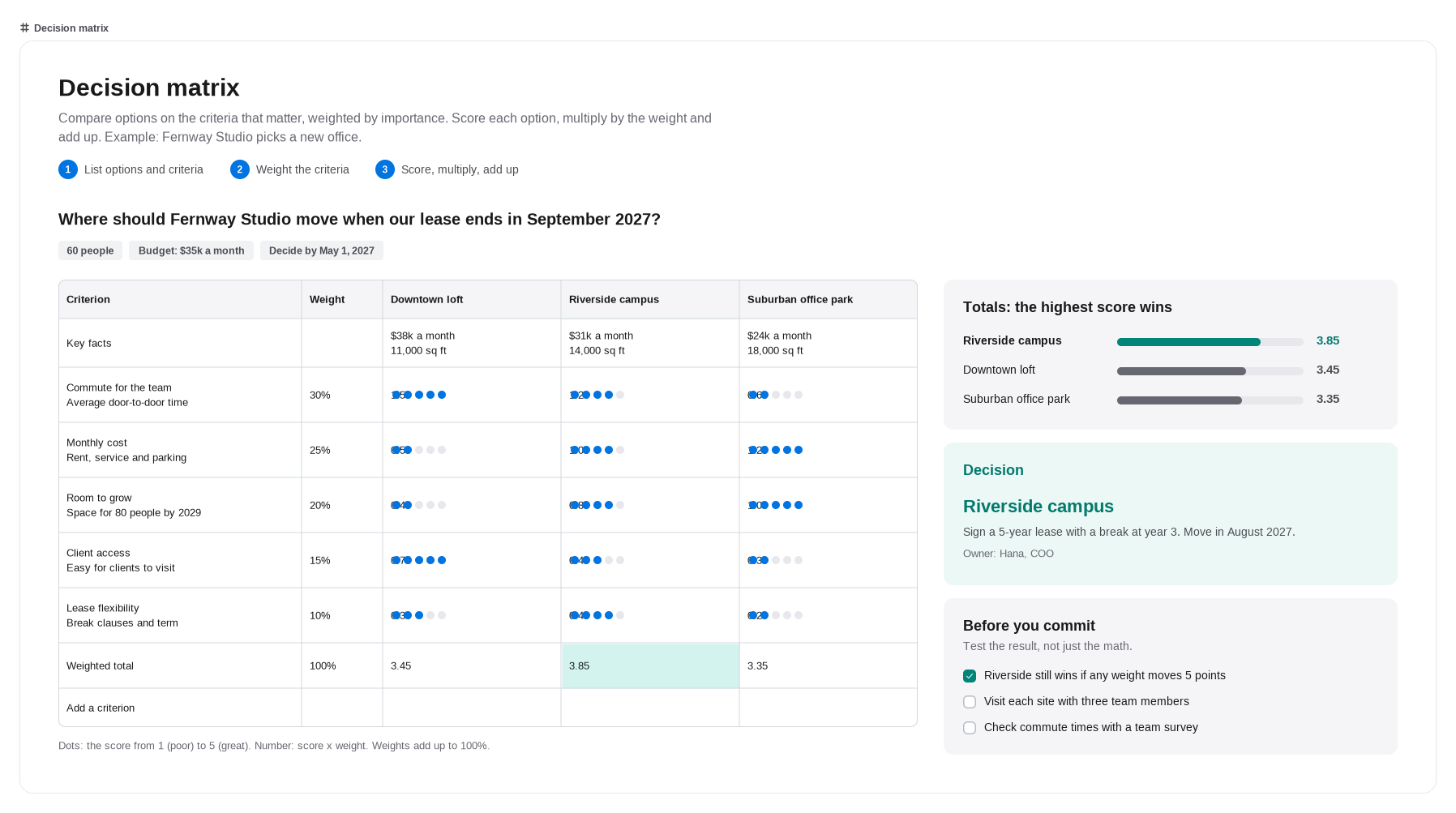
The top of the board states the decision as one question: "Where should Fernway Studio move when our lease ends in September 2027?" Under it sit three small tags: 60 people, Budget: $35k a month, Decide by May 1, 2027.
Those tags do real work. A headcount and a budget rule options out before anyone scores them, and a decision date keeps the matrix from turning into a standing meeting. Write your own question so that every option on the table is a possible answer to it.
Criteria, weights and options
Rows are criteria and columns are options. Fernway compares a Downtown loft, a Riverside campus and a Suburban office park. A Key facts row keeps the raw numbers visible: the loft is $38k a month for 11,000 sq ft, the park $24k for 18,000 sq ft.
The five criteria each carry a weight and a one-line definition:
- Commute for the team, average door-to-door time: 30%
- Monthly cost, rent, service and parking: 25%
- Room to grow, space for 80 people by 2029: 20%
- Client access, easy for clients to visit: 15%
- Lease flexibility, break clauses and term: 10%
The weights add up to 100%. Agree on them before anybody scores, or people will tune the weights to rescue a favorite.
Score, multiply, add up
Each cell shows a row of five dots and a number. The dots are the score from 1 (poor) to 5 (great). The number is the score times the weight. The loft is best for commuting, so its 5 becomes 1.50 at a weight of 30%. On lease flexibility the Riverside campus gets 0.40, a 4 at a weight of 10%.
The Weighted total row adds each column: 3.45 for the loft, 3.85 for Riverside, 3.35 for the office park. The heading and the total of the winning column are shaded green, so the result reads at a glance. A dashed row at the bottom, Add a criterion, waits for a sixth line, and if you add one the weights must be shared out again.
Totals and the decision
The first card on the right repeats the totals as three bars under the line "Totals: the highest score wins". Bars make the gap visible: Riverside leads the loft by 0.40, which is clear but not a landslide.
The Decision card then says what will happen, in words a landlord could act on: Riverside campus, "Sign a 5-year lease with a break at year 3. Move in August 2027." The last line names the owner: Hana, COO. A matrix without that card is an analysis. With it, the board is a record of who decided what and why.
How to use the decision matrix template
- Open it as a new board. The office example stays in your copy until you overwrite it.
- List options and criteria. Rename the three option columns and the criteria rows. Give each criterion a second line that defines it, as "Space for 80 people by 2029" does.
- Weight the criteria. Split 100% between them as a group, and only then look at the options.
- Score, multiply, add up. Type each weighted number in its cell and the sums in the Weighted total row, then set the bars on the Totals card to match.
- Test before you commit. The last card lists three checks. The first is already ticked: "Riverside still wins if any weight moves 5 points". The other two send people out of the table: visit each site with three team members, and check commute times with a team survey.
When a decision matrix helps, and when to pick another template
Reach for it when you have three to six real options, several things you care about and people who disagree on which matters most: choosing a vendor, an office, a hire or a technology.
For a single yes-or-no choice, a pros and cons list is quicker. When the options are tasks to rank by payoff and cost, an impact effort matrix needs no arithmetic. And if each option leads to further choices and uncertain outcomes, draw a decision tree.
Questions about the Decision matrix template
How do I choose the weights?
Start by ranking the criteria from most to least important, then split 100 points between them. If two people disagree, average their splits and note the difference. Keep the top weight under about 40%, or that one criterion decides everything and the table adds nothing.
What scale should the scores use?
The template scores from 1 (poor) to 5 (great). Five steps are enough to separate options and few enough that people can agree. Where you can, tie the scale to a measure: for commute, a 5 might mean under 30 minutes door to door.
What if two options end up almost level?
Then the matrix has told you they are close on what you measured. Move each weight a few points up and down and see if the order changes. If it does, pick with the checks on the last card, such as a site visit, or add the criterion you left out.
How many criteria should a decision matrix have?
Four to seven. The example uses five. With fewer than four you rarely need a table, and with more than seven the small weights blur together and nobody can say why the winner won. Merge criteria that measure the same thing.