What is an incident response plan?
An incident response plan says what a team does when its service breaks: who is paged, who decides, who talks to customers, and in what order things happen. Its value is that nobody has to invent the process at 3 a.m. with the site down.
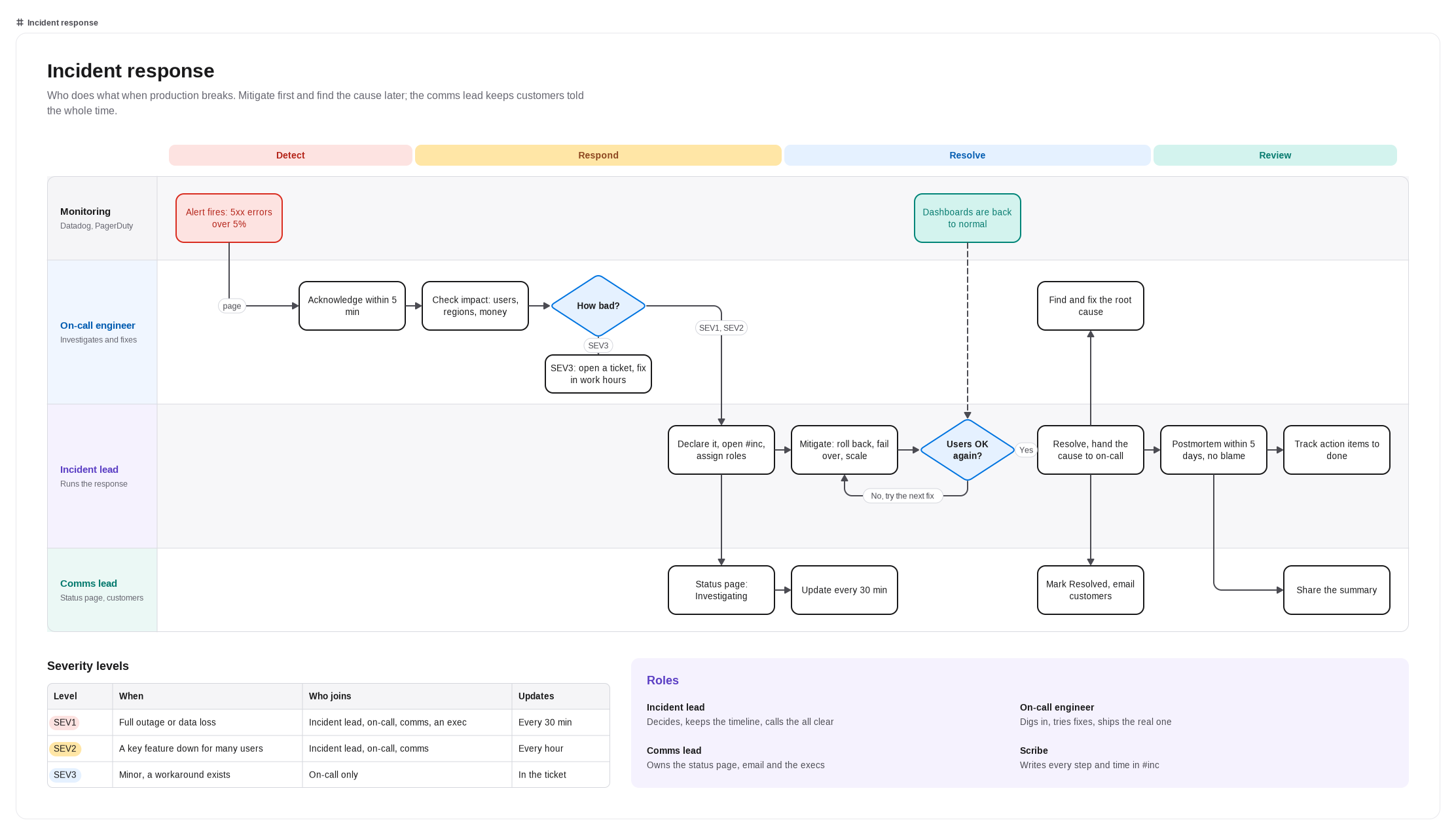
This template puts the plan on one board. Four lanes hold the actors: monitoring, the on-call engineer, the incident lead and the comms lead. Four phase bars across the top, Detect, Respond, Resolve, Review, show how far along you are. The subtitle carries the rule the whole flow is built on: mitigate first and find the cause later.
Detect and size it up
The flow begins in the Monitoring lane with a concrete trigger: “Alert fires: 5xx errors over 5%”. A line labelled “page” drops to the on-call engineer, who must acknowledge within 5 minutes and then check the impact in three words: users, regions, money.
Then comes the only severity decision on the board, the diamond How bad? A SEV3 leaves the flow right there: open a ticket and fix it in work hours. SEV1 and SEV2 continue down to the incident lead. That early exit matters. If every alert starts the full process, people stop taking the process seriously.
Declare, mitigate, resolve
For a serious incident the lead takes three actions in one box: declare it, open the #inc channel, assign roles. The next step is Mitigate, with the usual options written on it: roll back, fail over, scale.
The diamond “Users OK again?” gets its answer from above, where the Monitoring lane reports that dashboards are back to normal. A “No, try the next fix” line loops back to Mitigate. Only on “Yes” does the lead resolve the incident and hand the cause to on-call, who then finds and fixes the root cause without the clock running. The drawing separates stopping the harm from understanding it.
The comms lane runs alongside
The bottom lane belongs to the comms lead and starts the moment an incident is declared: the status page is set to “Investigating”, then updated every 30 minutes. When the lead resolves the incident, comms marks it Resolved and emails customers.
Giving communication its own lane protects the engineer doing the fixing. Questions from sales, support and executives go to one named person, and customers hear something on a schedule even when the news is “still working on it”.
Review: the postmortem
The Review phase has two steps in the lead's lane: a postmortem within 5 days, with no blame, and tracking its action items to done. A line runs down to comms, who shares the summary.
Both details in the first box are worth keeping. A deadline stops the review from fading once the pressure is off. “No blame” means the write-up asks what in the system allowed the failure, which is the only version people will be honest in.
Define the levels before you need them
The table at the bottom left answers “How bad?” in advance. Each level says when it applies, who joins and how often updates go out:
- SEV1: full outage or data loss. The incident lead, on-call, comms and an exec join, with updates every 30 minutes.
- SEV2: a key feature is down for many users. The same group without the exec, updates every hour.
- SEV3: minor, a workaround exists. On-call only, updates in the ticket.
Write your own rows so that two engineers reading the same alert would pick the same level. Tie each one to something you can measure, such as the share of failed requests.
How to use the incident response template
- Open the template and save it where on-call can find it. A plan nobody can locate during an outage does not exist.
- Replace the trigger. Write the alert and threshold that page your team today.
- Put names or rotations on the roles. The Roles card defines four: the incident lead decides and keeps the timeline, the on-call engineer digs in, the comms lead owns the status page, and a scribe writes every step and time in the channel.
- Set your timings. Adjust the 5 minutes to acknowledge, the update intervals and the 5 days for the postmortem.
- Rehearse it. Run a pretend outage against the board and correct whatever confused people.
When to use it, and when another board fits
Use this template to set up on-call for the first time, to tighten a process after a messy outage, or to train new engineers before their first shift.
It covers the response, not the analysis. For the write-up afterwards, open a post-mortem board. Bugs that are not urgent belong in the bug triage workflow. If outages tend to follow deployments, a release checklist will prevent some of them.
Questions about the Incident response template
What does an incident lead do?
The lead runs the response and does not debug. On the board that means declaring the incident, assigning roles, deciding which mitigation to try next, keeping the timeline and calling the all clear. One person decides, so the engineers can focus on the system.
Why mitigate before finding the root cause?
Because users are affected while you investigate. Rolling back a release or failing over takes minutes and ends the harm. The cause can then be studied calmly with logs and time, which also produces a better fix.
How many severity levels do we need?
Three is enough for most teams, as in the example: one for all hands, one for a serious but partial failure, one for on-call alone. More levels lead to debates about the level during the incident itself.
Can one person hold several roles?
On a small team, yes. The lead often doubles as scribe and the on-call engineer may post the updates. Keep the lead and the engineer separate when you can, since deciding and debugging compete for the same attention.