What is the software development lifecycle?
The software development lifecycle, or SDLC, is the sequence of phases a piece of software goes through, from the first idea to running in production and being looked after. Teams name the phases differently, but the same work always has to happen: decide what to build, design it, write it, check it, ship it and keep it healthy.
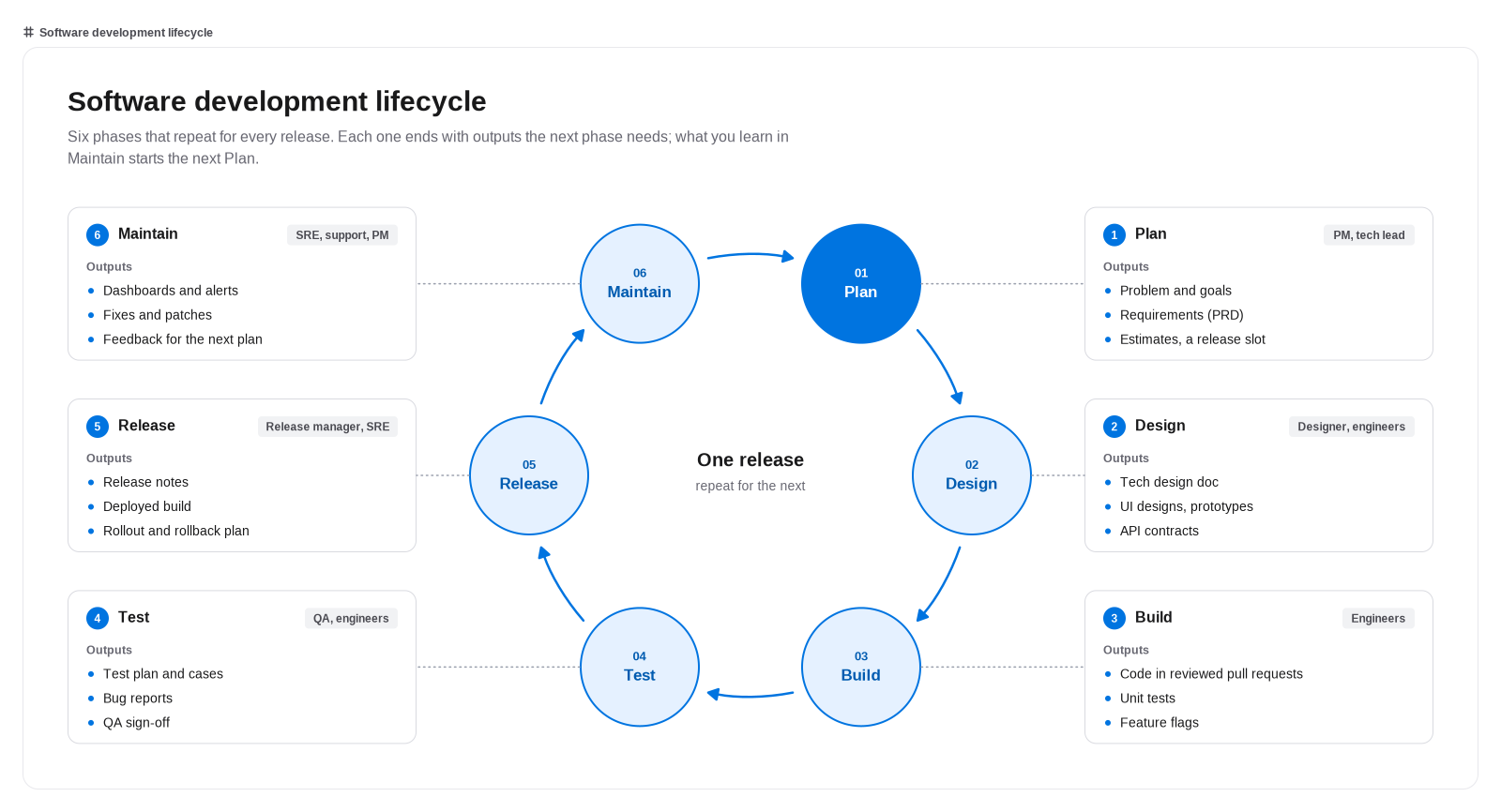
This template draws the lifecycle as a loop of six numbered phases with a card beside each. Its subtitle makes two points that the rest of the board illustrates. Each phase ends with outputs the next phase needs. And what you learn in Maintain starts the next Plan, which is why the diagram is a circle and not a line.
Six phases in a loop
The center of the board is a ring of six nodes numbered 01 to 06: Plan, Design, Build, Test, Release, Maintain. Arrows run clockwise from each node to the next, and the last arrow, from Maintain back to Plan, closes the loop. In the middle are the words “One release, repeat for the next”.
That caption sets the scale. The loop is not the life of the whole product. It is one release, whether that takes two weeks or three months. A team working in sprints goes around it constantly. A team with quarterly releases goes around it four times a year. The phases are the same in both cases. Only the size of each lap changes.
Plan, design, build
The three cards on the right cover the first half of the lap. Each has the phase number, a chip with the roles involved and a list headed “Outputs”.
- Plan (PM, tech lead): the problem and goals, the requirements in a PRD, and estimates with a release slot.
- Design (designer, engineers): a tech design doc, UI designs and prototypes, and API contracts.
- Build (engineers): code in reviewed pull requests, unit tests and feature flags.
Read down the lists and you can see one phase feeding the next. Engineers cannot write a design doc without requirements, and they cannot build against an API whose contract nobody has agreed on.
Test, release, maintain
The loop continues up the left side of the board.
- Test (QA, engineers): a test plan and cases, bug reports, and QA sign-off.
- Release (release manager, SRE): release notes, a deployed build, and a rollout and rollback plan.
- Maintain (SRE, support, PM): dashboards and alerts, fixes and patches, and feedback for the next plan.
Notice who appears in Maintain. The PM is back, next to operations and support. That is how the loop closes in practice: the person who will write the next plan is in the room when users report what the last release got wrong.
List outputs, not activities
The cards do not say what people do in a phase. They say what exists when the phase is over. The Release card is a good example. It does not read “deploy the software”. It lists three things you could ask to see: release notes, a deployed build, and a rollout and rollback plan.
Outputs make a phase checkable. “Testing” can go on forever, but “QA sign-off” either exists or it does not. When you adapt the cards, write each line as a noun, a document or an artifact someone hands over. Three per phase is enough. If you need more, the phase is probably two phases.
How to use the software development lifecycle template
- Open the template as a board of your own. The six phases fit most teams, so begin with the cards, not the loop.
- Put your roles on the chips. Write the job titles or names of the people who do each phase in your team.
- Rewrite the outputs. For each phase, list the documents and artifacts you really produce. Link each line to where it lives if you can.
- Rename or merge phases. If design and build happen together in your team, combine their cards and remove one node from the ring.
- Check the handoffs. For every arrow, ask whether the next phase has what it needs from the one before. The link from Maintain to Plan is the one most teams find missing.
For a more detailed process with decisions and branches, the AI flowchart tool can draft one from your description.
When to use this diagram, and what to add to it
Use it to explain to new hires and non-engineers how software gets made in your company, to agree with another department on who delivers what, or to spot the phase where work keeps getting stuck.
It is an overview. Each phase has a more detailed template of its own. For the automated path from commit to production, use the CI/CD pipeline. For the continuous version of this loop that joins development and operations, see the DevOps loop. For release day itself, line by line, open the release checklist.
Questions about the Software development lifecycle template
What are the phases of the software development lifecycle?
Most descriptions have six or seven. This template uses six: Plan, Design, Build, Test, Release and Maintain. Other versions split planning from requirements analysis or call the last phases deployment and operations. The work is the same; only the labels differ.
Is the SDLC the same as waterfall?
No. Waterfall is one way to run the lifecycle: each phase once, in order, for the whole project. Agile teams go through the same phases in short repeated laps. Drawing the lifecycle as a loop for one release fits both.
Where does security fit in the lifecycle?
In every phase, not as a seventh one. Add security outputs to the cards you have: a threat model in Design, dependency checks in Build, a penetration test in Test. Each card has room for another line.
Can I use the template on the Free plan?
Yes. The board has 101 elements, within the 150 that a Free board allows. You can edit it alone, share it with colleagues to view and comment, and export it as PNG, SVG or PDF.