What is a domain model?
A domain model is a picture of the ideas a business works with and how they relate: a customer, an order, a payment. It is drawn before the database and before most of the code, and its job is to make developers and business people use the same words for the same things.
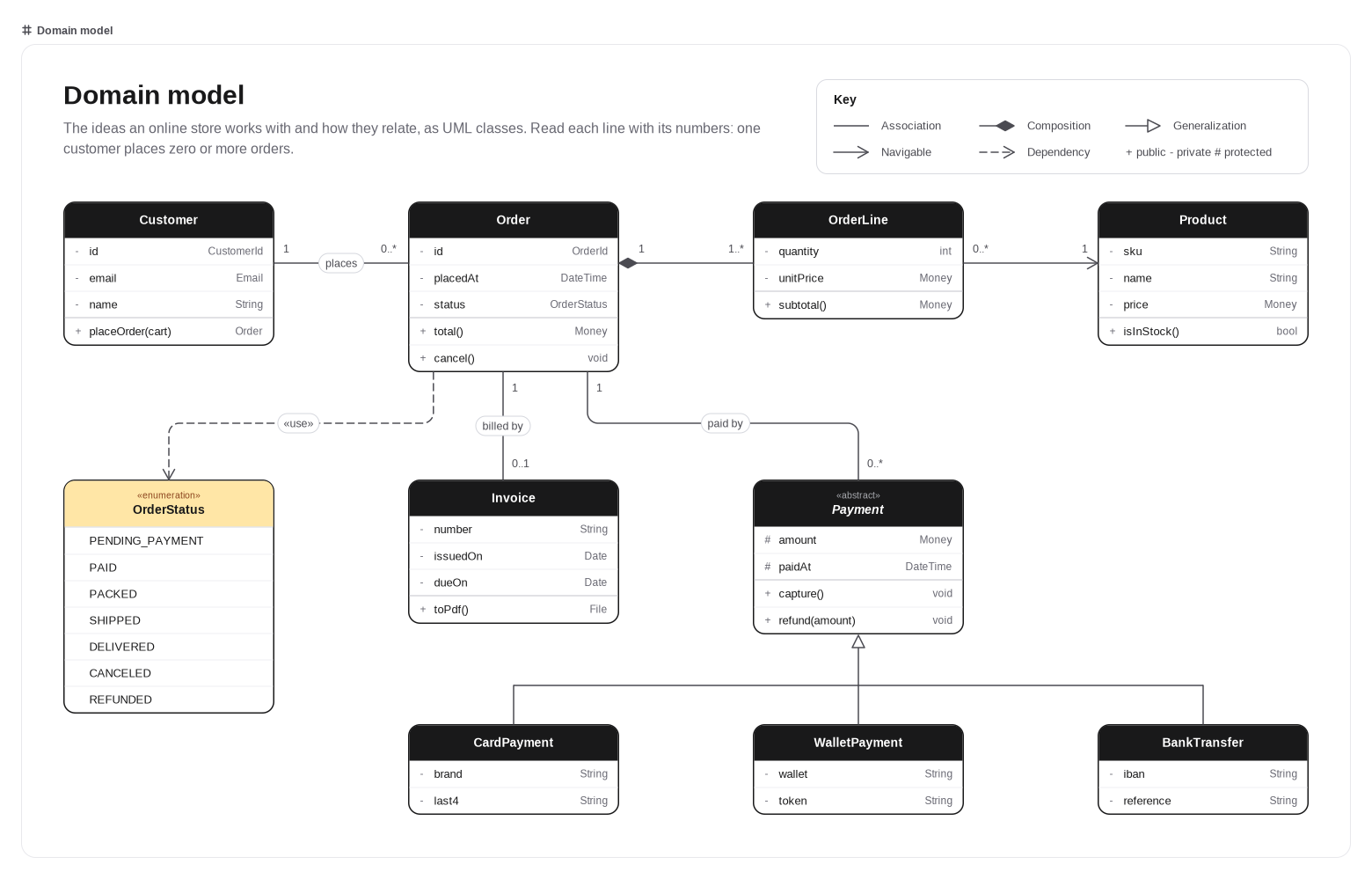
This template is a domain model of an online store, drawn as a UML class diagram. It has ten boxes: Customer, Order, OrderLine, Product, Invoice, Payment with three kinds of payment under it, and an OrderStatus list. The board’s summary tells you how to read it: “Read each line with its numbers: one customer places zero or more orders.”
Reading a line: a customer places orders
Each class box has three parts: the name, the attributes and the operations. Customer has id, email and name, and one operation, placeOrder(cart), which returns an Order. Order has id, placedAt and status, with the operations total() and cancel().
The line between them is labeled “places”. The numbers at its ends are multiplicities: 1 next to Customer and 0..* next to Order. Read from left to right, one customer places zero or more orders. Read from right to left, every order belongs to exactly one customer. Both halves are business statements someone can confirm or reject. Can an order exist without a customer, for a guest checkout? If so, the 1 is wrong, and it is cheaper to learn that here than in production.
Order lines and products: composition and direction
The line from Order to OrderLine ends in a diamond on the Order side. The key calls this Composition: the lines are part of the order and do not exist without it. Delete the order and its lines go too. The multiplicities are 1 and 1..*, so an order has at least one line.
OrderLine holds quantity and unitPrice and can compute subtotal(). Its line to Product ends in an open arrowhead, which the key calls Navigable: an order line knows its product, but a product does not keep a list of the lines that mention it. The numbers are 0..* and 1. A product can appear in any number of lines, including none. Product itself has sku, name and price, and answers isInStock().
Invoice, payment and three ways to pay
Two lines drop from Order. “billed by” leads to Invoice with 1 and 0..1: an order has one invoice at most, and may have none yet. “paid by” leads to Payment with 1 and 0..*, which allows several payments for one order.
Payment is marked abstract. It defines what every payment has, an amount and paidAt, and what every payment can do, capture() and refund(amount). Below it, three classes are joined to it by a hollow triangle, the sign for Generalization: CardPayment adds brand and last4, WalletPayment adds wallet and token, and BankTransfer adds iban and reference. The rest of the model only ever talks to Payment, so a fourth way to pay can be added without touching Order.
A fixed list of values: OrderStatus
The tall box on the left is an enumeration, not a class with behavior. OrderStatus lists the seven values an order’s status may take: PENDING_PAYMENT, PAID, PACKED, SHIPPED, DELIVERED, CANCELED and REFUNDED.
Order is tied to it by a dashed arrow labeled «use». The key names that line a Dependency. Order needs the list to exist, since its status attribute has the type OrderStatus, but the two are not associated the way Order and Customer are. Putting the allowed values on the model stops a slow kind of drift, where one team writes “cancelled”, another “void”, and a report quietly counts them as different things.
How to use the domain model template
- Open it on a Pro or Team plan, since it is a Pro template, and rename the classes to the nouns your business uses.
- Cut attributes to the ones people mention. A domain model is not a table definition. Leave out technical fields.
- Set both numbers on every line. Ask a domain expert each question aloud: “Can an order have no invoice?”
- Choose the line type from the key. Association, Navigable, Composition, Dependency or Generalization. The key also explains the visibility marks: + public, - private, # protected.
- Review it with non-developers. If they cannot read a line as a sentence, relabel it.
When to draw a domain model, and what comes next
Draw it at the start of a product, when you enter a business area you do not know, or when two teams keep misunderstanding each other’s terms. It is about meaning, so it should stay free of storage details.
When the model is agreed, the database schema template turns the same store into tables with types and keys. For a general class diagram of code rather than of a business, use the UML class diagram template. And for the life of a single order through the seven statuses, the order state machine shows which moves are allowed.
Questions about the Domain model template
What is the difference between a domain model and a database schema?
A domain model describes business ideas, their behavior and their relationships, with no storage details. A schema describes tables, column types and keys. One class may become several tables or none. Draw the model first to agree on meaning, then derive the schema.
What does 0..* mean on a UML line?
It is a multiplicity: zero or more. At the Order end of the “places” line it says a customer may have no orders or any number of them. Other values on the board are 1 (exactly one), 0..1 (none or one) and 1..* (at least one).
What is the difference between composition and association?
An association says two things are related and each can exist alone, like Customer and Order. Composition, drawn with a diamond, says one is a part of the other and has no life outside it, like an OrderLine inside its Order.
Which plan includes the domain model template?
It is a Pro template, available on the Pro and Team plans. Once opened, every class, attribute and line can be edited, and the diagram exports as PNG, SVG, PDF or JSON for your documentation.