What is a UML class diagram?
A class diagram shows the static structure of object-oriented code: the classes, what each one knows and can do, and how they relate. It is the diagram to draw when you need to agree on a design before writing it, or explain an existing one without opening twenty files.
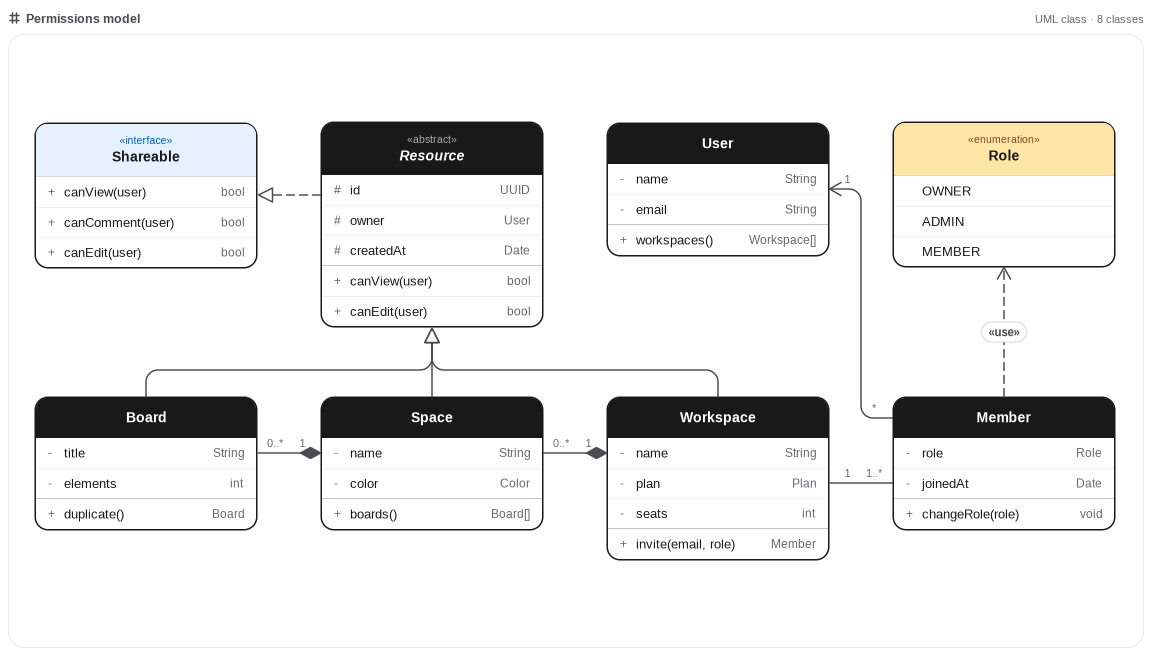
The template is a frame called Permissions model. Its eight boxes describe how a collaboration product might decide who can open a board: Shareable, Resource, Board, Space, Workspace, User, Member and Role. Between them the example uses every relationship a class diagram commonly needs, so you can copy the one you want.
Inside a class box
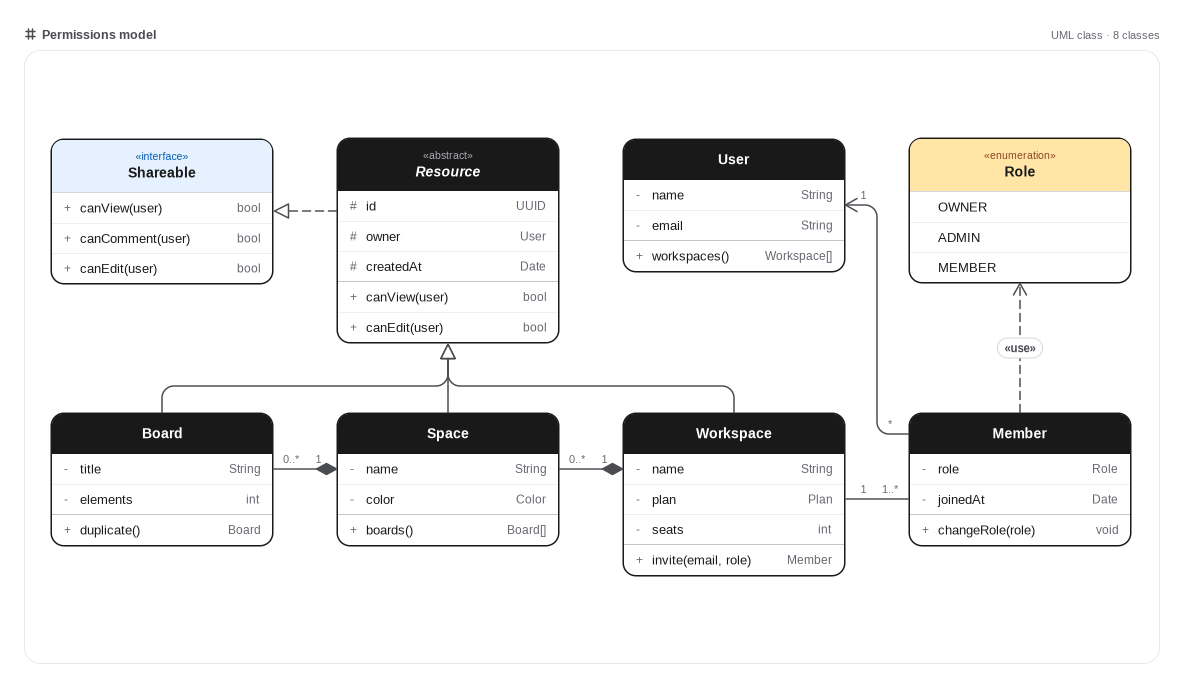
Every class is a box with up to three compartments. The top one holds the name. The middle one lists attributes, the data an object carries. The bottom one lists operations, the things it can do.
In front of each attribute and operation is a visibility mark: a plus sign for public, a minus for private, a hash for protected. After a colon comes the type. Read Board and Space side by side and the pattern is plain: a few private attributes, then one public operation that other classes may call.
Keep the lists short. A class diagram is a map, not a listing. Show the members that explain the design and leave getters, setters and helpers in the code.
Interface and abstract class
Two boxes in the top row are not ordinary classes. Shareable is an interface: it lists operations and no data, a promise about what an object can be asked. Resource is an abstract class: it holds the attributes and behavior its children have in common, and no object is ever created from it directly.
The dashed line with a hollow triangle between them says that Resource realizes Shareable, meaning it keeps the promise. Anything that deals with sharing can then depend on the small interface and ignore what kind of resource it has been handed. When you design your own model, look for this pair: one narrow interface that callers use, and one abstract class that saves the subclasses from repeating themselves.
Inheritance: three kinds of Resource
Below Resource sit Board, Space and Workspace. Solid lines rise from each and join into one hollow triangle at Resource. That is inheritance, read as “is a”: a board is a resource, a space is a resource, a workspace is a resource.
The three subclasses inherit what Resource declares, so the diagram does not repeat it in their boxes. Each lists only what is its own. Use the “is a” sentence as a test before drawing the triangle. If it sounds wrong aloud, the relationship is probably “has a”, and it needs an association instead.
Associations and multiplicity
The remaining lines are associations: one class holds a reference to another. The small numbers at their ends are multiplicities, and they say how many objects take part.
- A Workspace has one or more Member objects, and each member belongs to one workspace.
- Each Member points to one User, while a user can be a member many times, once for every workspace they join.
- A dashed arrow runs from Member up to Role. It is a dependency: Member uses the Role type without owning it.
Along the bottom row, lines ending in a diamond show containment. Boards sit in a space and spaces sit in a workspace. Putting Member between Workspace and User is the design decision of the whole example: the role belongs to the membership, not to the person, so the same user can be an owner in one workspace and a plain member in another.
How to use the UML class template
- Open it as a new board. It is a Pro template, available on the Pro and Team plans.
- Rename the classes to your domain’s nouns. Start with the three or four you are sure about and delete the rest for now.
- Write two or three members in each box. Choose the attributes and operations someone would need in order to understand the class, and set the visibility mark on each.
- Add relationships one kind at a time. Inheritance first, then associations with a multiplicity at each end, then the few dependencies that matter.
- Read each line as a sentence. “A member has one role” should be true in your product. Where the sentence is false, fix the model before the code.
When a class diagram fits, and when to draw something else
Draw one for a design review, for documentation of a core module, or to get a new teammate oriented in a codebase. The guide on how to draw a UML class diagram covers the notation in full.
A class diagram is static. To show the order in which objects call each other, use a sequence diagram. To show database tables with keys in place of classes with operations, use the ER diagram. For a conceptual picture of a business domain that leaves out implementation detail, start from the domain model.
Questions about the UML class template
What do the plus, minus and hash signs mean in a class diagram?
They are visibility marks. Plus means public: any class may use the member. Minus means private: only the class itself may. Hash means protected: the class and its subclasses may.
What is the difference between an interface and an abstract class?
An interface only declares operations; it holds no data and no code. An abstract class can hold both, and exists to be extended. In the template, Shareable is the interface and Resource is the abstract class that realizes it.
How is aggregation different from composition?
Both mean one object contains others and are drawn with a diamond at the container. A hollow diamond is aggregation: the parts can outlive the whole. A filled diamond is composition: the parts are deleted with it.
Which plan do I need for the UML class template?
The Pro or Team plan. UML class is one of the Pro templates, so it does not open on the Free plan. Once it is on your board, every class and line can be edited.