What is a go-to-market plan?
A go-to-market plan describes how a product will reach its first paying customers. It names who those customers are, what you will tell them, what you will charge, where you will show up, when things happen and which numbers will prove it worked. Most launches that disappoint skipped one of those six.
This template gives each of them a numbered card on one board, so the plan can be read in a few minutes and argued about in one meeting. The example is Pulse Pro, a feedback app for online stores, launching on April 6, 2027.
Card 1: the target customer
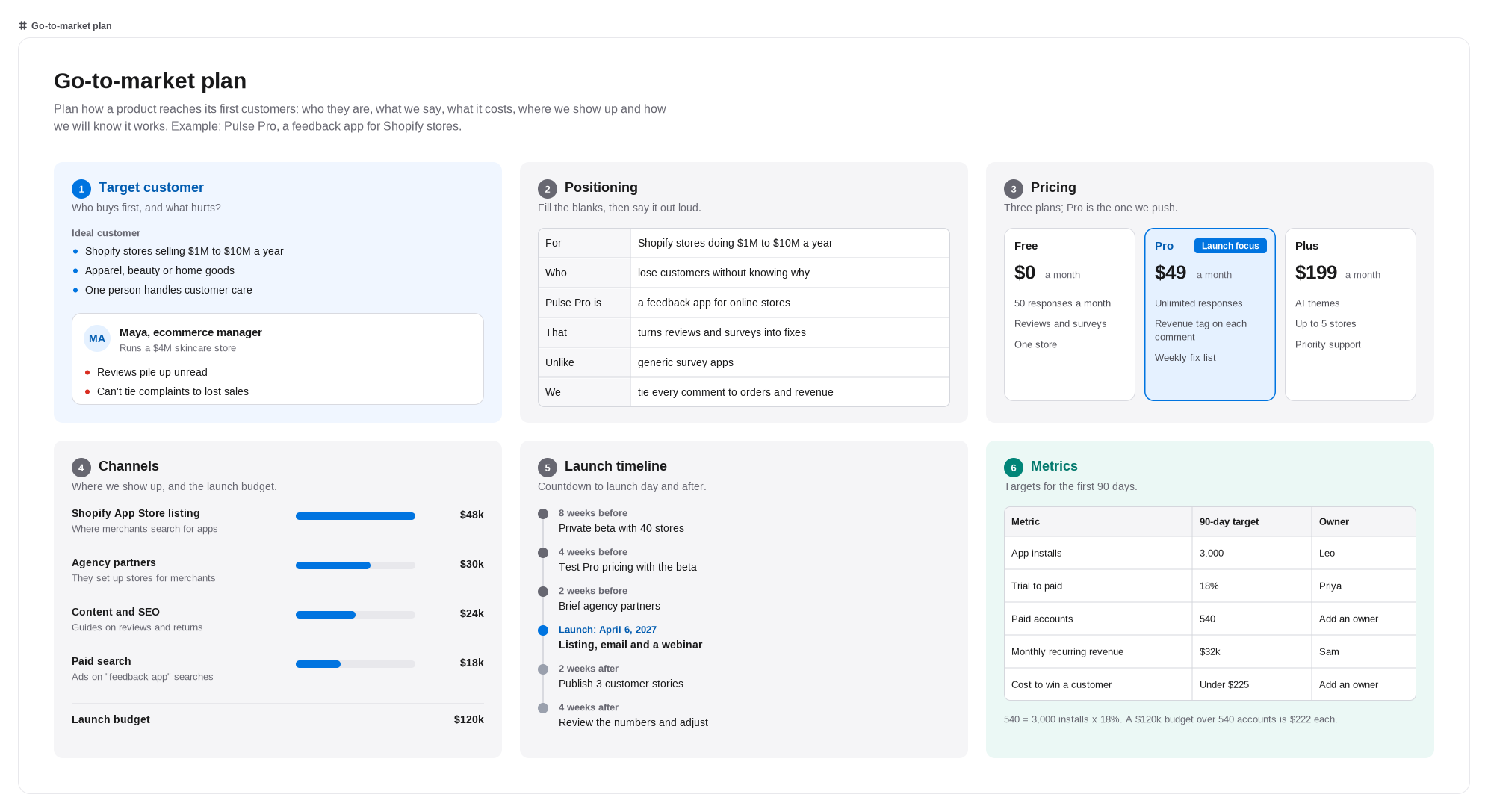
The first card asks "Who buys first, and what hurts?" It answers in two parts. The ideal customer is a kind of company: an online store with $1M to $10M in yearly sales, in apparel, beauty or home goods, where one person handles customer care. Three filters like these are narrow enough to make a list of real stores.
Under it is one person: Maya, ecommerce manager, who runs a $4M skincare store. Her two pains are written the way she would say them: "Reviews pile up unread" and "Can’t tie complaints to lost sales". Everything else on the board should make sense to Maya. If a channel or a price would not, it is aimed at someone else.
Cards 2 and 3: positioning and pricing
Positioning is a fill-in-the-blanks statement in six rows: For, Who, the product is, That, Unlike, We. Read down the right side and it forms a sentence: for stores that lose customers without knowing why, Pulse Pro is a feedback app that turns reviews and surveys into fixes; unlike generic survey apps, "We tie every comment to orders and revenue". The card’s own advice is to fill the blanks, then say it out loud. If it sounds like a slogan, rewrite it.
Pricing shows three plans side by side: Free at $0 a month with 50 responses, Pro at $49 with unlimited responses and a revenue tag on each comment, and Plus at $199 for up to 5 stores. Pro carries a Launch focus badge. A launch can only push one plan, and marking it keeps the channels and the metrics pointed the same way.
Cards 4 and 5: channels and the launch timeline
The Channels card lists where the product will show up and splits the launch budget between the places. An app store listing gets $48k, agency partners $30k, content and SEO $24k and paid search $18k, for a total of $120k. A bar beside each line makes the bet visible: the listing, where merchants already search for apps, takes the largest share.
The Launch timeline counts toward launch day and past it. Eight weeks before: a private beta with 40 stores. Four weeks before: test Pro pricing with the beta. Two weeks before: brief agency partners. Launch day brings the listing, an email and a webinar. Then two entries that many plans forget: publish 3 customer stories two weeks after, and review the numbers and adjust at four weeks.
Card 6: metrics for the first 90 days
The last card is a table of targets with an owner each: 3,000 app installs for Leo, 18% trial to paid for Priya, $32k of monthly recurring revenue for Sam. Two rows, Paid accounts at 540 and Cost to win a customer at under $225, still say "Add an owner", which is a prompt, not an oversight to copy.
The line under the table is the best habit on the board: "540 = 3,000 installs x 18%. A $120k budget over 540 accounts is $222 each." The targets are derived from one another and from the budget on card 4. When a plan’s numbers connect like this, changing one forces you to revisit the rest, and nobody can promise installs that the money cannot buy.
How to use the go-to-market plan template
- Open it as a new board. The feedback app’s plan is copied with it, card by card.
- Write card 1 before anything else. Replace the three customer filters and the persona. Quote two pains from real conversations.
- Fill the positioning rows. Keep each answer to one line and name the alternative buyers use today in the Unlike row.
- Set prices and pick the launch plan. Move the badge to the plan your launch will sell.
- Work backward from launch day. Put your date on the timeline’s blue marker, then fill the weeks before and after it, and split the budget across channels until the total matches.
- Derive the metrics. Start from the traffic your channels can bring, apply a conversion rate, and check the cost per customer against the budget.
When this plan fits, and what to pair it with
Use it for a new product, a new plan or tier, or an existing product entering a new market. It is sized for a launch one team can run in a quarter.
If you are still unsure who the customer is, start with a user persona or a value proposition canvas and come back. If the whole business model is open, not just the launch, a lean canvas asks the earlier questions.
Questions about the Go-to-market plan template
What is the difference between a go-to-market plan and a marketing plan?
A go-to-market plan is about one launch: one product, one first audience, one date. It includes pricing and sales channels as well as promotion. A marketing plan covers ongoing activity for the whole company across a year, and usually takes the pricing and the product as given.
How do I set launch targets if I have no data yet?
Work from the budget, as the example does. Estimate what each channel costs per visitor or install, apply a cautious conversion rate from a beta or from similar products, and see how many customers that buys. Write the formula on the board so it can be corrected after week four.
How long before launch should the plan be ready?
The example timeline starts eight weeks before launch day with a private beta, so the plan itself should be agreed a little earlier, around ten weeks out. A simple feature release can do with half that.
Do I need all six cards for a small launch?
Keep customer, positioning and metrics even for the smallest launch; they take ten minutes and prevent most confusion. Pricing can be deleted if it does not change, and channels and timeline can shrink to two or three lines each.