What is I like, I wish, what if?
I like, I wish, what if is a feedback format built on three sentence starters. “I like” names what works. “I wish” names what you would change. “What if” offers a new idea. Because every note begins with one of the three, criticism arrives as a wish and not as a verdict, and the person whose work is on the table can hear it. The format comes out of design education and is used for prototypes, drafts, workshops and team habits alike.
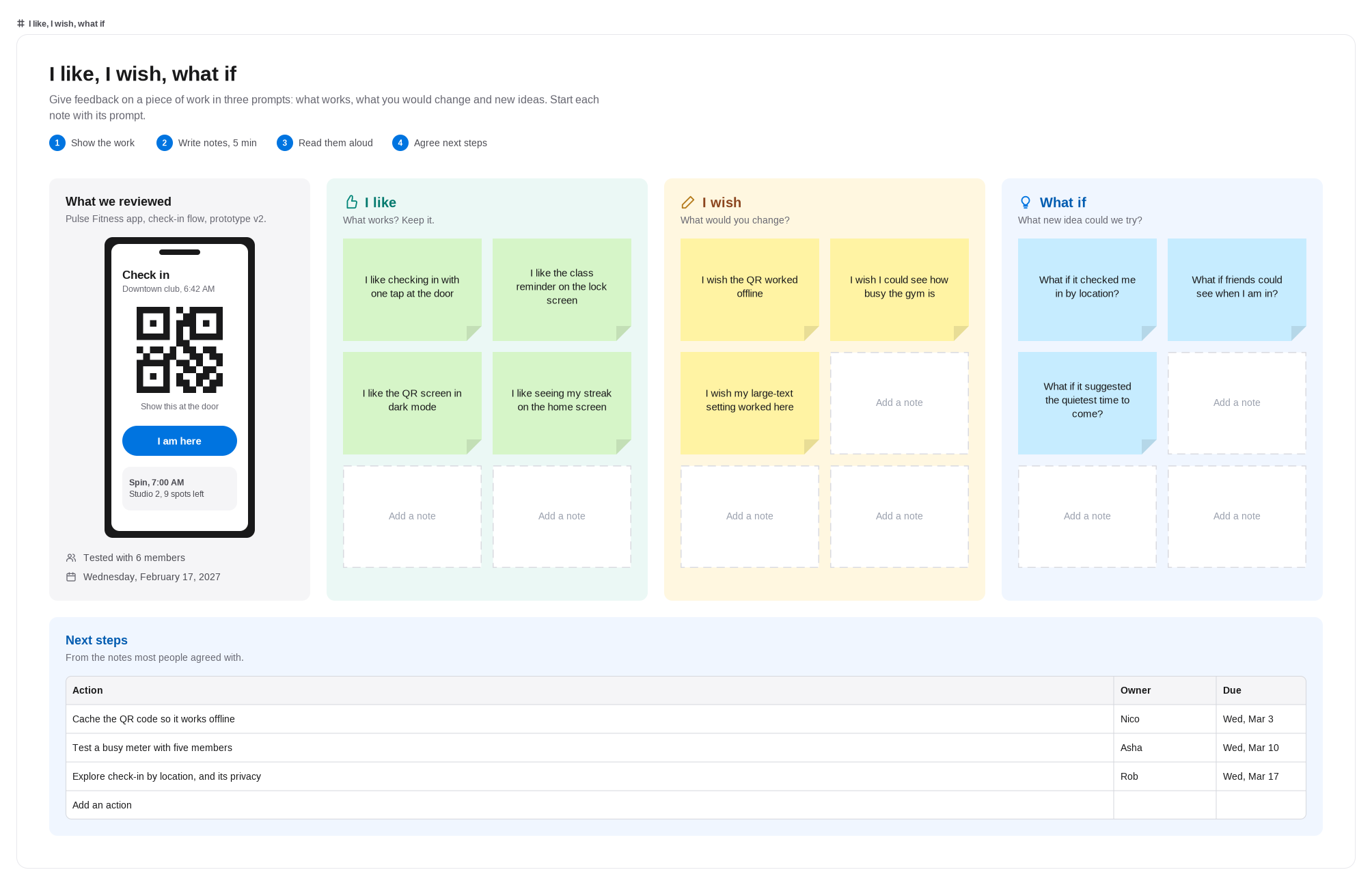
This template puts the work under review on the left, gives each prompt a column, and closes with a table of next steps. The example is a review of the Pulse Fitness app’s check-in flow, prototype v2.
Show the work first
Feedback is only as good as the reviewers’ picture of the thing. The first panel, What we reviewed, keeps that picture on the board. In the example it is a drawing of one phone screen: the heading “Check in”, the line “Downtown club, 6:42 AM”, a QR code with “Show this at the door”, a button reading “I am here”, and a card for the next class, “Spin, 7:00 AM”, in Studio 2 with 9 spots left.
Two lines under the phone add context: the prototype was tested with 6 members, and the review took place on Wednesday, February 17, 2027. Naming the version matters. Notes about v2 should not be read later as notes about the shipped app.
I like: what works, so keep it
The first column asks “What works? Keep it.” It is tempting to rush through praise to reach the problems. Resist that, because this column tells the designer what not to break in the next version. The reviewers of the check-in flow wrote four notes:
- I like checking in with one tap at the door
- I like the class reminder on the lock screen
- I like the QR screen in dark mode
- I like seeing my streak on the home screen
Each one points at a specific part of the product. “I like the design” would give the team nothing to protect. “One tap at the door” does.
I wish: a change, phrased as a wish
The second column asks “What would you change?” The starter does real work here. Compare “The QR code breaks without signal” with the note on the board: “I wish the QR worked offline”. Both carry the same information, but the second already points toward a fix and is easier to receive.
The other two wishes are “I wish I could see how busy the gym is” and “I wish my large-text setting worked here”. A good wish describes the experience the writer wants, not the implementation. How to show how busy the gym is remains the team’s job. The third note is an accessibility problem, the kind of detail that surfaces when people write alone before anyone speaks.
What if: ideas without commitment
The third column asks “What new idea could we try?” A what-if is a question, so nobody has to defend it. That makes it the safest place on the board for a bold idea or a half-formed one:
- What if it checked me in by location?
- What if friends could see when I am in?
- What if it suggested the quietest time to come?
Notice how the columns talk to each other. The wish to see how busy the gym is and the idea of suggesting the quietest time are two angles on one need. Spotting pairs like this is how a pile of notes turns into a direction.
How to use the I like, I wish, what if template
- Open it as a new board. Replace the phone drawing with your own work: paste a screenshot, a page of the draft or a photo, and name the version.
- Show the work. Walk through it once without explaining your choices.
- Write notes for 5 minutes. Everyone writes in silence and starts each note with its prompt. Aim for at least one note per column.
- Read them aloud. Go column by column. The author of the work listens and asks questions only to understand.
- Agree next steps. Take the notes most people agreed with into the table. The example turns “I wish the QR worked offline” into “Cache the QR code so it works offline”, owned by Nico and due March 3.
When it fits, and when to choose another format
Use it to review a prototype, a draft document, a presentation or a finished workshop, with anyone from teammates to customers. It needs no training, which makes it a good first feedback format for a new team.
For a design review judged against stated goals and principles, the design critique board is stricter. To reflect on how a team worked, not on a piece of work, try rose thorn bud or start stop continue. Short on reviewers? FlowDraw AI can draft a first set of notes from a description, for people to react to.
Questions about the I like, I wish, what if template
What is the difference between “I wish” and “what if”?
An “I wish” responds to something that is there and asks for it to be different: the QR code should work offline. A “what if” proposes something that is not there yet, such as checking in by location. Wishes improve the current version; what-ifs widen the options.
How many notes should each person write?
One to three per column in five minutes. The example has ten notes in total from a small review. Insist on at least one “I like” from everyone, so the author hears what to keep as well as what to change.
Should the author respond to the feedback during the session?
Only with questions. Defending a choice turns the review into a debate and makes people soften their next note. The author’s response is the Next steps table: which notes become actions, and who owns them.
Can this format be used as a retrospective?
Yes. Replace the work under review with the sprint or the project, and keep the three prompts. “I like” covers what went well, “I wish” what should change, and “what if” experiments for next time.