What is start stop continue?
Start stop continue is the plainest retrospective there is. The team answers three questions about how it works: what should we start doing, what should we stop doing, and what should we continue doing? Every answer is a habit, and every habit ends up in one of three columns.
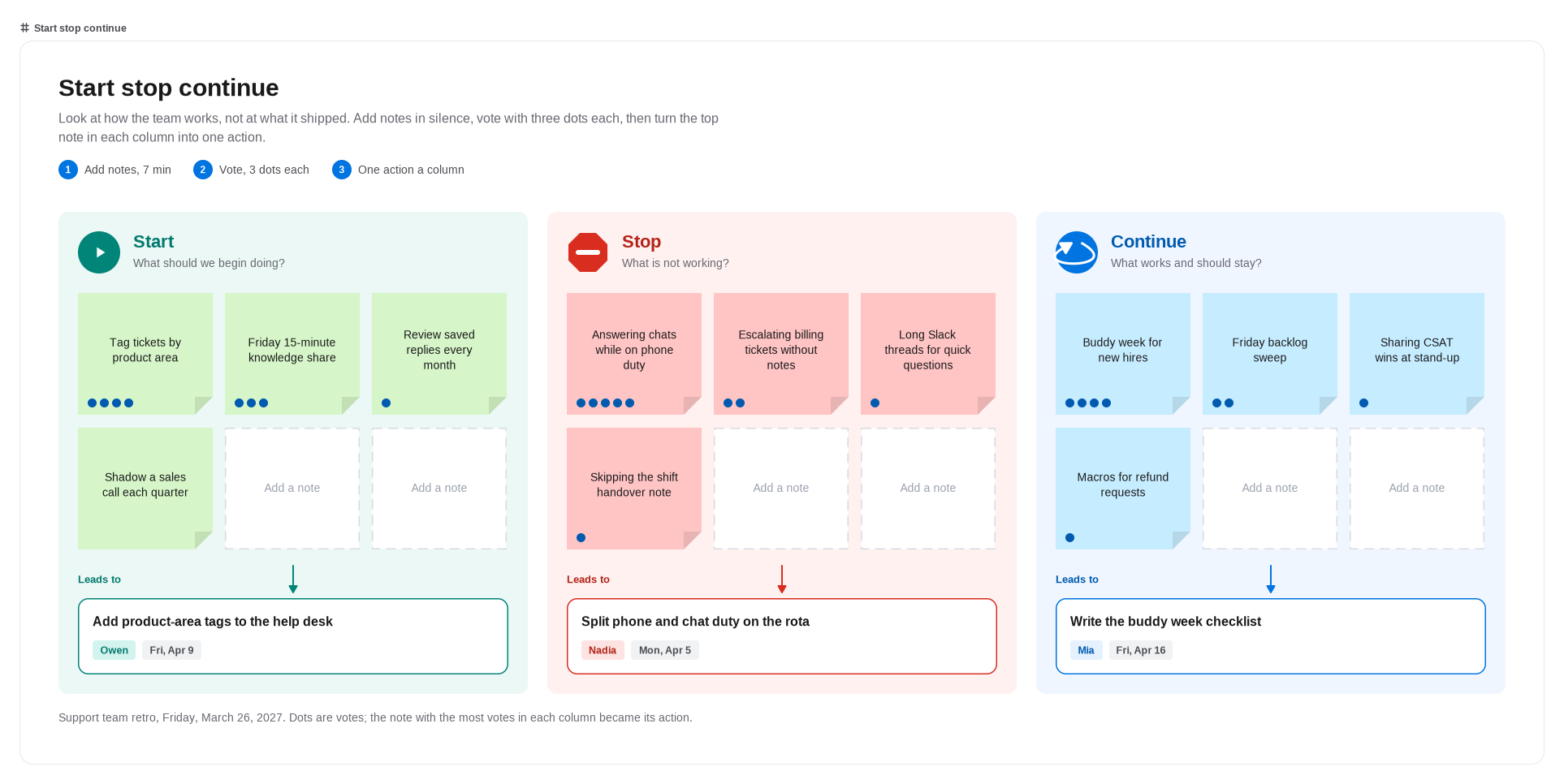
The instruction printed on this template gives the angle: “Look at how the team works, not at what it shipped.” The board has the three columns, vote dots on the notes and a “Leads to” box under each column for the action that comes out of it. The example is a support team’s retro from Friday, March 26, 2027.
Three columns, three questions
Each column prints its question under the title, and the notes in the example show the kind of answer it wants.
- Start: “What should we begin doing?” The support team suggests “Tag tickets by product area” and a “Friday 15-minute knowledge share”.
- Stop: “What is not working?” Notes include “Answering chats while on phone duty” and “Skipping the shift handover note”.
- Continue: “What works and should stay?” Here are “Buddy week for new hires” and “Friday backlog sweep”.
The columns use three note colors: green, red and blue. Each column has four notes and two empty cards marked “Add a note” for more.
Write habits, not outcomes
A note belongs on this board when it describes something people do, and can do differently on Monday. Look down the Stop column. “Escalating billing tickets without notes” is a behavior. Anyone on the team can picture it, and anyone can stop doing it. A note like “slow response times” would be an outcome: true, perhaps, but nobody can stop doing it.
When an outcome turns up, ask what habit sits behind it. “Answering chats while on phone duty” is that kind of answer: a habit, not a result. It drew five dots, the most on the board.
A Stop note is also not a complaint about a person. Phrase it as the practice, starting with a verb, and the discussion stays on the work.
Vote, then take one action a column
Twelve notes cannot all become changes. Each person gets three dots to place on the notes they care about most. The line at the foot of the board explains the outcome: “Dots are votes; the note with the most votes in each column became its action.”
In the Start column “Tag tickets by product area” has four dots, one more than the knowledge share. The box under the column, labelled “Leads to”, holds the action it became: “Add product-area tags to the help desk”, with Owen’s name and the date Fri, Apr 9. The note says what the team wants. The action says what one person will do first, and by when.
One action a column means three in total. That is few enough for a team to finish before the next retro.
Continue is the column teams skip
It is tempting to rush through Continue, since nothing there needs fixing. The example shows why it earns its third of the board. “Buddy week for new hires” got the most votes in the column, and the action is “Write the buddy week checklist”, owned by Mia and due Fri, Apr 16.
That is the typical Continue action. The habit works, but it lives in a few people’s heads. Writing it down, or giving it an owner, keeps it alive when the team changes or gets busy. The other notes in the column, such as “Sharing CSAT wins at stand-up”, are a record of what the team values.
How to use the start stop continue template
- Open it as a new board. Use this template gives you your own copy of the three columns. Delete the example notes and dots, and change the footer to your team and date.
- Add notes, 7 minutes. Everyone writes in silence. Ask for at least one note in each column per person, so Continue does not stay empty.
- Vote, 3 dots each. Read the notes aloud first and merge duplicates. Then each person places three dots, on one note or on three.
- One action a column. Take the note with the most dots in each column and rewrite it in the Leads to box as a first step, with one name and one date.
When to choose it, and when to move on
Start stop continue is the format to use for a team’s first retro, for a short slot, or for a group that does not run sprints at all, like the support team in the example. Nobody needs the format explained twice.
Its simplicity is also its limit. Everything is start or stop, with nothing in between: for “more of this, less of that”, switch to the starfish retrospective. It also has no place for how people feel, which is what mad sad glad is for. And for feedback on a piece of work, not on team habits, use I like, I wish, what if.
Questions about the Start stop continue template
What is a start stop continue exercise?
It is a short review in which a team lists what it should start doing, stop doing and continue doing, then picks a few changes to make. It is used as a sprint retrospective, and also by teams outside software.
How many actions should come out of it?
Three, one for each column. That is the rule printed on this template. A team that leaves with ten actions tends to finish none, while three with owners and dates can be checked at the start of the next session.
How do the vote dots work on the board?
A dot is a small circle placed on a note. In the example each person had three. Count the dots on each note when voting ends. On the Team plan everyone places their own dots at once. On other plans one editor places them as people call out their votes.
How often should we run it?
As often as the team can act on the results. Sprint teams run it every sprint. A team with steady work, such as support, might run it once a month. Start each session by checking the three actions from the last one.