What is the Lean UX canvas?
The Lean UX canvas, created by Jeff Gothelf, is a one-page way to start a piece of product work. It frames the work as a problem to solve and a result to reach instead of a list of features. It then leads the team to hypotheses and to an experiment that could prove them wrong cheaply.
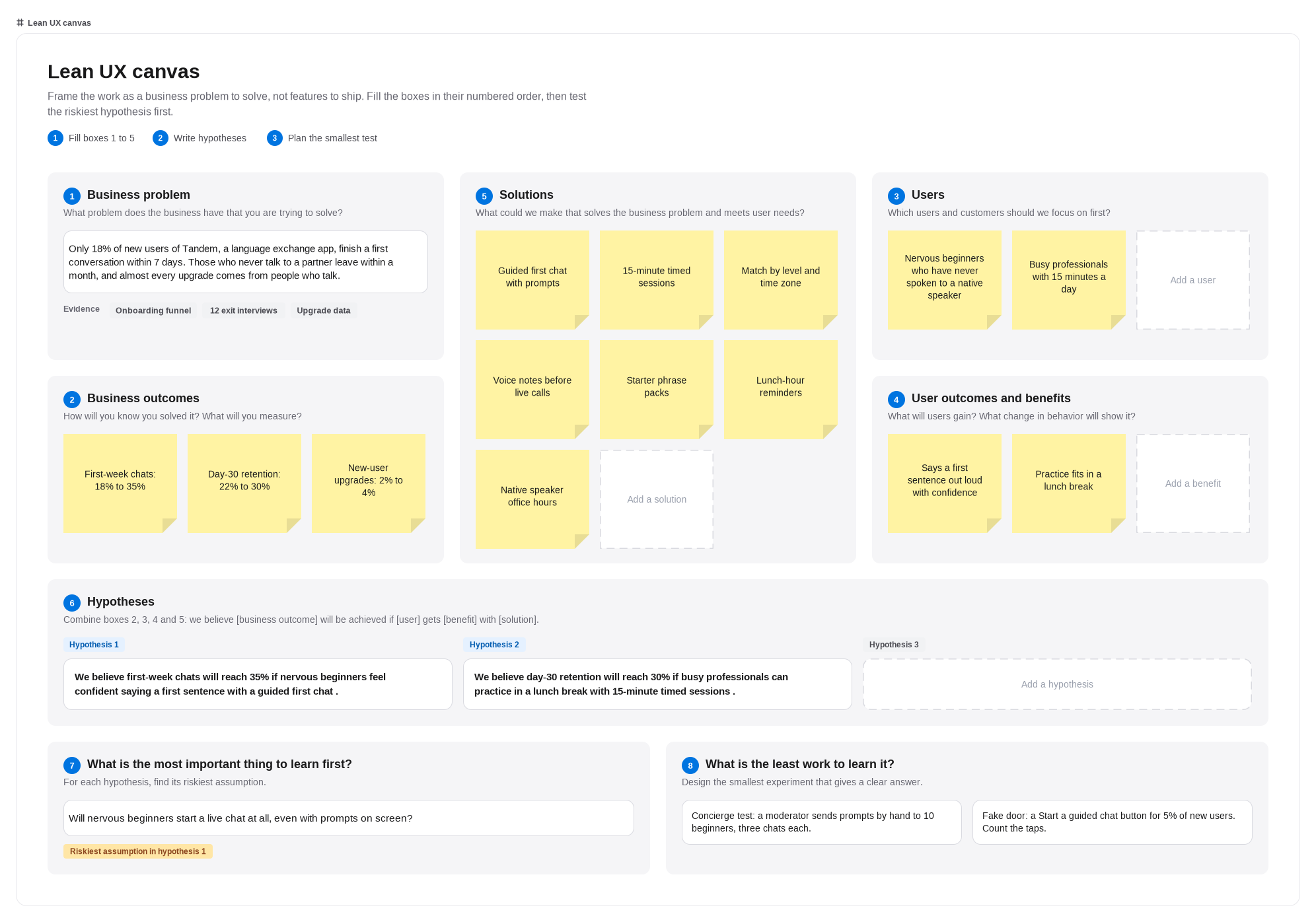
The template has eight numbered boxes. The numbers are the order you fill them in, which is not the order they sit on the board: boxes 1 and 2 are on the left, 3 and 4 on the right, and 5 in the middle. Boxes 6, 7 and 8 run along the bottom. The example is a language exchange app with an onboarding problem.
Boxes 1 and 2: the business problem and its outcomes
Box 1, Business problem, asks what problem the business has. The example states it with numbers: only 18% of new users finish a first conversation within 7 days, those who never talk to a partner leave within a month, and almost every upgrade comes from people who talk. An Evidence line under it lists the sources: the onboarding funnel, 12 exit interviews and upgrade data.
Box 2, Business outcomes, asks how you will know you solved it. Each sticky note is a measure with a start and a target: first-week chats from 18% to 35%, day-30 retention from 22% to 30%, new-user upgrades from 2% to 4%. An outcome written as “from X to Y” leaves no room to argue later about whether the work succeeded.
Boxes 3, 4 and 5: users, benefits and solutions
Now jump to the right side. Box 3, Users, names who to focus on first: nervous beginners who have never spoken to a native speaker, and busy professionals with 15 minutes a day. Box 4, User outcomes and benefits, says what each would gain: saying a first sentence out loud with confidence, and practice that fits in a lunch break.
Only then comes the middle. Box 5, Solutions, is the largest box and the one teams want to fill first. It holds seven ideas, among them a guided first chat with prompts, 15-minute timed sessions, voice notes before live calls and starter phrase packs. Solutions are numbered fifth for a reason. Ideas written after the users and their benefits are known tend to answer them.
Box 6: hypotheses
Box 6 joins the earlier boxes into testable sentences. The pattern is printed in the box: we believe [business outcome] will be achieved if [user] gets [benefit] with [solution]. Each slot comes from one of boxes 2, 3, 4 and 5.
The first example reads: “We believe first-week chats will reach 35% if nervous beginners feel confident saying a first sentence with a guided first chat.” The second connects day-30 retention, busy professionals, a lunch break and 15-minute timed sessions. If you cannot complete the sentence for a solution, it has no user or no outcome, and it should leave box 5.
Box 7: the riskiest assumption
Box 7 asks: what is the most important thing to learn first? For each hypothesis you look for the assumption that would sink it if false. For hypothesis 1 the example writes: “Will nervous beginners start a live chat at all, even with prompts on screen?”
That is a good riskiest assumption, because everything else depends on it. Prompts cannot build confidence in someone who never opens the chat. It is also phrased as a question with a yes or no answer, which is what the next box needs.
Box 8: the least work to learn it
Box 8 asks for the smallest experiment that gives a clear answer. The example offers two, and neither involves building the feature.
- A concierge test: a moderator sends prompts by hand to 10 beginners, three chats each.
- A fake door: a “Start a guided chat” button shown to 5% of new users, and a count of the taps.
Both name a sample and what to observe. Before running one, agree on the result that would make you drop the hypothesis. Without that line, any result looks like encouragement.
How to use the Lean UX canvas template
- Open it as a new board. Use this template gives you a copy with the language app example in all eight boxes.
- Fill boxes 1 to 5. Work in number order with product, design and engineering together. Put evidence under the problem before anything else.
- Write hypotheses. Build one sentence per promising solution in box 6, using the printed pattern.
- Plan the smallest test. Pick the riskiest assumption for box 7 and an experiment for box 8 that fits in days, not months.
Return to the board when results come in. Update the numbers in box 2 and replace the hypothesis you have just tested.
When to use this canvas, and when not to
Use it at the start of an initiative, at a quarterly reset, or whenever a team has been handed a feature and nobody can say what it is for. It suits work where the answer is uncertain.
It is not a business plan. For the model behind a new venture, start with a lean canvas. If you have many assumptions and need to sort them by risk before picking one, use assumption mapping. And once a test is chosen, an A/B test plan records the details of running it.
Questions about the Lean UX canvas template
Why are the boxes numbered out of order?
The numbers set the sequence for filling them in: problem, outcomes, users, benefits, and only then solutions. Solutions sit in the center of the board but come fifth, so that ideas respond to a problem and a user instead of arriving first and looking for a reason.
What is the difference between a business outcome and a user outcome?
A business outcome is a change in a number the company tracks, such as retention rising from 22% to 30%. A user outcome is a change in what a person can do or feel, such as saying a first sentence with confidence. A hypothesis claims that the second causes the first.
How long does it take to fill in a Lean UX canvas?
A first pass fits in a workshop of a couple of hours if the evidence for box 1 is gathered beforehand. Expect the canvas to change afterward. It is meant to be revisited each time an experiment ends, not completed once and filed.
What is the difference between the Lean UX canvas and the lean canvas?
They share a name and little else. The lean canvas describes a business model: customers, problem, channels, revenue and costs. The Lean UX canvas describes one piece of product work and ends in hypotheses and an experiment. A startup may use both, the first for the company and the second for each initiative.