What is a lotus blossom diagram?
A lotus blossom diagram spreads one theme into 64 ideas in two moves. First you surround the theme with eight sub-themes. Then each sub-theme becomes the center of a grid of its own and gets eight ideas around it. The picture opens outward like petals, which is where the name comes from.
The fixed number is what makes it work. A blank page lets a group stop at ten ideas. Eight empty cells around every sub-theme keep asking for more. This template has the nine grids, a panel for the theme, a five-step guide, a progress count and a column for the ideas worth doing. In the example, the green team at Hillside High works on the theme “Greener campus”.
The theme and its eight sub-themes
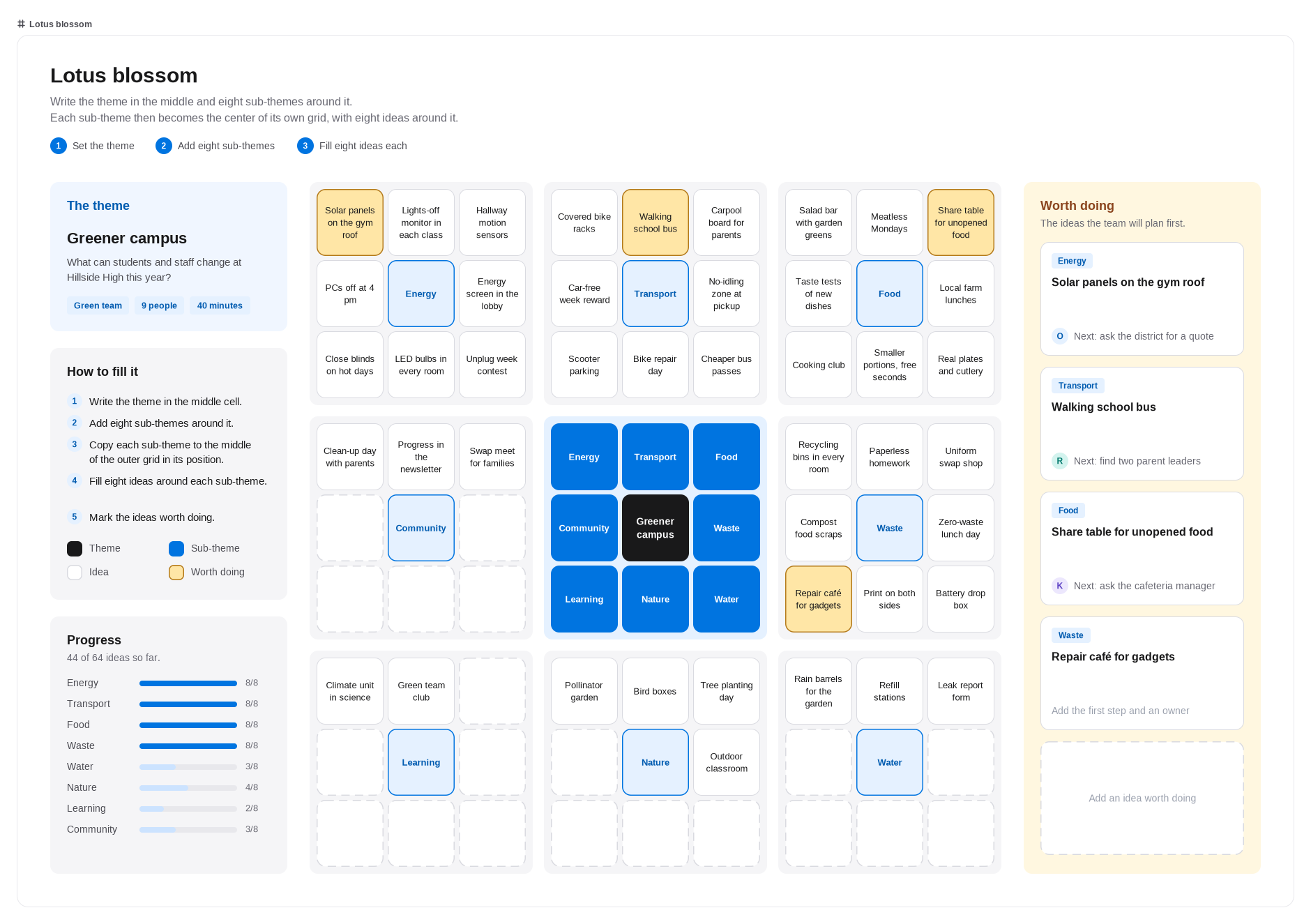
The middle grid is where the session starts. Its center cell holds the theme, “Greener campus”, and the eight cells around it hold the sub-themes: Energy, Transport, Food, Waste, Water, Nature, Learning and Community.
Good sub-themes split the theme without overlapping. Here each one is a different part of school life, so an idea has one obvious home. The panel at the top left narrows the theme further with a question, “What can students and staff change at Hillside High this year?”, and notes who is in the room: the green team, 9 people, 40 minutes.
That question does real work. “This year” and “students and staff” rule out a new building or a change in district policy, which keeps the 64 cells for things the team can actually do.
Eight outer grids, eight ideas each
Every sub-theme is copied to the center of the outer grid that sits in the same position. Energy is the top-left cell of the middle grid, so the Energy grid is the top-left grid. Transport is above the theme, so its grid is the top one.
Around each copied sub-theme go eight ideas. The Energy grid in the example is full: solar panels on the gym roof, a lights-off monitor in each class, hallway motion sensors, an energy screen in the lobby, an unplug week contest, LED bulbs in every room, closing blinds on hot days and PCs off at 4 pm. Transport is full as well, from covered bike racks to a no-idling zone at pickup.
Look at the range inside one grid. Some ideas cost money (solar panels), some cost nothing (close the blinds), and some are habits (PCs off at 4 pm). Eight cells are enough to force that variety.
Push past the easy grids
The progress panel reads “44 of 64 ideas so far” and lists each sub-theme with a bar. Energy, Transport, Food and Waste stand at 8/8. Water has 3/8, Nature 4/8, Learning 2/8 and Community 3/8.
That pattern is typical. A team fills the grids it knows best and slows down on the rest. The slow grids are where the session earns its time. The Water grid has rain barrels for the garden, refill stations and a leak report form, then five blank cells. Asking “what else uses water here?” (the sports field, the labs, the kitchen) is how the next cells get filled.
Do not pad a grid to reach eight. A cell is better left empty than filled with a repeat of its neighbor.
Mark what is worth doing
Sixty-four ideas are a list, not a plan. The last step of the guide is “Mark the ideas worth doing”, and the column on the right collects them, one card each, labelled with its sub-theme:
- Energy: Solar panels on the gym roof. Next: ask the district for a quote.
- Transport: Walking school bus. Next: find two parent leaders.
- Food: Share table for unopened food. Next: ask the cafeteria manager.
- Waste: Repair café for gadgets. This card still says “Add the first step and an owner”.
Each next step is small and has a person's initial beside it. Picking one idea from each of several sub-themes, as the team did, spreads the work across the school instead of loading it all on one group.
How to use the lotus blossom template
- Open it as a new board. It has 184 elements, more than the 150 a Free board holds, so it needs the Pro or Team plan.
- Set the theme. Type it into the center cell of the middle grid and write the question behind it in the panel at the top left.
- Add eight sub-themes. Fill the cells around the theme, then copy each one to the middle of the outer grid in the same position.
- Fill eight ideas each. Work one grid at a time, three to four minutes a grid, and update the progress count as you go.
- Mark the ideas worth doing. Copy four or five into the right column with a first step and an owner.
When a lotus blossom fits, and when it is too much
Choose it for broad themes that need covering from every side: a yearly plan, a campaign, a course, a product area. It suits groups that tend to stop early, because the empty cells are hard to ignore.
For a narrow question, 64 cells are too many and a brainstorm session will do. If your topic branches unevenly, with two ideas in one place and twenty in another, a mind map bends to it where a fixed grid cannot. And if the aim is to rework one existing product, the seven prompts of SCAMPER give more direction than sub-themes do.
Questions about the Lotus blossom template
Do we have to fill all 64 cells?
No. The count is there to keep the group going, not to be obeyed. The example stops at 44 of 64 with four grids complete. Fill what you can in the time you set, then look hardest at the grids that stayed thin.
How do you choose the eight sub-themes?
Split the theme into parts that do not overlap: places, audiences, stages of a process or kinds of resource. If you can only find five, the theme may be too narrow for this method. If you find twelve, merge the closest ones.
How long does a lotus blossom session take?
The school team in the example set aside 40 minutes for nine people. Allow about five minutes for the sub-themes, three to four minutes for each outer grid and five minutes at the end to mark what is worth doing.
Which plan do I need for this template?
The Pro or Team plan. The board holds 184 elements and a board on the Free plan can hold 150. On Pro one person edits and others can view and comment; on Team several people can fill grids at the same time.