What is SCAMPER?
SCAMPER is a checklist of seven prompts for improving something that already exists. The letters stand for Substitute, Combine, Adapt, Modify, Put to another use, Eliminate and Reverse. The educator Bob Eberle arranged the list into its well-known acronym. Each prompt asks you to change the product in one specific way and see what falls out.
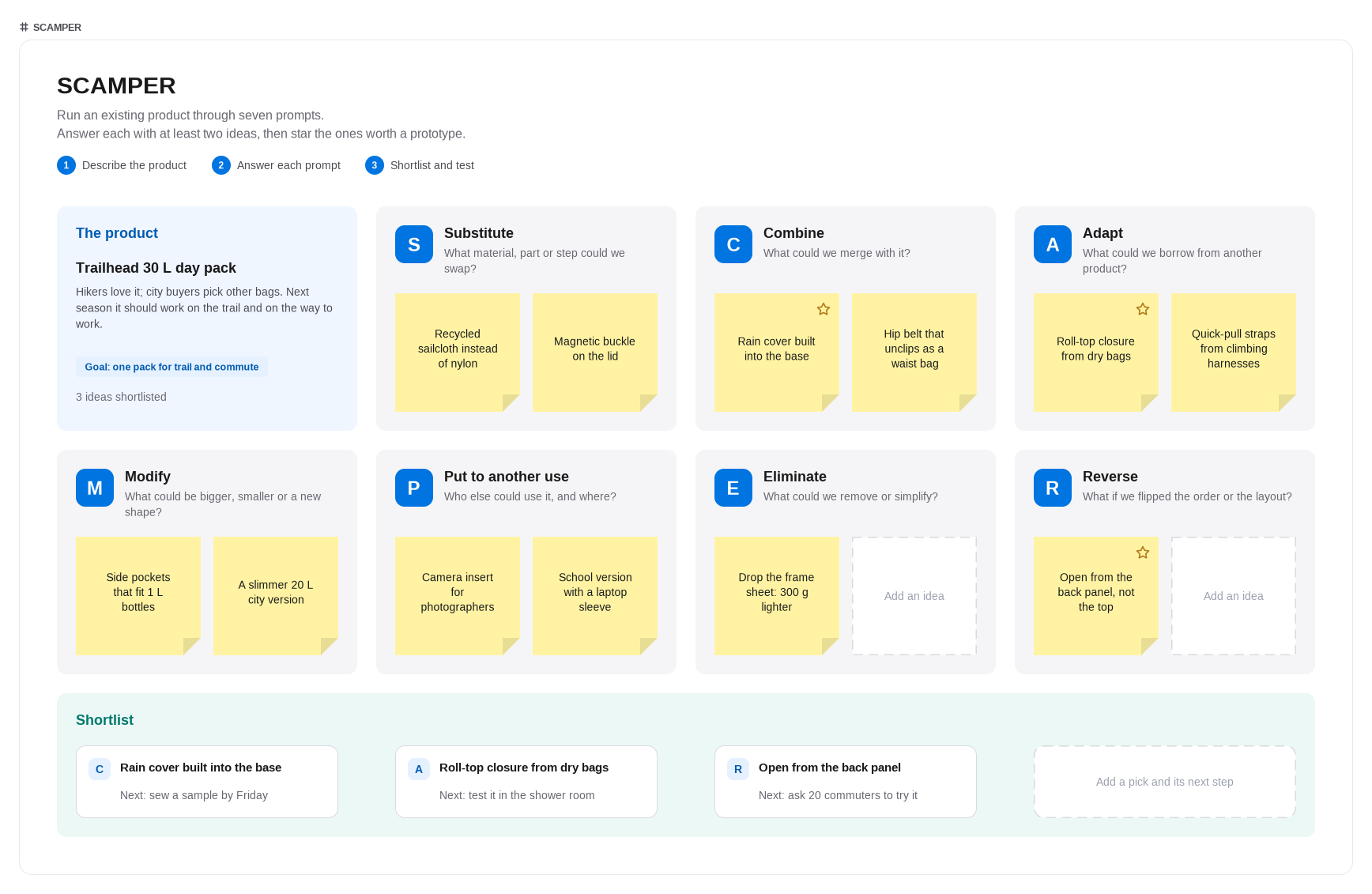
It helps most when a team knows its product too well to see it fresh. This template is a grid of eight cards: one describes the product and seven carry the prompts. A shortlist runs along the bottom. The product in the example is the Trailhead 30 L day pack.
Describe the product first
The first card is not a prompt. It holds the product and the reason for the session: “Hikers love it; city buyers pick other bags. Next season it should work on the trail and on the way to work.” Under that sits the goal in one line, “one pack for trail and commute”.
This card is what stops SCAMPER from turning into a list of random changes. With the goal in view, every answer can be asked one more question: does this help a commuter without losing the hiker? A prompt answered without a goal gives you novelty. Answered with one, it gives you a candidate.
Substitute, Combine, Adapt
The first three prompts change what the product is made of and what it borrows.
- Substitute. “What material, part or step could we swap?” The team wrote recycled sailcloth instead of nylon, and a magnetic buckle on the lid.
- Combine. “What could we merge with it?” A rain cover built into the base, and a hip belt that unclips as a waist bag.
- Adapt. “What could we borrow from another product?” A roll-top closure from dry bags, and quick-pull straps from climbing harnesses.
Adapt is the prompt that most rewards looking outside your own category. Both of its notes name the product they borrow from, which makes the idea easy to picture and easy to test.
Modify, Put to another use, Eliminate, Reverse
The second row changes size, audience and structure.
- Modify. “What could be bigger, smaller or a new shape?” Side pockets that fit 1 L bottles, and a slimmer 20 L city version.
- Put to another use. “Who else could use it, and where?” A camera insert for photographers, and a school version with a laptop sleeve.
- Eliminate. “What could we remove or simplify?” Drop the frame sheet and the pack is 300 g lighter.
- Reverse. “What if we flipped the order or the layout?” Open from the back panel, not the top.
Eliminate and Reverse have one note each and a dashed “Add an idea” card. Those two prompts are the hardest, because they ask you to undo decisions the team once made on purpose. They can also pay well: the Eliminate note comes with a saving you can weigh, 300 g.
Shortlist what is worth a prototype
Twelve notes went onto the cards, and three made the shortlist. Each shortlisted idea keeps the letter of the prompt it came from and gains a next step:
- C: Rain cover built into the base. Next: sew a sample by Friday.
- A: Roll-top closure from dry bags. Next: test it in the shower room.
- R: Open from the back panel. Next: ask 20 commuters to try it.
All three serve the goal on the product card. A rain cover and a roll-top help on a wet ride to work as much as on a trail, and a pack that opens from the back suits a desk as well as a campsite. The next steps are cheap and quick: a sample, a shower, twenty people. The fourth slot is still open.
How to use the SCAMPER template
- Open it as a new board. Rewrite the product card: the name, who buys it now and the one-line goal.
- Answer each prompt. Take the seven cards in order, four minutes each, and aim for at least two notes a card. Skip none, even if a prompt seems not to apply.
- Test every note against the goal. Delete the ones that change the product without serving it.
- Shortlist and test. Move up to four ideas into the bottom row and write a next step that fits inside a week.
The method works on services and processes too. Put “our onboarding call” on the product card and the same seven questions apply.
When SCAMPER fits, and when to start elsewhere
SCAMPER needs something to work on. Use it for a product, a service, a page or a process that exists and has gone stale, or to stretch the winning idea from an earlier session.
With nothing on the table yet, begin with a brainstorm session. If the product breaks down into independent parts, each with several options, a morphological matrix combines them more systematically than seven prompts can. To study one candidate from several attitudes before you commit, lay it out under the six thinking hats.
Questions about the SCAMPER template
What do the letters in SCAMPER stand for?
Substitute, Combine, Adapt, Modify, Put to another use, Eliminate and Reverse. Some versions read M as Magnify or Minify and R as Rearrange. The template uses Modify and Reverse, and its question lines cover both readings.
Do I have to answer the prompts in order?
No, but going in order makes sure none is skipped. If the group stalls on one, leave a blank card and return to it. Eliminate and Reverse are worth the extra minutes, since few teams question what they built on purpose.
Can SCAMPER be used alone?
Yes. The seven questions do the job a group normally does, which is to push you off your first thought. Give each card a few minutes and write two notes before moving on. Show the shortlist to someone else before you build anything.
Is the SCAMPER template free to use?
Yes. It has 75 elements, well inside the 150 that a board on the Free plan can hold. Every card and note can be edited, and the finished board exports as PNG, SVG, PDF or JSON.