What is MoSCoW prioritization?
MoSCoW sorts the scope of a release into four groups: must have, should have, could have and won’t have this time. The capital letters spell the name. It is a way to agree, before work starts, on what the release cannot ship without and what gives way if time runs short.
Most MoSCoW boards stop at four lists. This template adds sizes and a capacity check, because a must-have list that does not fit the time is only a wish. The example is version 2.0 of a hiking app.
Start with the facts of the release
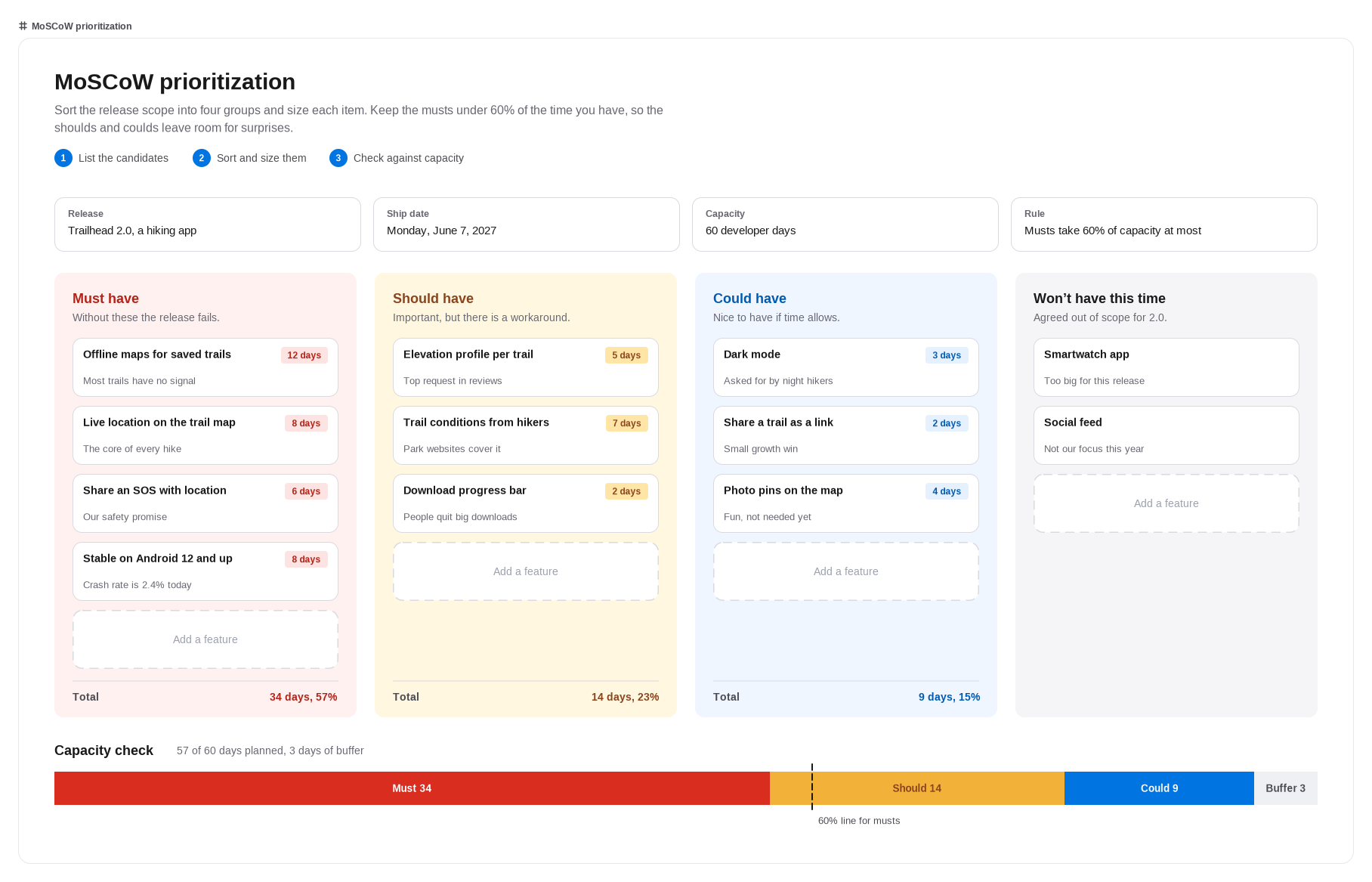
Four cards sit above the columns: the release, the ship date, the capacity and the rule. In the example the release ships on Monday, June 7, 2027, the team has 60 developer days, and the rule reads “Musts take 60% of capacity at most”.
Fill these in first. Without a date and a number of days, every feature looks like a must. The 60% rule is what leaves room for the surprises every release has.
Must have and should have
The Must have column carries the line “Without these the release fails.” It holds four items, each with a reason under it and a size beside it. “Offline maps for saved trails” is there because most trails have no signal, and it costs 12 days. “Share an SOS with location” is the app’s safety promise, at 6 days.
Should have means important, but there is a workaround. “Trail conditions from hikers” takes 7 days and its reason is honest: park websites cover it. That one line is why it is a should and not a must.
Could have and won’t have this time
Could have items are nice to have if time allows: dark mode at 3 days, sharing a trail as a link at 2 days, photo pins on the map at 4 days. They are the first to go when a must runs late, and everyone knows it in advance.
The fourth column matters as much as the first. “Won’t have this time” records what was agreed out of scope for 2.0: a smartwatch app, too big for this release, and a social feed, not the focus this year. Writing these down stops them from coming back in week three.
Check the plan against capacity
Each column ends with a total. The musts add up to 34 days, which is 57% of the 60 available and just under the rule. The shoulds take 14 days, or 23%, and the coulds 9 days, or 15%.
The bar at the bottom shows the same numbers as one strip: Must 34, Should 14, Could 9 and a buffer of 3. A marker shows the 60% line for musts. The summary beside it reads “57 of 60 days planned, 3 days of buffer”. If your must segment crosses the line, something has to move to the next column.
How to use the MoSCoW prioritization template
- Open the template as a board of your own. The hiking example stays in place until you overwrite it.
- List the candidates. Fill the four fact cards, then write every feature anyone has asked for, one per card.
- Sort and size them. Place each card in a column, add the reason in one line and an estimate in days. Ask of every must: what happens if we ship without it?
- Check against capacity. Update the totals and the bar. Move items down a column until the musts fit under your rule.
When MoSCoW fits, and when to score instead
MoSCoW works best for a fixed date with a fixed team: a launch, a contract deadline, a conference. It gets a group to agree quickly and gives stakeholders a clear record of what is out.
It does not rank the items inside a column. If you need an ordered list across many ideas, use RICE scoring. To learn which features customers expect and which delight them before you sort, run a Kano model survey. For a fast two-axis sort without estimates, an impact effort matrix is enough.
Questions about the MoSCoW prioritization template
What does MoSCoW stand for?
Must have, Should have, Could have and Won’t have this time. The two letters o are only there to make the word easy to say. Some teams read the W as “wish”, but “won’t have this time” is clearer about the decision.
How much of the capacity should the musts take?
A common rule is 60% at most, which is the rule on this board. The remaining time goes to shoulds and coulds, and those are what you drop if a must takes longer than planned.
What if everything ends up in Must have?
Then the sizes will show it: the must total will exceed the capacity. Go through the column and ask whether the release would truly fail without each item, or whether a workaround exists. If one does, it is a should.
Does a won’t-have item mean never?
No. It means not in this release. The column is a record of what the group agreed to leave out for now, with a reason, so the same items can be reconsidered when the next release is planned.