What is the OAuth 2.0 authorization code flow with PKCE?
OAuth 2.0 lets an app act for a user without ever seeing the user’s password. In the authorization code flow, the user signs in at an authorization server, the app receives a short-lived code, and the app trades that code for tokens. PKCE (Proof Key for Code Exchange) adds a one-time secret that the app makes up for each sign-in, so a stolen code cannot be traded by anyone else.
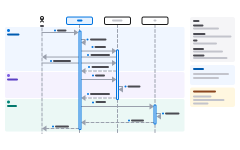
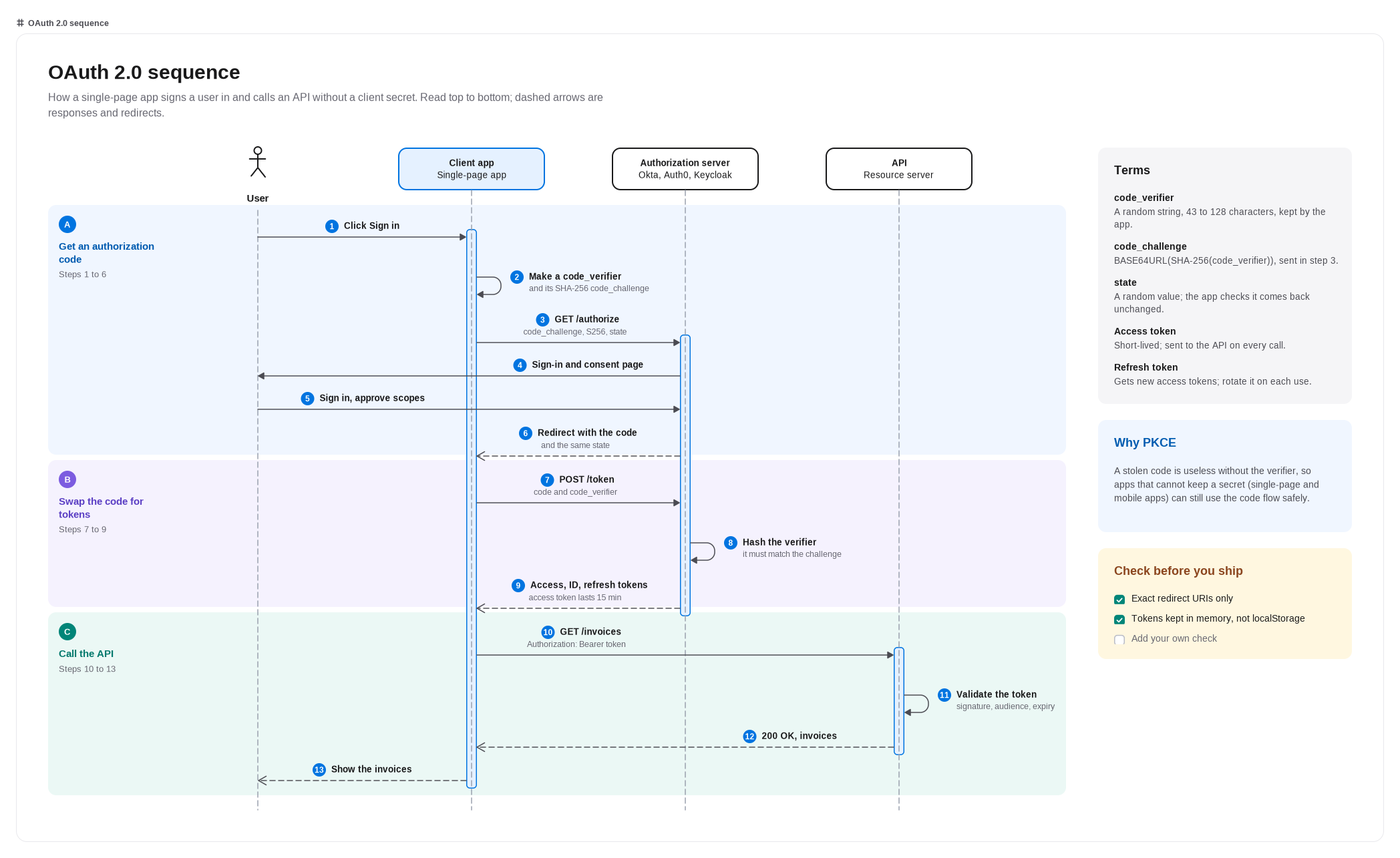
This template draws the whole flow as a sequence diagram with 13 numbered messages. The example is a single-page app that signs a user in and then loads invoices from an API, all without a client secret.
Phase A: get an authorization code
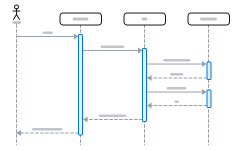
Four participants stand across the top: the User, the Client app (a single-page app), the Authorization server and the API, which OAuth calls the resource server. Time runs down the page. Solid arrows are calls; dashed arrows are responses and redirects.
Phase A covers steps 1 to 6. The user clicks Sign in. In step 2 the app makes a code_verifier and its SHA-256 code_challenge, an arrow that loops back to the app because nothing leaves it yet. Step 3 is GET /authorize with the code_challenge, S256 and state. The server shows its sign-in and consent page, the user signs in and approves scopes, and step 6 redirects back to the app with the code and the same state.
Phase B: swap the code for tokens
Steps 7 to 9 happen between the app and the authorization server, with no user involved. In step 7 the app calls POST /token and sends the code together with the code_verifier it kept from step 2. In step 8 the server hashes the verifier: “it must match the challenge” it received in step 3. Only then does step 9 return the access, ID and refresh tokens.
The note under step 9 gives the example a real number: the access token lasts 15 min. Write your own lifetime there. It is the figure a reviewer will ask about first.
Phase C: call the API
Steps 10 to 13 show what the tokens are for. The app calls GET /invoices with the header “Authorization: Bearer token”. The API does not ask the authorization server about every request. Step 11 is a self-arrow on the API lifeline: it validates the token’s signature, audience and expiry on its own. Step 12 answers 200 OK with the invoices, and step 13 shows them to the user.
The tall bars on each lifeline mark when a participant is busy. The app’s bar runs from step 1 to step 13, the authorization server’s ends after step 9, and the API’s covers only steps 10 to 12.
The terms, and why PKCE works
A sequence diagram of OAuth is hard to read if the words are new, so the board defines five of them next to the drawing:
- code_verifier: a random string, 43 to 128 characters, kept by the app.
- code_challenge: BASE64URL(SHA-256(code_verifier)), sent in step 3.
- state: a random value; the app checks it comes back unchanged.
- Access token: short-lived; sent to the API on every call.
- Refresh token: gets new access tokens; rotate it on each use.
The Why PKCE card states the point in one sentence: a stolen code is useless without the verifier, so apps that cannot keep a secret, single-page and mobile apps, can still use the code flow safely.
How to use the OAuth 2.0 sequence template
- Open it as a new board and rename the participants. Replace “Single-page app” with your client and write your own identity provider under Authorization server.
- Swap the endpoints. Change GET /invoices in step 10 to a real call of your API, and put your scopes into step 5.
- Set the numbers. Replace the 15 min access token lifetime, and add a step after 13 if you want to show the refresh call.
- Finish the checklist. “Check before you ship” starts with two items, exact redirect URIs only and tokens kept in memory, not localStorage. The third line, “Add your own check”, is yours.
If you would rather describe the flow in words first, FlowDraw AI can draw a sequence from a description, and you can correct it against this board.
When to use it, and what to use instead
Use this board in a security review, in the docs of an API that third parties sign in to, or to teach a team why the browser never holds a client secret. It describes one grant only: a server-to-server integration uses client credentials and needs fewer lifelines.
For a flow of your own with different participants, start from the blank sequence diagram template. To design the screens the user sees in steps 4 and 5, use the sign-up and login flow. To look for the ways this flow could be attacked, pair it with a threat model.
Questions about the OAuth 2.0 sequence template
Is PKCE only for mobile and single-page apps?
It was designed for them, because they cannot keep a client secret, and the Why PKCE card on the board says so. Current security guidance recommends PKCE for every client that uses the authorization code flow, including server-side apps, since it also protects against injected codes.
Why does the app send a challenge first and the verifier later?
The challenge in step 3 travels through the browser, where it can be seen. It is only a hash, so it gives nothing away. The verifier is sent in step 7 on a direct call to the token endpoint. Only the app that started the flow knows the value that hashes to the challenge.
What is the state parameter for?
It ties the redirect in step 6 to the request in step 3. The app makes a random value, sends it, and checks that the same value comes back. If it does not match, the response did not come from the sign-in the app started, and the app drops it.
Can I use this template on the Free plan?
Yes. The board has 110 elements, under the 150 a Free board holds, and it is not a Pro template. You can edit every message and export the diagram as PNG, SVG, PDF or JSON for your documentation.