What is a sign-up and login flow?
A sign-up and login flow is a flowchart of how a person becomes a signed-in user. It covers the form they fill in, the checks the system runs, and each place the attempt can fail. Teams draw it before they build authentication, because the forgotten cases, such as an expired link or a locked account, are where security bugs and support tickets come from.
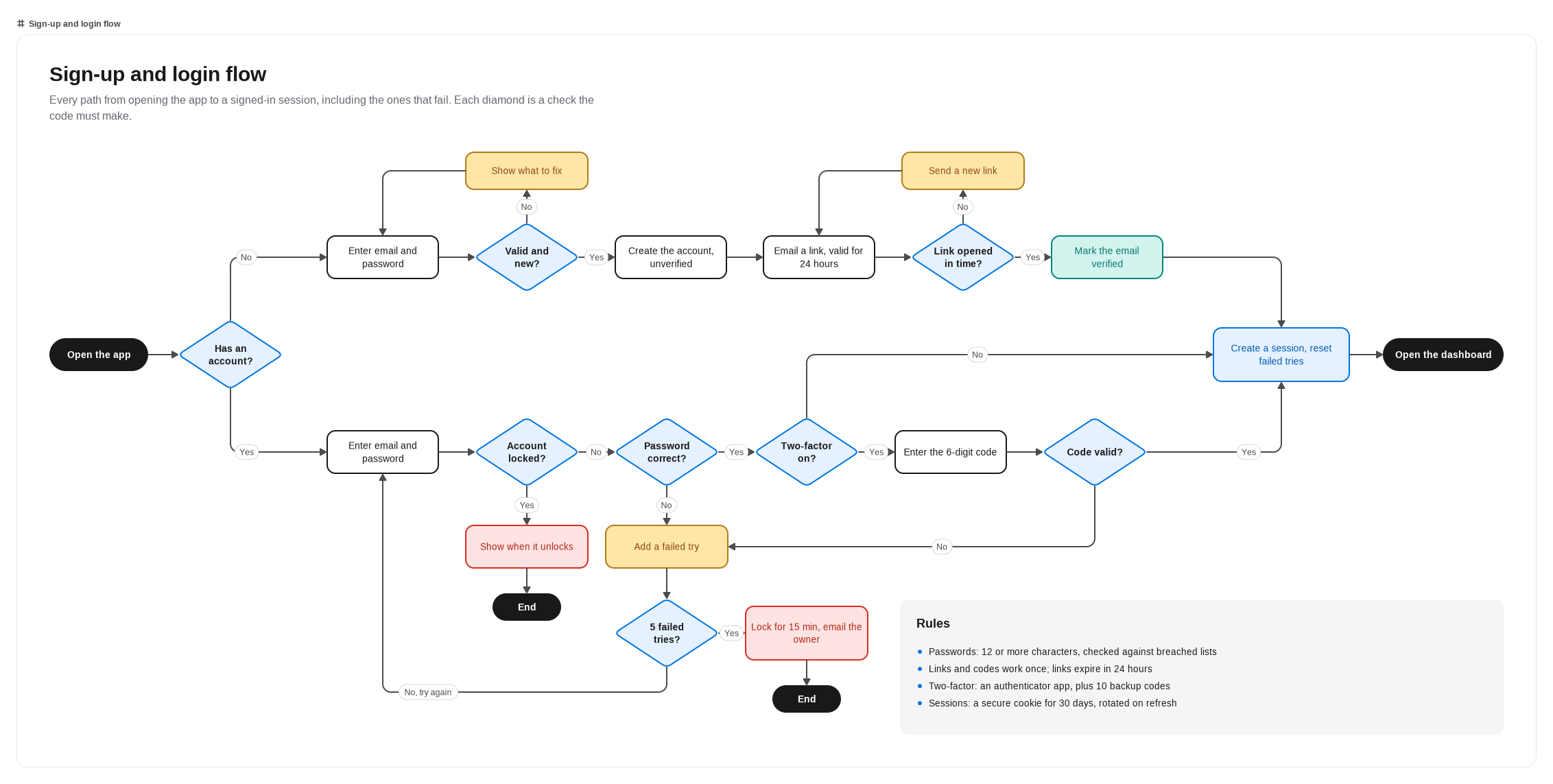
This template draws the complete flow for an app with email and password accounts. Rounded boxes are steps, diamonds are decisions. As the board's own subtitle puts it, each diamond is a check the code must make. A card in the corner lists the rules for passwords, links, codes and sessions.
One entrance, two paths
The flow starts at “Open the app” and meets its first diamond at once: Has an account? “No” leads up to the sign-up path and “Yes” leads down to the login path. Both begin with the same step, “Enter email and password”, which is a reminder that the two forms can share most of their fields and their validation.
After that the paths ask different questions. Sign-up asks “Valid and new?”, meaning the input passes the rules and no account uses that email yet. Login asks “Account locked?” before it even looks at the password, so a locked account cannot be probed further.
The sign-up path and email verification
When the input is valid and new, the system creates the account in an unverified state and emails a link that is valid for 24 hours. The next diamond asks “Link opened in time?”. If yes, the email is marked verified and the flow moves on to create a session.
Two small boxes sit above the path and catch its failures. If the input is not valid, “Show what to fix” sends the person back to the form. If the link expired, “Send a new link” loops back to the email step. Neither failure is a dead end, and neither creates a second account.
Logging in, with or without a second factor
The lower path runs through three diamonds in a row: “Account locked?”, “Password correct?” and “Two-factor on?”. If two-factor is off, a line goes straight to the session. If it is on, the person enters a 6-digit code and a fourth diamond, “Code valid?”, decides.
Both paths end in the same box: Create a session, reset failed tries. The second half of that label is easy to forget in code. Without the reset, a user who mistyped twice last month and twice today would be one slip from a lockout.
Draw the paths that fail
The branch under the login path is the part most flowcharts skip. A wrong password and a wrong code both lead to “Add a failed try”. Then a diamond asks 5 failed tries? If not, the line labelled “No, try again” returns to the form. If so, the account is locked for 15 minutes and the owner gets an email.
A person who arrives while the account is locked sees when it unlocks, and the flow ends. Notice that every “No” on the board goes somewhere. When you adapt the template, check each diamond for two exits. A decision with one exit is a case the code will handle by accident.
How to use the sign-up and login flow template
- Open the template as your own board. All the steps and lines can be edited.
- Match the entry to your product. If you offer sign-in with a social account or a magic link, add a branch after “Has an account?” for each method.
- Set your numbers. Replace 24 hours, 5 failed tries and 15 min with the values your team has agreed on.
- Rewrite the Rules card. It holds four lines: passwords of 12 or more characters checked against breached lists, links and codes that work once, an authenticator app plus 10 backup codes, and a secure cookie for 30 days that is rotated on refresh.
- Walk it with a developer and a tester. Each diamond becomes at least two test cases.
Need a variant, such as password reset? Describe it to the AI flowchart tool and paste the result beside this flow.
When this flow is the right drawing
Use it when you plan authentication for a new product, review an existing one for gaps, or brief a tester on what to cover. Product, design, engineering and security can all read it without learning a notation.
It shows decisions, not messages between systems. If you add sign-in through an identity provider, pair it with the OAuth 2.0 sequence, which shows the redirects and tokens. To design the screens the person sees along the way, use a user flow, and to judge what an attacker could do at each step, a threat model.
Questions about the Sign-up and login flow template
Should the login form say whether the email or the password was wrong?
No. Show one message for both, such as “Email or password is incorrect”. Telling a visitor that an email exists lets an attacker collect a list of your users. The flow on the board has a single “Password correct?” check for this reason.
Why lock an account after failed tries?
It slows down guessing. With a lock of 15 minutes after 5 tries, as in the example, an attacker gets a few hundred guesses a day at most. Emailing the owner tells the real user that someone is trying.
Where does password reset fit in this flow?
It is not drawn, to keep the board readable. Add it as a branch from the login form: enter the email, send a one-time link, set a new password, then end every other session. The Rules card already covers how long links last.
Is this template free to use?
Yes. It has 66 elements, well under the 150 a Free board holds, so there is room to add reset, social sign-in or an invite path without upgrading.