What is a release checklist?
A release checklist is the list of things that must be true before, during and after new software goes to production. It exists because releases fail in boring ways: a backup nobody tested, a support team that was not told, a migration that was never rehearsed. A list read out loud catches what memory does not.
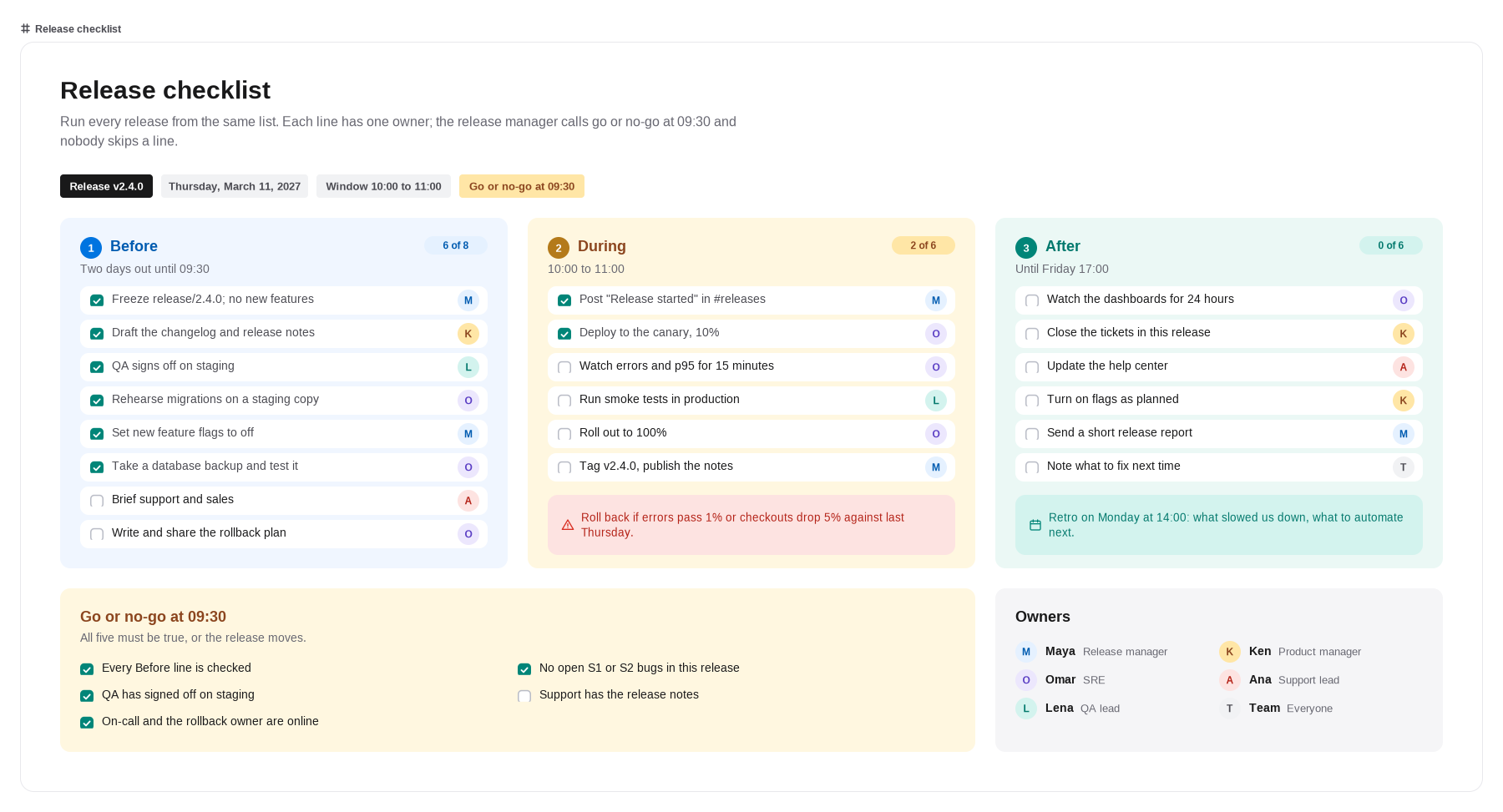
This template is filled in for one release. Chips under the title give its name, v2.4.0, the date, the window from 10:00 to 11:00 and the time of the decision, 09:30. The subtitle sets the discipline: run every release from the same list, each line has one owner, and nobody skips a line.
Before: two days out until 09:30
The first column has eight lines and a counter that reads “6 of 8”. It covers the preparation that makes release day dull:
- Freeze the branch release/2.4.0, with no new features.
- Draft the changelog and release notes.
- QA signs off on staging.
- Rehearse migrations on a staging copy.
- Set new feature flags to off.
- Take a database backup and test it.
- Brief support and sales.
- Write and share the rollback plan.
Two wordings deserve attention. The backup line says “and test it”, because a backup that has never been restored is a hope. And the rollback plan is written and shared before the release, when people are calm.
During: the release window
The middle column is the hour itself, six lines in the order they happen. Post “Release started” in #releases. Deploy to the canary at 10%. Watch errors and p95 for 15 minutes. Run smoke tests in production. Roll out to 100%. Tag v2.4.0 and publish the notes.
Under the list is a red note that turns judgment into a rule: roll back if errors pass 1% or checkouts drop 5% against last Thursday. The comparison with the same weekday is deliberate, since traffic on a Thursday morning does not look like traffic on a Sunday. With a trigger written down, the person watching the dashboard does not have to argue for a rollback. They only have to read a number.
After: until Friday 17:00
A release is not finished when the deploy is. The third column keeps it open for another day: watch the dashboards for 24 hours, close the tickets in this release, update the help center, turn on flags as planned, send a short release report, and note what to fix next time.
The note at the bottom books the follow-up: a retro on Monday at 14:00, on what slowed the team down and what to automate next. That last question is how a checklist gets shorter over time. Any line a script can do should stop being a line a person does.
The go or no-go gate
The wide card under the columns is the decision at 09:30. Its rule is one line: all five must be true, or the release moves. The five conditions are that every Before line is checked, QA has signed off on staging, on-call and the rollback owner are online, there are no open S1 or S2 bugs in this release, and support has the release notes.
“Or the release moves” is the important half. Moving a release by a day costs little. Shipping with a missing condition is how a routine Thursday becomes an incident. The release manager makes the call, and the card makes it a short one.
One owner on every line
At the end of each line is a small circle with a letter. The Owners legend decodes them: M is Maya, the release manager. O is Omar, SRE. L is Lena, the QA lead. K is Ken, the product manager. A is Ana, the support lead. T stands for the team, everyone.
Follow the letters and the release has a shape. Omar owns the migrations, the backup, the rollback plan and every deploy step. Lena owns the sign-off and the smoke tests. Only one line, “Note what to fix next time”, belongs to everyone. A line owned by two people is owned by neither, so keep it to a single initial.
How to use the release checklist template
- Open the template and set the chips at the top: the version, the date, the window and the decision time.
- Replace the owners. Put your team in the legend and change the initial on every line.
- Edit the lines to match your release. Remove steps you have automated and add the ones that have gone wrong for you before.
- Write your rollback triggers. Pick two numbers you already track and the values at which you stop.
- Duplicate the board for each release. Check lines off as they happen and update the counters, so anyone opening the board sees the state at a glance.
When a checklist is enough, and when it is not
Use it for scheduled releases that involve several people: a weekly or monthly version, a database migration, a launch with support and sales in the loop. A team that deploys many times a day through automation needs most of these lines in its pipeline instead.
To design that automation, use the CI/CD pipeline template. To widen one risky feature gradually after the deploy, see the feature flag rollout. To schedule several releases across a quarter, the release plan is the right board.
Questions about the Release checklist template
What should a software release checklist include?
Preparation, such as a code freeze, QA sign-off, a tested backup and a rollback plan. The deploy steps in order, with what to watch. And follow-up: monitoring, closing tickets, updating help pages and a short report. Each line needs one owner.
What is a go or no-go meeting?
A short check just before the release window in which one person, usually the release manager, confirms a fixed list of conditions. If any is false, the release is postponed. On this board it happens at 09:30 for a window that opens at 10:00.
Does this template work on the Free plan?
No. The board has 166 elements and a Free board holds up to 150, so it needs the Pro or Team plan. On Team, several owners can check off their own lines at the same time during the window.
How do I keep a record of past releases?
Keep one board per release, named with the version and date. You can also export the finished checklist as a PDF or PNG and attach it to the release report, which gives auditors a dated record of who did what.