What is a service blueprint?
A service blueprint is a diagram of how a service is delivered. It follows the customer’s steps across the top, and under each step it shows what staff do in front of the customer, what happens out of sight, and which systems make it possible. It is the tool to reach for when a service fails somewhere between teams.
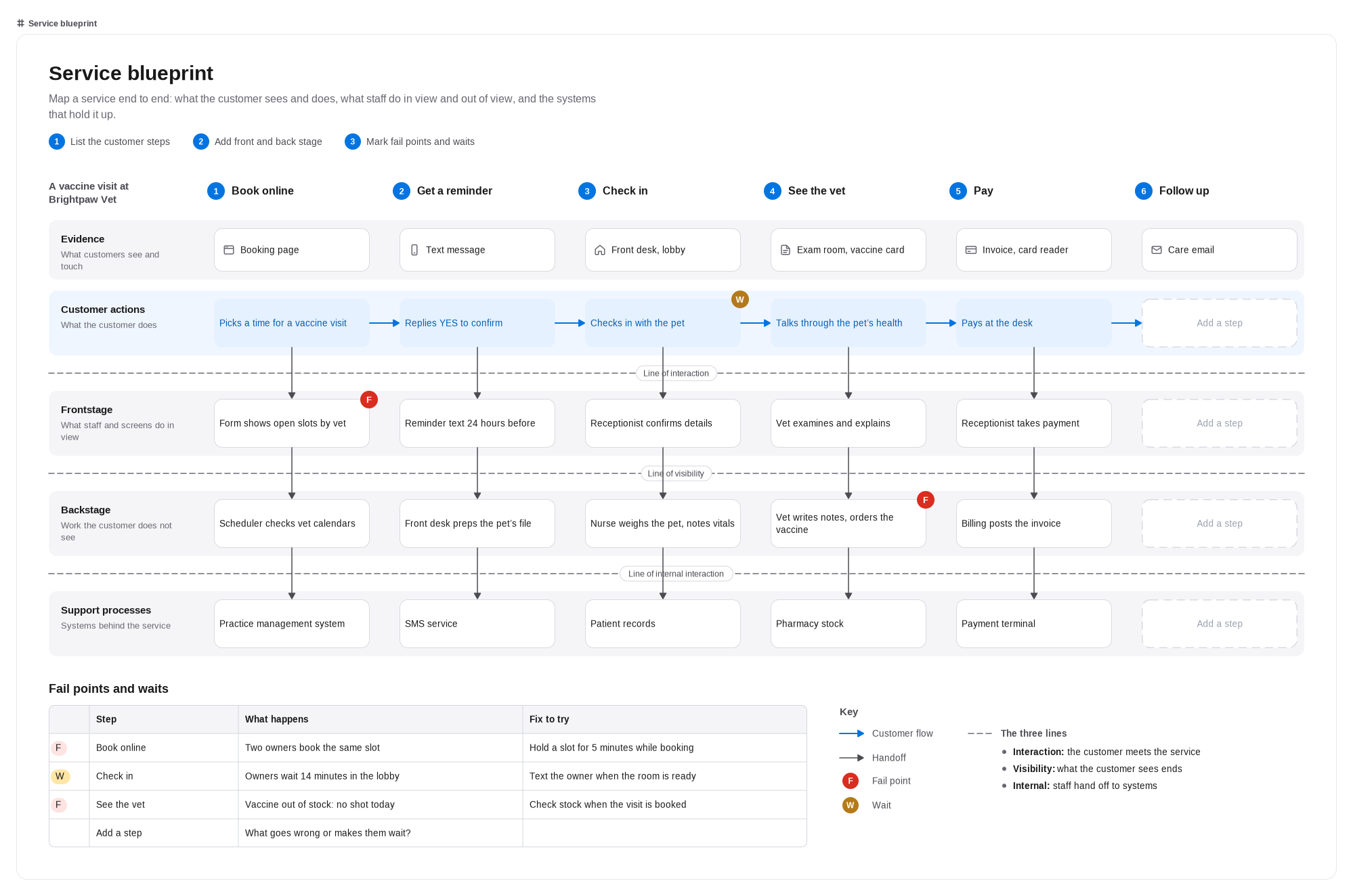
This template maps one visit to a clinic called Brightpaw Vet in six numbered steps: Book online, Get a reminder, Check in, See the vet, Pay and Follow up. Five rows cross those steps, three dashed lines separate the layers, and a table at the bottom lists what goes wrong and what to try.
Steps, evidence and customer actions
The numbered headers name the stages from the customer’s point of view. Under them, the first row is Evidence: what customers see and touch at each stage. For the vet visit that is the booking page, a text message, the front desk and lobby, the exam room and vaccine card, the invoice and card reader, and a care email.
The second row is Customer actions, joined by arrows into one path: the owner picks a time for a vaccine visit, replies YES to confirm, checks in with the pet, talks through the pet’s health and pays at the desk. Write these as plain actions with a verb. They are the spine of the blueprint, and every box below hangs from one of them.
Frontstage, backstage and support
Three more rows sit below, each divided from the one above by a dashed line.
- Under the line of interaction is Frontstage: what staff and screens do in view. A form shows open slots by vet, a reminder text goes out 24 hours before, the receptionist confirms details.
- Under the line of visibility is Backstage: work the customer does not see. A scheduler checks vet calendars, the front desk preps the pet’s file, a nurse weighs the pet and notes vitals.
- Under the line of internal interaction are Support processes, the systems behind the service: the practice management system, an SMS service, patient records, pharmacy stock, the payment terminal.
The lines matter as much as the rows. Each crossing is a handoff, and handoffs are where information gets lost.
Read a column from top to bottom
The value of a blueprint shows when you read one step downward. Take step 4, See the vet. The evidence is the exam room and the vaccine card. The owner talks through the pet’s health. In view, the vet examines and explains. Out of view, the vet writes notes and orders the vaccine. Holding it all up is pharmacy stock.
That chain exposes a risk no single team would see: if stock is wrong, the visit fails in the exam room, in front of the customer. The example marks it with a red F on the backstage box. Step 3, Check in, carries a W on the customer’s action for a wait. Put a marker on the exact box where the trouble starts, which is often lower down than where the customer feels it.
Fail points and waits
Markers alone do not fix anything, so the board ends with a table. Each row takes one marker and gives it a step, a description and a fix to try.
- F, Book online: two owners book the same slot. Fix to try: hold a slot for 5 minutes while booking.
- W, Check in: owners wait 14 minutes in the lobby. Fix to try: text the owner when the room is ready.
- F, See the vet: vaccine out of stock, no shot today. Fix to try: check stock when the visit is booked.
Notice that the third fix happens at step 1, long before the failure would show. A blueprint makes that kind of fix visible. The last table row is blank and asks its own question: what goes wrong or makes them wait?
How to use the service blueprint template
- Open it as a new board. Use this template copies the vet visit to your workspace as a working example.
- List the customer steps. Rename the six headers and the customer actions for your service. Fill the Evidence row as you go.
- Add front and back stage. Work down each column with the people who do the job. A receptionist knows the backstage row better than a manager does.
- Mark fail points and waits. Drag an F or a W onto each trouble spot, using the key at the bottom right, then give it a row in the table.
- Finish the open column. Step 6, Follow up, has only its evidence filled in. Complete it for the example or replace it.
If you have the process written down already, the FlowDraw AI tools can turn a description into a first diagram for you to refine.
When a blueprint is worth making, and when it is too much
Make one when a service involves several roles or systems and problems show up at the joins: clinics, deliveries, support desks, onboarding handled by people. It is also useful before automating a step, to see what that step feeds.
If you only need the customer’s side, with thoughts and feelings, a user journey map is lighter. To study timing and waste in a repeating process, use a value stream map. For a simple view of who does what in sequence, a swimlane diagram is quicker to draw.
Questions about the Service blueprint template
What is the line of visibility?
It is the boundary between what the customer can see and what they cannot. Above it are frontstage actions, like a receptionist confirming details. Below it are backstage actions, like preparing a file. Moving a task across that line, in either direction, is one of the main design choices a blueprint supports.
How is a service blueprint different from a customer journey map?
A journey map stays on the customer’s side and records actions, thoughts and emotions. A blueprint keeps the customer’s actions as its top rows and adds the organization underneath: staff, hidden work and systems. Many teams draw the journey first and then extend its weakest stages into a blueprint.
Who should be in the room when filling it in?
People from every row. For the vet visit that means a receptionist, a nurse, a vet and whoever looks after the booking and billing systems. Each of them knows one layer well and is usually surprised by the others. That surprise is where improvements come from.
Can I map a digital service with this template?
Yes. Replace staff with the parts of the product the customer meets, such as screens, emails and chat, on the frontstage row. Put background jobs, reviews and manual operations backstage, and the platforms they rely on in the support row.