What are SMART goals?
A SMART goal is one that is specific, measurable, achievable, relevant and time-bound. The five words are tests. A goal that passes all of them can be planned, tracked and finished. One that fails any of them tends to drift. The SMART goals page explains the method in more depth.
This template walks one goal through the five tests. It starts with the goal as people first say it, checks it letter by letter, and ends with a single sentence and a list of milestones. The example is Harbor Yoga, a business with two studios.
Start with the goal as people say it
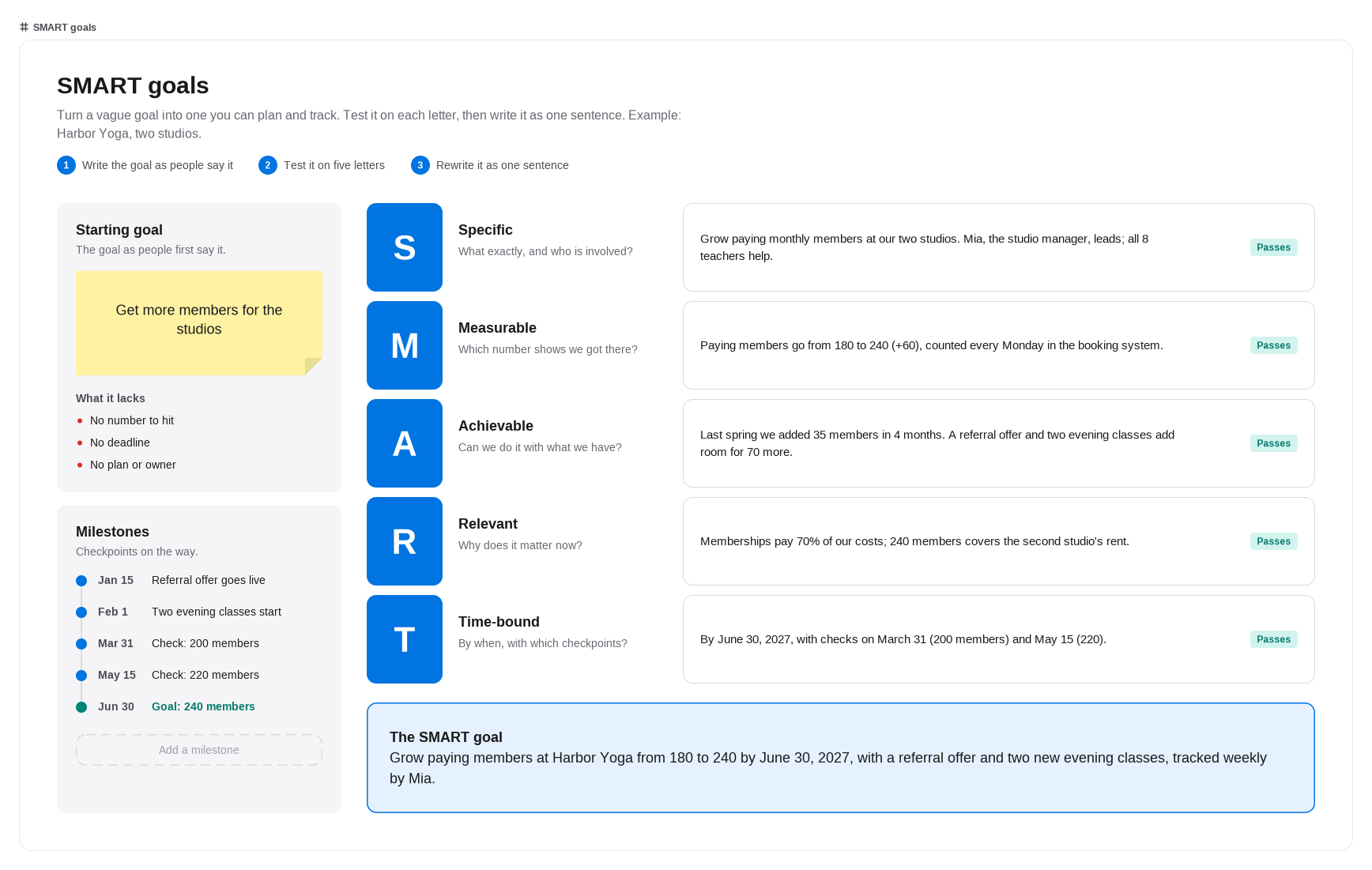
The top-left card holds the raw goal on a sticky note: “Get more members for the studios”. Nothing is wrong with it as a wish. Everyone at Harbor Yoga would agree with it, which is the problem: nobody could say when it has been achieved.
Under the note, a short list titled “What it lacks” names the gaps: “No number to hit”, “No deadline” and “No plan or owner”. Writing the gaps down before fixing them is useful. It shows the team why the five tests are worth ten minutes.
Five tests, one per letter
Each row has a letter, a question and the answer for this goal, with a tag that reads “Passes” once the answer holds up.
- Specific: “What exactly, and who is involved?” Grow paying monthly members at the two studios. Mia, the studio manager, leads, and all 8 teachers help.
- Measurable: “Which number shows we got there?” Paying members go from 180 to 240, counted every Monday in the booking system.
- Achievable: “Can we do it with what we have?” Last spring the studios added 35 members in 4 months. A referral offer and two evening classes add room for 70 more.
- Relevant: “Why does it matter now?” Memberships pay 70% of costs, and 240 members covers the second studio’s rent.
- Time-bound: “By when, with which checkpoints?” By June 30, 2027, with checks on March 31 and May 15.
The Achievable answer is the one teams most often skip. Here it rests on a past result and on two specific changes.
Write the goal as one sentence
The wide card at the bottom joins the five answers: “Grow paying members at Harbor Yoga from 180 to 240 by June 30, 2027, with a referral offer and two new evening classes, tracked weekly by Mia.”
Check it against the starting note. The number, the deadline, the plan and the owner are all there, in under thirty words. Leave the why out of the sentence. It stays in the Relevant row, where anyone who asks can find it.
If your sentence runs past two lines, the goal is probably two goals. Split it and run each through the rows.
Break it into milestones
A deadline months away is easy to ignore until the last few weeks. The Milestones card puts dates in between: “Referral offer goes live” on Jan 15, “Two evening classes start” on Feb 1, then “Check: 200 members” on Mar 31, “Check: 220 members” on May 15 and “Goal: 240 members” on Jun 30.
The first two are actions and the last three are readings of the number. That mix works well. The actions must happen for the number to move, and the checks show early whether they are working. An “Add a milestone” slot at the bottom takes one more.
How to use the SMART goals template
- Open it as a new board. Keep the yoga example until your own rows are written, then delete what is left of it.
- Write the goal as people say it. Put the raw version on the sticky note and list what it lacks.
- Test it on five letters. Answer each row’s question. Mark a row “Passes” only when a colleague would accept the answer.
- Rewrite it as one sentence. Combine the answers in the bottom card, then add dated milestones with at least one check before the deadline.
If you would like a first draft to react to, FlowDraw AI can draft SMART goals from a rough description.
When SMART goals help, and when to use something else
Use the template for one goal that a person or a small team owns: a sales number, a launch date, a hiring plan. It fits yearly reviews and project kickoffs equally well.
It handles one goal at a time. For a set of team goals in a quarter, each with several measures, use OKR planning. If you are unsure how far the current state is from where you want to be, start with a gap analysis. To spread a year’s goals across quarters, use annual planning.
Questions about the SMART goals template
What does SMART stand for?
Specific, measurable, achievable, relevant and time-bound. Some versions use other words for A and R, such as attainable or realistic. The template uses the five above and prints a question under each so the meaning is clear.
What is the difference between achievable and relevant?
Achievable asks whether you can do it with the people, time and money you have. Relevant asks whether it is worth doing now. A goal can be easy and pointless, or important and out of reach. It needs to pass both.
What should I do when a goal fails one of the tests?
Change the goal, not the test. If it is not measurable, find the number. If it is not achievable, lower the number or extend the date until past results support it. Leave the Passes tag off the row until the answer holds.
Is the SMART goals template free?
Yes. It has 73 elements and fits a Free board, and the Free plan includes three boards, so you have room for three goals. Each board can be exported as PNG, SVG or PDF.