What is OKR planning?
OKR stands for objectives and key results. An objective is a short statement of what the team wants to achieve this quarter. Its key results are the numbers that prove the objective was reached. Planning with OKRs means agreeing on a few of each, then checking the numbers every week.
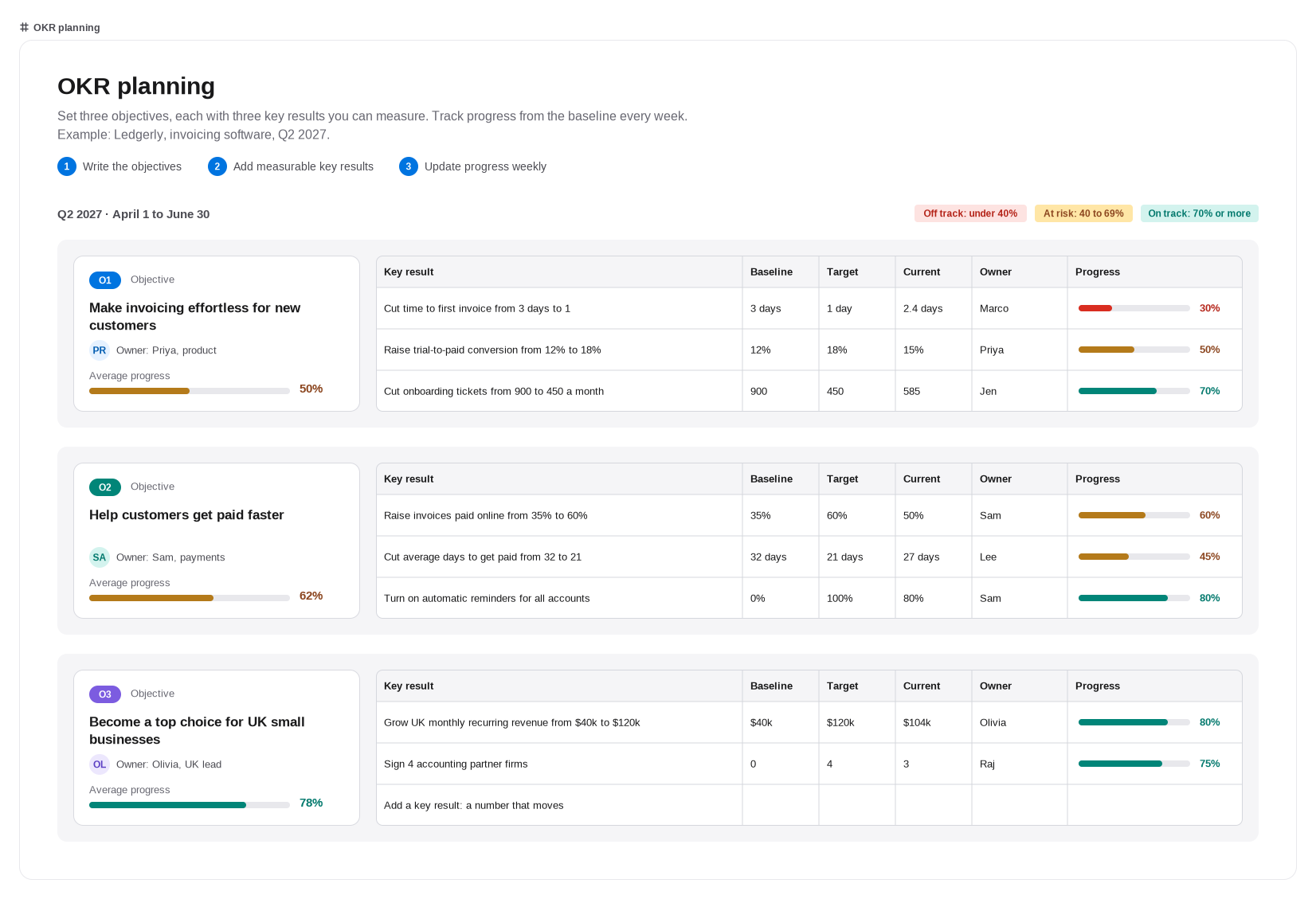
This template holds three objectives, each beside a table of three key results. The example is Ledgerly, a company that makes invoicing software, planning Q2 2027 (April 1 to June 30). Every key result has a baseline, a target, a current value, an owner and a progress bar.
An objective and its key results
Look at the first row. The card on the left is the objective, tagged O1: “Make invoicing effortless for new customers”. It has one owner, Priya from product, and a bar for average progress.
The table on the right lists what “effortless” means in numbers:
- “Cut time to first invoice from 3 days to 1”
- “Raise trial-to-paid conversion from 12% to 18%”
- “Cut onboarding tickets from 900 to 450 a month”
The objective names a direction and the key results set the finish line. None of the three says how the team will get there, which leaves room to change tactics during the quarter without rewriting the plan.
Measure progress from the baseline
Progress on a key result is the share of the distance covered between baseline and target. Take the second objective, “Help customers get paid faster”. Average days to get paid started at 32 with a target of 21 and now stands at 27: five of eleven days gained, so the bar reads 45%.
The objective’s own bar is the average of its key results: 60%, 45% and 80% give 62%. A key above the rows turns the number into a status:
- On track: 70% or more.
- At risk: 40 to 69%.
- Off track: under 40%.
By that key, the time-to-first-invoice result in the first row, at 30%, is the one to talk about in the weekly check.
Write key results that are numbers
The last row of the third table is an empty slot that reads “Add a key result: a number that moves”. That phrase is the test. “Launch in the UK” is a task: it is either done or not. “Grow UK monthly recurring revenue from $40k to $120k” is a key result, because the team can report $104k partway through the quarter and know where it stands.
Use the pattern the example uses: a verb, a metric, a starting value and an end value. “Sign 4 accounting partner firms” starts at 0, so the baseline can go unsaid. Give each key result one owner. In the example, Olivia owns the revenue number and Raj owns the partner firms.
How to use the OKR planning template
- Open it as a new board. Your copy arrives with Ledgerly’s quarter still in the three rows, so you can overwrite it line by line.
- Write the objectives. Set the quarter and its dates above the rows, then replace each objective with one sentence and one owner.
- Add measurable key results. Fill the Key result, Baseline and Target columns first. Leave Current equal to the baseline on day one.
- Update progress weekly. Change the Current values, resize the bars to match and rewrite the percentages. Compare each one with the status key.
Share the board with everyone who owns a key result so they can comment on their row. On the Team plan they can edit it alongside you.
When OKRs help, and when something else fits
OKRs suit a team that has more ideas than time and needs to agree on what matters for the next three months. They work when the results can be counted and checked often.
They are a poor fit for routine work that must simply keep running, and for a plan that is really a list of projects. For the projects themselves, use quarterly planning. If the team has not yet agreed on the one number everything should serve, start with a north star metric. For a single personal or team goal, SMART goals is lighter.
Questions about the OKR planning template
How many objectives and key results should a team set?
The template is built for three objectives with three key results each, and that is a sensible ceiling for one team in one quarter. Fewer is fine. More than nine numbers to watch usually means some of them get ignored after the first few weeks.
What progress counts as a good result?
The board’s key calls 70% or more on track, 40 to 69% at risk and under 40% off track. Many teams set targets they expect to reach only in part, so ending a quarter at 70% is a pass, not a failure.
What is the difference between a key result and a task?
A task is something you do, such as shipping a reminder feature. A key result is what changes because you did it, such as invoices paid online rising from 35% to 60%. If the line cannot have a baseline and a target, it is a task.
Is the OKR planning template free?
Yes. It has 73 elements and fits a Free board, which allows up to 150. One person edits on the Free plan, and anyone you share the board with can view it and comment on a key result.