What is a use case diagram?
A use case diagram shows what a system is for, from the point of view of the people who use it. Stick figures, called actors, stand outside a box. Inside the box are ovals, each naming one goal an actor can reach with the system. Lines join each actor to their goals. How the system does any of it is left out on purpose.
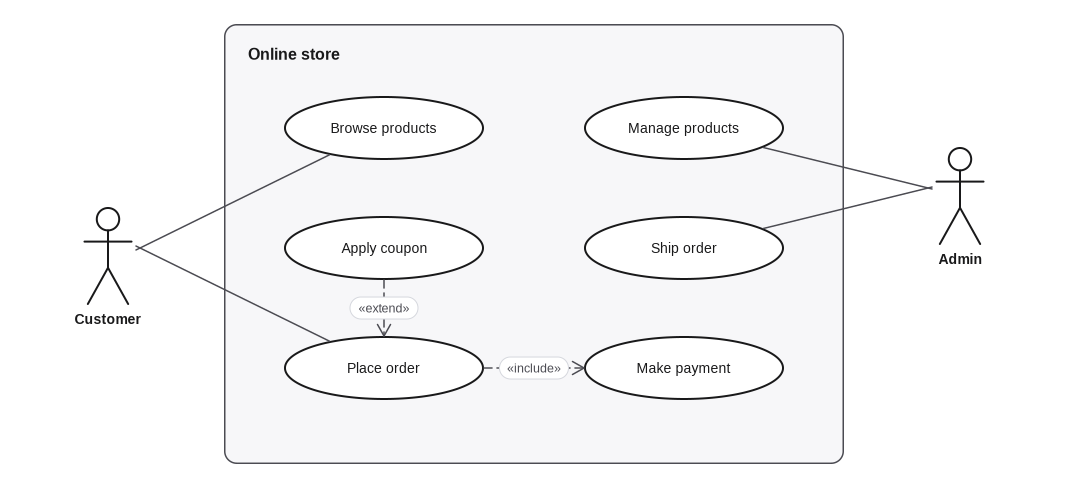
The template models an Online store. A Customer stands on the left and an Admin on the right. Six use cases sit between them, from “Browse products” to “Ship order”. It is a scope statement in picture form: one glance says who the store serves and what it lets them do.
Actors: who uses the system
An actor is a role, not a person. “Customer” covers everyone who shops, whoever they are. The same human being could be a Customer in the morning and an Admin in the afternoon, and the diagram would show them as two figures.
The Customer’s lines lead to “Browse products” and “Place order”. Those are the goals a shopper starts. Nothing joins the Customer to “Make payment” or “Apply coupon” directly, because neither is something a person comes to the store to do for its own sake. They happen as part of placing an order, and the diagram links them to that use case instead.
Place the actors who start things on the left, and those who run or support the system on the right, as the template does.
The system boundary
The large rectangle with Online store in its corner is the system boundary. Everything inside is something the system must do. Everything outside is someone or something it must work with. The actors are always outside.
Drawing the boundary forces useful arguments early. Is “Ship order” really inside the store system, or does a courier’s system do part of it? Is payment handled inside, or by an outside payment service that should appear as a third actor? The template keeps both inside, a reasonable choice for a small shop. If your answer is different, move the oval out and add the actor. That one change can save weeks of confusion about who builds what.
Name each use case as a goal
Every oval reads as a verb and an object: “Apply coupon”, “Place order”, “Ship order”, “Make payment”. Each is a complete thing an actor wants done, and you could finish the sentence “The customer wants to…” or “The admin needs to…” with any of them.
Two of the links between ovals are dashed arrows, and they mean different things:
- Include. Place order always includes Make payment. An order cannot be placed without it.
- Extend. Apply coupon extends Place order. It happens only sometimes, when the shopper has a code.
Use both sparingly. A diagram where every oval includes three others has turned into a flowchart, and steps like “Click button” or “Validate form” are not use cases at all.
How to use the use case template
- Open it as a new board. Use case diagram is a Pro template, so you need the Pro or Team plan.
- Rename the boundary. Replace Online store with the name of the system or the release you are scoping.
- List the actors. Ask who or what will use the system, including other systems. Rename Customer and Admin, and copy a figure for each extra role.
- Write each actor’s goals. Go one actor at a time. The Admin in the example has “Manage products” and “Ship order”. Aim for goals a user would recognize, not features on a menu.
- Connect and prune. Join every actor to the goals they start. An oval with no actor is either part of another use case or out of scope.
When to draw a use case diagram
Draw one at the start of a project, when the question is still “what should this do, and for whom?” It suits a kickoff, a proposal, or a conversation with stakeholders who do not read technical diagrams. The guide on how to draw a use case diagram works through another example.
It says nothing about order or screens. To lay out the steps a person takes through one of the goals, draw a user flow. To show the logic of a use case with its branches, use an activity diagram. And to show the messages between the parts of the system once a goal is under way, move to a sequence diagram.
Questions about the Use case diagram template
What is the difference between include and extend?
Include means the first use case always runs the second as part of itself, like Place order and Make payment. Extend means the second use case adds optional behavior to the first under some condition, like Apply coupon on an order.
Can an actor be another system?
Yes. An actor is anything outside the boundary that interacts with the system: a person in a role, another application, a device or a scheduled job. Draw it as a figure, or as a box if a stick figure would mislead.
How many use cases belong on one diagram?
Enough to show the scope and no more, typically five to fifteen. The template has six. If you pass twenty, split the diagram by actor or by area of the product so each one can still be read at a glance.
Which plan includes the use case diagram template?
It is a Pro template, so it opens on the Pro and Team plans. The board itself is small, 16 elements, and every actor, oval and line on it can be edited after you open it.