What is a Venn diagram?
A Venn diagram compares groups by overlapping circles. Each circle is a set. Whatever belongs to two sets goes where their circles overlap, and whatever belongs to only one stays in the part of its circle that nothing else touches. It is the simplest picture there is of “what do these have in common, and what is unique to each?”
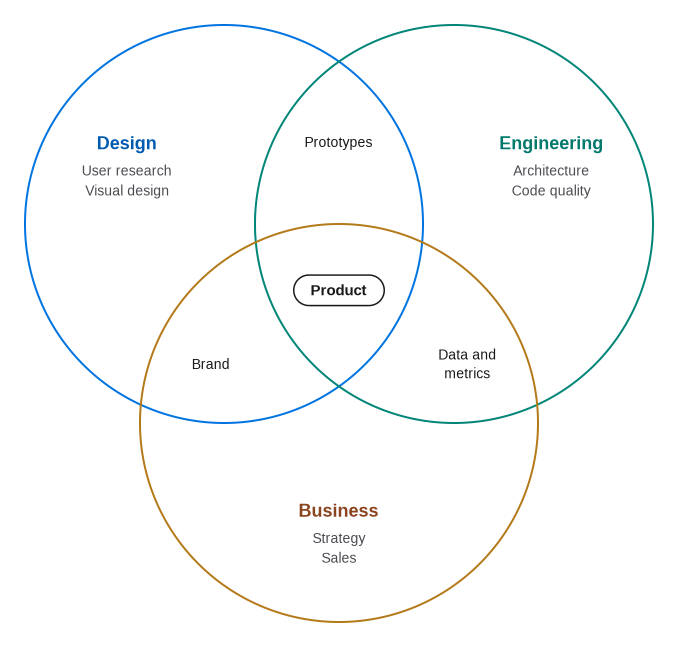
The template uses three circles to answer a question many teams ask: what does it take to make a product? Design, Engineering and Business each bring their own skills, each pair shares something, and Product sits in the middle where all three meet.
Three sets, each with something of its own
Start with the parts of each circle that do not overlap. They hold what belongs to one set only. Engineering lists “Architecture” and “Code quality”. Design lists “User research” and “Visual design”. Business lists “Strategy” and “Sales”.
Two entries per circle is a good amount. The title of the circle is large and the entries under it are small, so the eye takes in the three names first and the details second. If a circle’s own area ends up empty when you fill in your version, look again: a set with nothing unique to it may not be a separate set at all.
The overlaps carry the insight
The three lens-shaped areas between the circles are where a Venn diagram earns its place. In the template:
- Design and Engineering share “Prototypes”. Neither can make one alone.
- Design and Business share “Brand”.
- Engineering and Business share “Data and metrics”.
Each overlap names something that fails when one of its two owners is missing. That is the test for your own entries. If an item would be just as true with one circle removed, it belongs in a single circle, not in the overlap.
The center is the strictest region. It holds only what needs all three. Here it is a single word, Product, and one item is usually right: the center is the conclusion of the diagram.
Put every item in exactly one region
A common mistake is to let text sit across a border, so nobody can tell which region it is in. Look at the lower circle. “Strategy” and “Sales” are well inside Business and nowhere near the other two. “Brand” and “Data and metrics” are each clearly inside one overlap.
When you place an item, ask of each circle in turn: is it in or out? Three yes-or-no answers point to exactly one of the seven regions. If the team cannot agree on an answer, the item is too vague. Split it. “Data” might be Engineering’s alone, while “Data and metrics” that guide decisions is shared with Business.
How to use the Venn diagram template
- Open it as a new board. The product example is ready to overwrite.
- Rename the three circles. Choose sets of the same kind: three teams, three products, three candidates, three books.
- Fill the pairs before the singles. Write what each two have in common first. It is the harder part, and it shows quickly whether the comparison is worth making.
- Add what is unique to each. Two or three short entries per circle, as in the example.
- Name the center last. Once the rest is in place, the thing all three share is usually obvious. If nothing fits, leave it empty and say so; an empty center is a finding.
When a Venn diagram works, and when it does not
Use it to compare two or three things where the overlap is the interesting part: roles on a team, features of competing plans, themes in two texts. The guide to making a Venn diagram has more examples.
Past three sets the regions become too many and too small to read. For four or more options compared on the same points, a comparison table is clearer. For a classroom exercise on two subjects, the compare and contrast template gives more writing room. And if the ideas relate in ways other than “shared or not”, map them in a concept map.
Questions about the Venn diagram template
How many circles can a Venn diagram have?
Two or three circles stay readable. Three circles already create seven regions. Four sets cannot be drawn correctly with circles at all, so for four or more a table is the better choice.
What goes in the middle of a Venn diagram?
Only what belongs to every set. In the template that is one word, Product, the thing Design, Engineering and Business all work on. If you cannot name anything shared by all, leave the center empty.
Can I change the template to two circles?
Yes. Every element on the board can be edited, moved or deleted. Remove one circle with its labels, move the other two so they overlap by about a third, and keep one overlap label.
Is the Venn diagram template free?
Yes. The board has 17 elements and opens on the Free plan. When it is finished you can export it as PNG, SVG or PDF.