What is a class timetable?
A class timetable shows where one class is at every hour of the school week: which subject, which room, and when the breaks fall. Students use it to pack a bag and find a room. Teachers use it to see how the week is balanced.
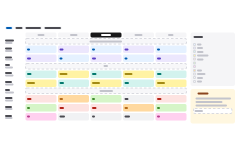
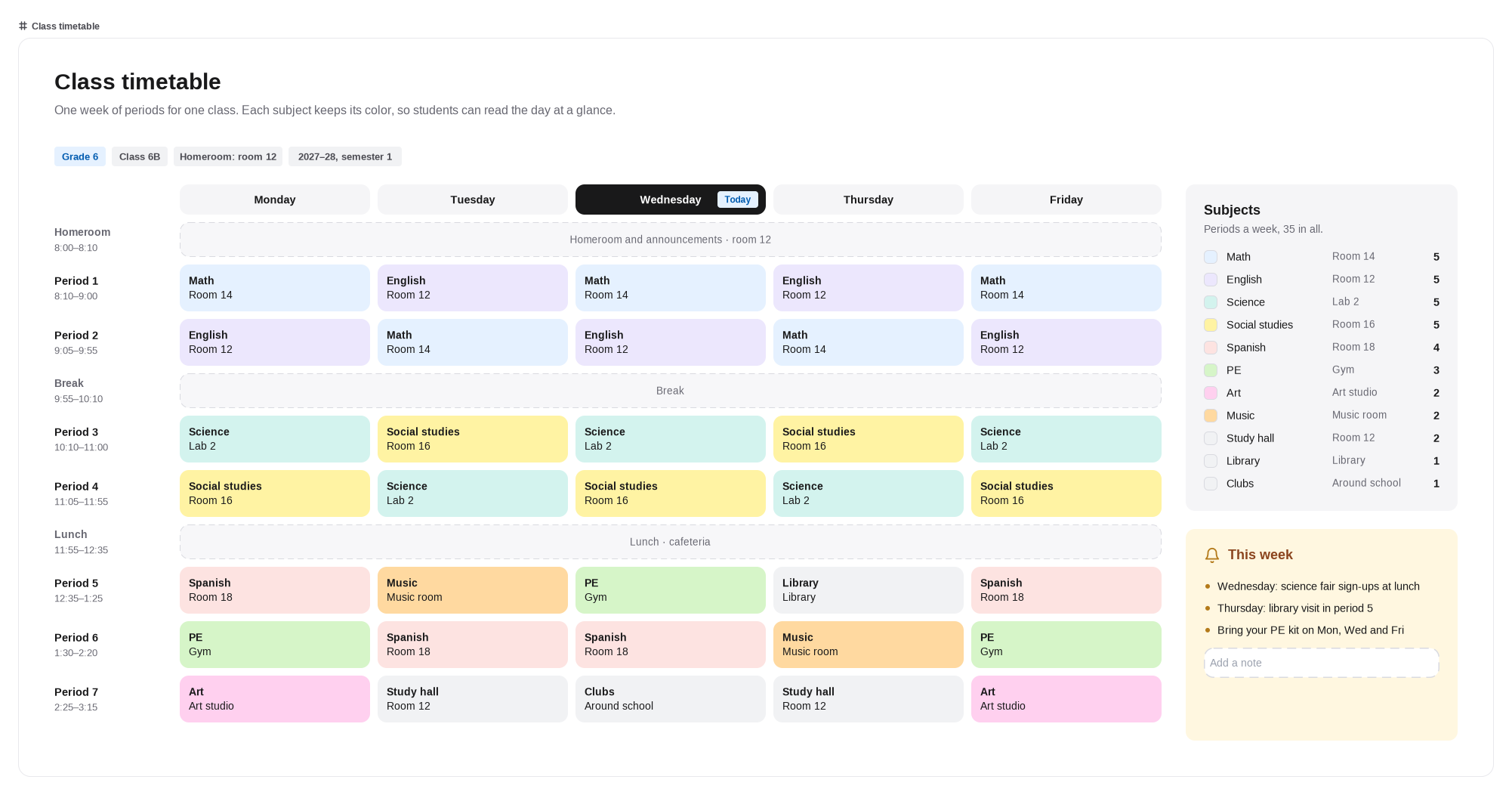
This template is a grid of five days and seven periods, with a key of subjects and a card for the week’s reminders beside it. Chips under the title say whose timetable it is: Grade 6, Class 6B, homeroom in room 12, semester 1. Each subject keeps one color across the grid, so a student can read a day from across the room.
The morning: fixed bands and core subjects
Days run across the top and periods run down the left side, each with its clock time. Period 1 is 8:10 to 9:00, period 2 is 9:05 to 9:55, and so on in 50-minute blocks with five minutes to change rooms.
Some rows are the same every day, so they are drawn as one band across all five columns: “Homeroom and announcements · room 12” from 8:00 to 8:10, “Break” at 9:55, and “Lunch · cafeteria” at 11:55. The bands cut the day into three chunks and are the first thing the eye finds.
Between the bands sit the cells. Each one has two lines: the subject, then the room. In the example the first two periods swap between Math in room 14 and English in room 12. Monday starts with Math, Tuesday with English, and the pattern alternates through Friday, so neither subject always gets the sleepy first slot. The Wednesday header carries a small “Today” tag you can move as the week goes on.
The subject key counts the week
The Subjects card on the right is both a legend and a tally. Every subject has a color square, its room and the number of periods it gets. The line under the heading gives the total: “Periods a week, 35 in all.”, which is seven periods times five days.
In the example Math, English, Science and Social studies have 5 periods each. Spanish has 4, PE has 3, and Art, Music and Study hall have 2. Library and Clubs have 1. If you move cells around in the grid, update these numbers and add them up again. A total that is not 35 means a slot is empty or a subject is counted twice.
The afternoon: where each day differs
After lunch the grid stops repeating. Periods 5 to 7 hold the subjects that meet less often, and no two days look alike. Monday is Spanish, PE and Art. Wednesday is PE, Spanish and Clubs, which the grid places “Around school” instead of in a room. Thursday opens with Library and ends with Study hall in room 12.
When you build your own week, this is the part to check twice:
- Spread active subjects. PE falls on Monday, Wednesday and Friday here, never two days in a row.
- Watch the room column. A class that goes from the Gym to the Art studio needs the change time between periods.
- Keep one color per subject. Recolor a cell when you retype it, or the grid stops being readable at a glance.
How to use the class timetable template
- Open it as a new board. Use this template gives you your own copy of the whole grid. Retype the four chips with your grade, class, homeroom and term.
- Set the bell times. Change the times down the left side first, and rename or remove the Break and Lunch bands to match your school day.
- Fill the key before the grid. List your subjects, rooms and periods a week in the Subjects card. Knowing each count makes the cells quick to place.
- Place the cells. Start with subjects tied to a special room, such as a lab or a gym, then fit the others around them.
- Add this week’s notes. The This week card holds dated reminders, such as “Thursday: library visit in period 5”, and an empty “Add a note” slot for the next one.
When a timetable is the right board
Use it for anything that repeats weekly by the clock: a class’s periods, a teacher’s own teaching load, a room’s bookings. The finished board exports as a PDF or PNG for a classroom wall or a parent email.
This board holds 198 elements, more than the 150 a board on the Free plan can hold, so opening it needs the Pro or Team plan. For lighter planning there are smaller boards: a weekly planner for tasks instead of periods, a study planner for what happens after the last bell, and a lesson plan for the inside of a single period.
Questions about the Class timetable template
How do I add an eighth period or a Saturday?
Select a full row or column of cells, duplicate it and move the copy into place, then retype the period label and time. Update the total in the Subjects card so it matches the new number of slots.
Can I make a timetable for a teacher instead of a class?
Yes. Put the class name where the example has the subject, for instance 6B or 7A, and keep the room on the second line. Free periods can stay as empty cells or become a muted Planning cell.
Does the class timetable template work on the Free plan?
No. The board has 198 elements and a Free board holds up to 150, so this template needs the Pro or Team plan. People you share the finished board with can still view it and comment.
How should I show a week A and week B rotation?
Make the board twice, one copy for each week, and name the week in the chips under the title. Two clean grids are easier for students to read than one grid with split cells.