What is a weekly planner?
A weekly planner is one page that shows what you intend to get done in a week and when you will do it. It differs from a to-do list in one way that matters: it has a clock. A list can grow without limit. A week has forty working hours, and the grid makes you see that.
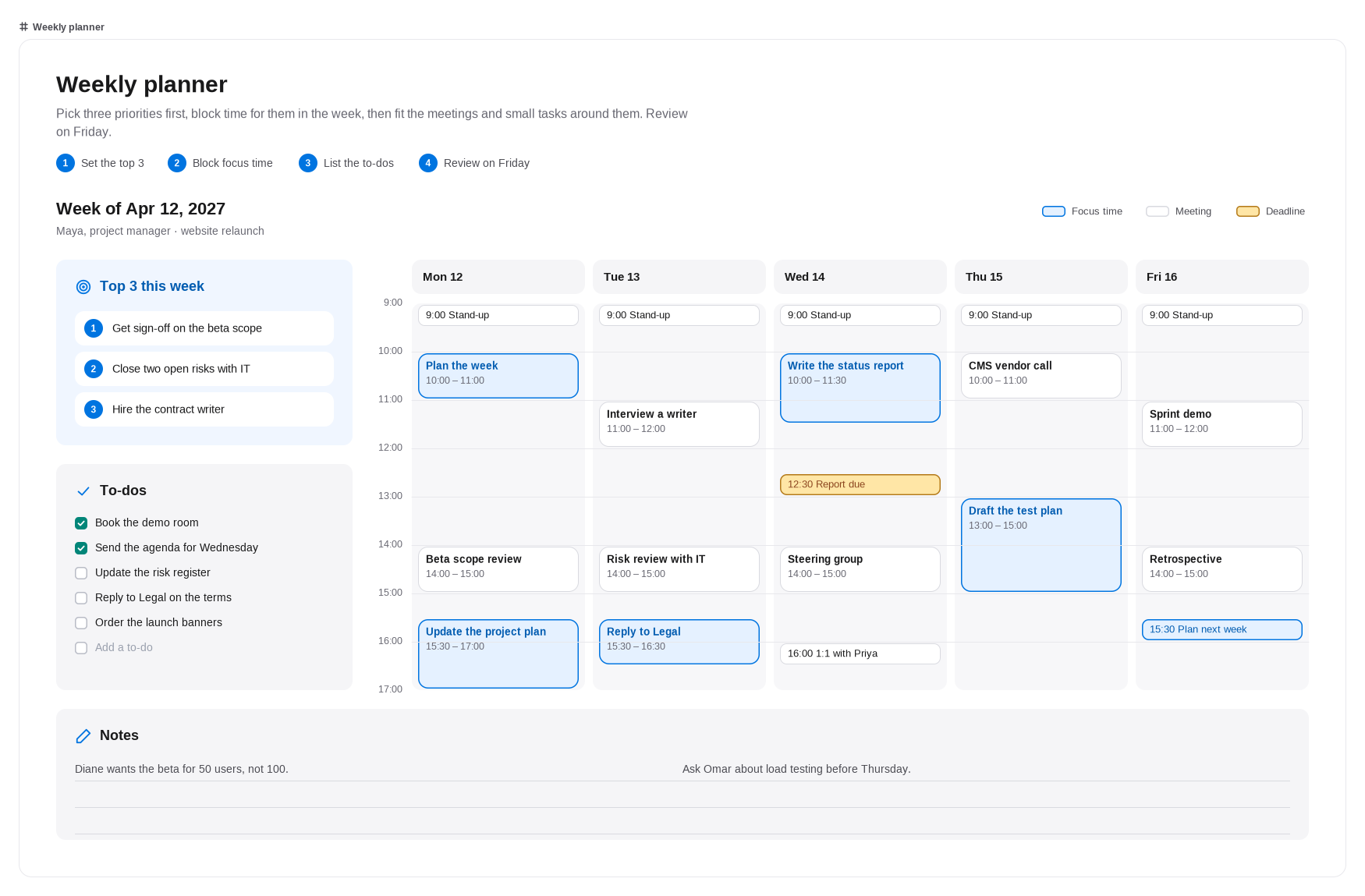
This template has four parts: a “Top 3 this week” panel, a to-do list, a time grid for Monday to Friday and a notes area. The board gives its method up front: pick three priorities first, block time for them in the week, then fit the meetings and small tasks around them.
Start with the top three
The panel at the top left has three numbered lines and no room for a fourth. In the example they are “Get sign-off on the beta scope”, “Close two open risks with IT” and “Hire the contract writer”.
Each is an outcome with a visible finish. On Friday the sign-off exists or it does not. Compare that with “work on the beta” or “look at risks”, which can never be ticked off. A good test for a priority: if only these three things happened this week, would it still count as a good week?
Give every priority a slot in the week
A priority without time on the calendar is a wish. Look at Monday and Tuesday in the example. The first priority has “Beta scope review” on Monday from 14:00 to 15:00. The second has “Risk review with IT” on Tuesday at the same hour. The third has “Interview a writer” on Tuesday from 11:00 to 12:00. By Tuesday evening all three have had their hour.
The grid runs from 9:00 to 17:00 in one-hour rows, and a block’s height shows its length. Monday also holds two blue blocks that are not meetings: “Plan the week” from 10:00 to 11:00 and “Update the project plan” from 15:30 to 17:00. That is time Maya has reserved for her own work, before anyone else could take it.
Focus time, meetings and deadlines
The key above the grid names three kinds of block. Focus time is blue: work you do alone. Meeting blocks are white with an outline. Deadline is amber, a thin marker at the hour something is due.
Wednesday shows how they fit together. “Write the status report” is a focus block from 10:00 to 11:30. Right under it sits an amber line, “12:30 Report due”, and at 14:00 the steering group meets. The focus block is placed where it is because of the deadline, with an hour of slack between them.
Thursday has the longest focus block of the week, “Draft the test plan” from 13:00 to 15:00, and only one meeting. Friday closes with a sprint demo, a retrospective and “15:30 Plan next week”, a short slot that turns the planner into a habit.
Small tasks go on the to-do list
Not everything deserves a block. The To-dos panel holds the short jobs that fit into gaps: “Book the demo room”, “Send the agenda for Wednesday”, “Update the risk register”, “Reply to Legal on the terms”, “Order the launch banners”. The last line, “Add a to-do”, is there to be typed over.
Keep this list short enough to finish. If a to-do needs more than half an hour, it has become a block and should move to the grid, as “Reply to Legal” has on Tuesday afternoon. If the list reaches ten lines, some of them belong to next week or to someone else.
How to use the weekly planner template
- Open it as a new board. Use this template makes a copy with Maya’s week on it. Change the heading to your own week and name.
- Set the top 3. Write three outcomes before you look at your calendar.
- Block focus time. Move the fixed meetings into the grid first, then place a blue block for each priority in the best hours that remain. Stretch a block to change its length.
- List the to-dos. Put everything under half an hour on the list and tick items as you go.
- Review on Friday. Check the three priorities, carry over what is left, and use the Notes area for things the next plan needs.
The notes in the example are of that kind: “Diane wants the beta for 50 users, not 100” and “Ask Omar about load testing before Thursday.”
When a weekly planner helps
It suits anyone whose week is a mix of meetings and work that needs quiet: project managers, team leads, freelancers, students. A week is long enough to protect a few hours for important work and short enough to plan with some accuracy.
If your trouble is deciding what matters, sort the candidates on an Eisenhower matrix first and bring the winners here. If you track tasks by state and not by time, a kanban board fits better. For a term of lectures and exams, the study planner is laid out for that.
Questions about the Weekly planner template
What is time blocking?
Time blocking means giving a task a fixed slot in the calendar, the way a meeting has one. In the example, “Draft the test plan” owns Thursday from 13:00 to 15:00. The block protects the time and shows honestly how much the week can hold.
How many priorities should a week have?
Three is a good limit, and it is what the template has room for. With more, each gets too little time and none is finished. Everything else still happens, but as a to-do or a meeting, not as a priority.
When is the best time to plan the week?
Friday afternoon or Monday morning. The example does both: a short “Plan next week” slot on Friday at 15:30 and an hour on Monday at 10:00 to confirm it once the week’s surprises are known.
Can I use the planner week after week?
Yes. Duplicate the board each week, or clear the blocks and keep the layout. The board has 137 elements and a Free board holds up to 150, so a very full week may need the Pro plan.
Can I change the hours or add the weekend?
Every part of the grid is an ordinary shape or text. Retype the hour labels to start earlier, or copy a day column and its head to add Saturday and Sunday.