What is a study planner?
A study planner turns “I should study this week” into specific sessions: which subject, which task, which day, from when to when. Deciding that once, on Sunday, saves a student from deciding it again every afternoon, which is when most study plans fall apart.
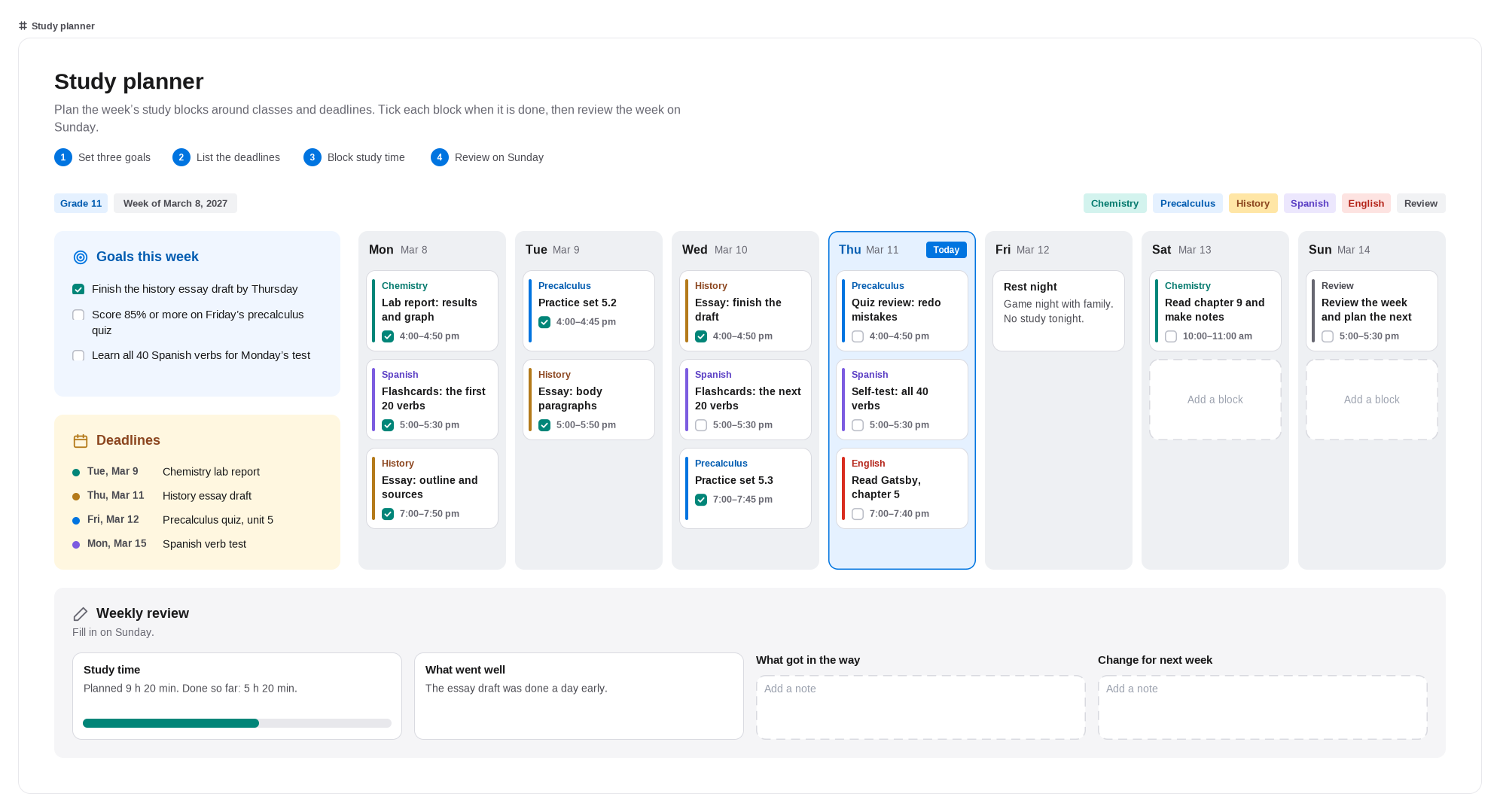
This template is one week on one board. Goals and deadlines sit on the left. Seven day columns fill the middle, each holding blocks of study time. A review band runs along the bottom. Chips at the top date the example, “Week of March 8, 2027”, for a student in Grade 11, and a legend gives every subject a color: Chemistry, Precalculus, History, Spanish, English and Review.
Start with goals and deadlines
The left column holds the two lists that everything else is built from. Goals this week has three checkboxes:
- Finish the history essay draft by Thursday
- Score 85% or more on Friday’s precalculus quiz
- Learn all 40 Spanish verbs for Monday’s test
Each goal has something you can check at the end of the week: a finished draft, a score, a number of verbs. “Study more history” would not tell you on Sunday whether you made it.
Deadlines lists what is due and when: the chemistry lab report on Tuesday, March 9, the history essay draft on Thursday, the precalculus quiz on unit 5 on Friday, and the Spanish verb test the following Monday. The last one falls outside the week, and it is on the list anyway. A planner that only looks as far as Sunday lets Monday’s test arrive unannounced.
Blocks that name a task, not just a subject
Each day column holds up to three blocks. A block has a colored stripe for its subject, the subject’s name, a task and a time. Monday’s three read: Chemistry, “Lab report: results and graph”, 4:00 to 4:50 pm. Spanish, “Flashcards: the first 20 verbs”, 5:00 to 5:30 pm. History, “Essay: outline and sources”, 7:00 to 7:50 pm.
Two things make these blocks work. First, every one says what will be done, not only what will be studied. “History” is a subject. “Essay: outline and sources” is something you can finish and tick. Second, no weekday block is longer than 50 minutes, and there is a gap before the next one.
Now follow one color across the days. The essay moves from outline and sources on Monday to body paragraphs on Tuesday to “finish the draft” on Wednesday, a day ahead of its Thursday deadline. The Spanish verbs go from the first 20 on Monday to the next 20 on Wednesday. A big goal becomes a chain of small blocks, each one a step past the last.
Today, a rest night and a lighter weekend
Thursday’s column carries a “Today” tag, so the board shows where the week stands. Its blocks are aimed at what comes next: “Quiz review: redo mistakes” for Friday’s precalculus quiz and “Self-test: all 40 verbs” for Spanish. Both are active tasks. Redoing wrong answers and testing yourself show what you do not know yet, which rereading notes does not. The evening block is English: read Gatsby, chapter 5.
Friday holds a single card of a different kind: “Rest night. Game night with family. No study tonight.” Planning the night off is as deliberate as planning the work. A week with no free evening is a week that gets abandoned by Wednesday.
The weekend is light. Saturday has one morning block, reading chemistry chapter 9 and making notes from 10:00 to 11:00 am. Sunday has one called Review: “Review the week and plan the next”. Each weekend column also has a dashed “Add a block” slot for anything that slipped.
The weekly review
The band at the bottom is headed “Fill in on Sunday.” and has four cards. Study time compares the plan with reality: “Planned 9 h 20 min. Done so far: 5 h 20 min.”, with a progress bar underneath. What went well has one line in the example: “The essay draft was done a day early.”
The other two cards, What got in the way and Change for next week, are empty, each with an “Add a note” prompt. They are the ones that improve the next plan. If the 7:00 pm blocks keep getting skipped, the note might read “too tired after dinner”, and the change is to move them earlier. One honest line in each is enough.
How to use the study planner template
- Set three goals. Open the template as a new board, change the week’s date and write three goals you can check off.
- List the deadlines. Add every test and due date for the week, plus anything due early the week after.
- Block study time. Rename the legend to your subjects. For each deadline, work backward and place blocks on the days before it. Keep at least one evening free.
- Tick as you go. Mark each block when it is done and move the “Today” tag along.
- Review on Sunday. Add up the minutes, fill in the four review cards, then duplicate the board for next week.
When a weekly planner is enough
This planner fits an ordinary school or college week with a few deadlines. It keeps homework, test preparation and long assignments moving at the same time.
The board holds 169 elements, above the 150 a Free board can hold, so it needs the Pro or Team plan. For the weeks before finals, when you need to cover whole subjects topic by topic, the exam revision plan looks further ahead. The class timetable shows the school day your study blocks have to fit around, and the Spanish blocks in the example are a natural use for the flashcards template.
Questions about the Study planner template
How long should a study block be?
Between 30 and 50 minutes for most students, with a break before the next one. The example uses 30 minutes for flashcards and up to 50 for writing. One block on Saturday runs an hour. Shorter, focused blocks are easier to start and to finish.
How many hours a week should I plan?
It depends on your courses, so begin with what you can keep to. The example plans 9 hours 20 minutes across six days. Compare planned and done in the Sunday review for two or three weeks, then adjust the total to what you really complete.
What should I do when I miss a block?
Move it instead of deleting it. Drag the block to the next free slot, or to one of the “Add a block” spaces at the weekend. Then note what got in the way in the review, so next week’s plan avoids the same clash.
Does the study planner template work on the Free plan?
No. The board has 169 elements and a Free board holds up to 150, so opening this template takes the Pro or Team plan. You can export a finished week as a PDF or PNG to print or keep on your phone.