What is a curriculum map?
A curriculum map is a one-page view of what a course teaches across the year and when. Each unit gets a span of weeks. Under it go the standards it covers, the question that drives it, the skills and vocabulary students should leave with, and how they will be assessed. With the year laid side by side, a teacher or a department can spot what a week-by-week plan book hides: a standard nobody teaches, a topic taught twice, three tests in the same fortnight.
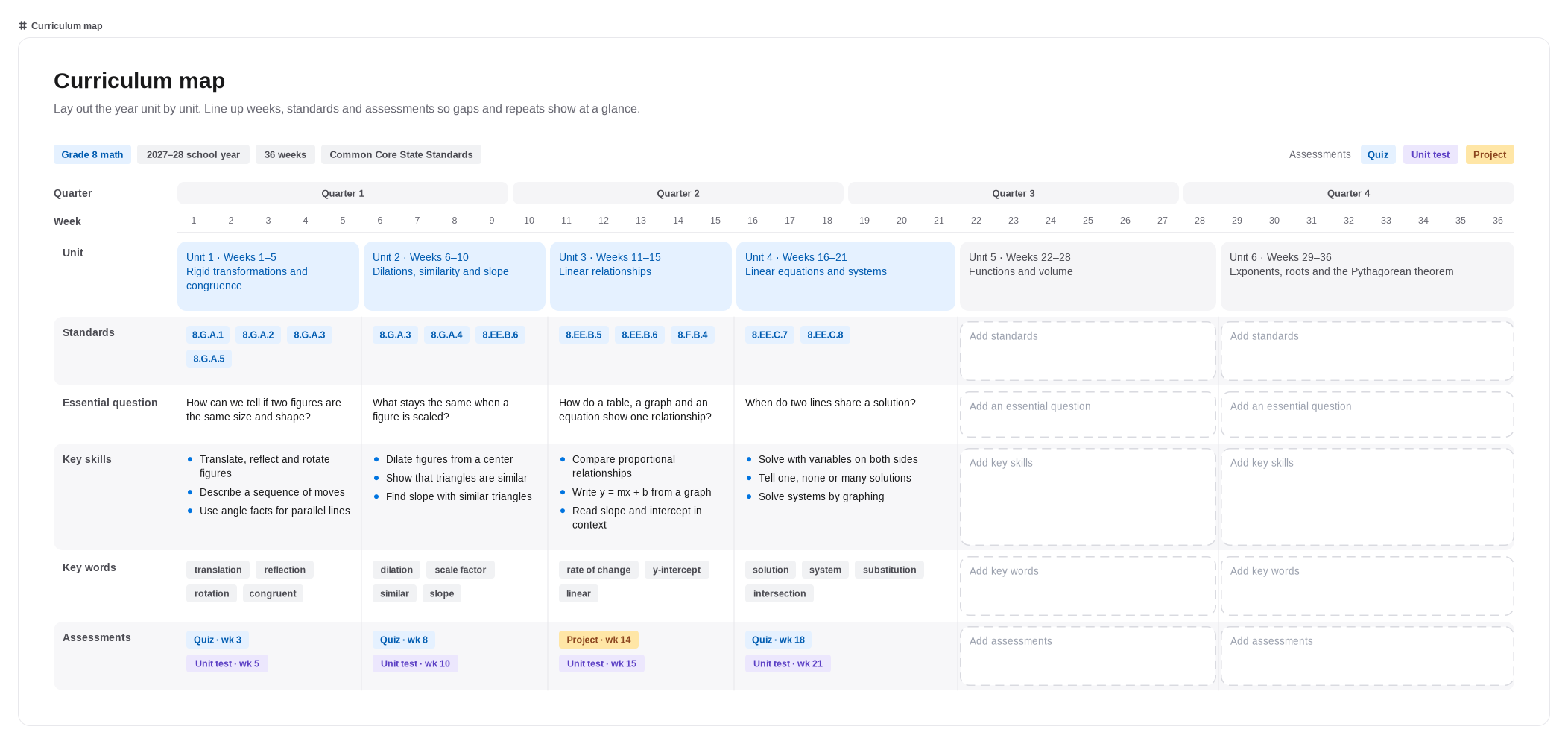
This template is a grid with time running left to right and six kinds of information running top to bottom. Chips under the title describe the example: Grade 8 math, the 2027 to 2028 school year, 36 weeks, Common Core State Standards.
Quarters, weeks and units drawn to scale
Two rulers sit above the grid. The first divides the year into Quarter 1 through Quarter 4. The second numbers every week from 1 to 36. Each unit is a block whose width matches its length in weeks, so longer units are visibly longer.
The example has six units. Unit 1, rigid transformations and congruence, runs weeks 1 to 5. Unit 4, linear equations and systems, runs weeks 16 to 21. Unit 6, exponents, roots and the Pythagorean theorem, takes the last eight weeks, 29 to 36. Because the blocks are to scale, you can also see where units cross a quarter line: Unit 2 starts in week 6 and ends in week 10, one week into Quarter 2. That matters when report cards are due.
Directly under each unit are its standards, written as short code chips such as 8.G.A.1 or 8.EE.C.7, and its essential question. Unit 1 asks: “How can we tell if two figures are the same size and shape?”
One unit, read from top to bottom
Follow a single column down and you have a unit plan in miniature. Take Unit 2, “Dilations, similarity and slope”, weeks 6 to 10:
- Standards: 8.G.A.3, 8.G.A.4 and 8.EE.B.6.
- Essential question: “What stays the same when a figure is scaled?”
- Key skills: dilate figures from a center, show that triangles are similar, find slope with similar triangles.
- Key words: dilation, scale factor, similar, slope.
- Assessments: a quiz in week 8 and a unit test in week 10.
Each cell is short on purpose. Three skills, four words, two assessments. A map is not the place for lesson detail. If a cell needs a paragraph, that detail belongs in the unit plan the map points to.
Read across a row to find gaps and repeats
The board’s own subtitle states the purpose: line up weeks, standards and assessments “so gaps and repeats show at a glance”. That happens when you read along a row instead of down a column.
In the Standards row of the example, 8.G.A.3 appears under both Unit 1 and Unit 2, and 8.EE.B.6 under both Unit 2 and Unit 3. Those are planned repeats: slope is introduced with similar triangles, then used for linear relationships. A repeat you did not plan is a sign of overlap.
In the Assessments row, chips are colored by type, with a legend at the top right: Quiz, Unit test, Project. Units 1, 2 and 4 each have a quiz mid-unit and a test in the final week. Unit 3 swaps the quiz for “Project · wk 14”. Scanning the row shows the pattern and its one exception in a second. The Key words row works the same way for vocabulary: “slope” arrives in Unit 2, “rate of change” and “y-intercept” in Unit 3.
How to use the curriculum map template
- Open it as a new board. Use this template gives you a copy. Change the chips to your grade, subject, year and standards framework.
- Block out the units. Rename the six unit blocks and drag their edges until each one covers the right weeks on the ruler.
- Tag the standards. Under each unit, type the codes it addresses. Then run your eye along the row and check each required standard appears at least once.
- Fill the cells. Add one essential question, about three key skills and a few key words per unit.
- Place the assessments. Add a chip for each quiz, test or project with its week number.
In the example, Units 5 and 6 are left open. Their cells read “Add standards”, “Add an essential question”, “Add key skills”, “Add key words” and “Add assessments”, so you can practice on them before clearing the rest.
When to map, and which plan to open
Build a map before the year starts, review it at each quarter, and share it with colleagues who teach the grade before and after yours. It is a planning and alignment tool for teachers and curriculum leads more than a handout for students.
The board holds 163 elements, which is over the 150 a Free board can hold, so this template needs the Pro or Team plan. On the Team plan a department can edit the same map together. For the student-facing version of a course, use the course syllabus. For a single period inside a unit, use the lesson plan, and to write the objectives behind each key skill, the learning objectives template.
Questions about the Curriculum map template
What is the difference between a curriculum map and a syllabus?
A curriculum map is a teacher’s planning view: units against weeks, with standards and assessments aligned. A syllabus is written for students and adds meeting times, grading and policies. Many teachers build the map first and write the syllabus from it.
What should each unit on the map include?
At minimum its weeks, the standards it addresses and how it is assessed. This template adds an essential question, key skills and key words. Keep every cell to a few short items so the whole year stays readable on one board.
Can I use it with standards other than Common Core?
Yes. The standards are plain text chips. Replace the codes with those of your state, country or school, and rename the chip under the title that says which framework the map follows.
Does the curriculum map template open on the Free plan?
No. It has 163 elements and a board on the Free plan holds up to 150, so it needs the Pro or Team plan. Colleagues you share the finished map with can still view it and leave comments.