What is the Eisenhower matrix?
The Eisenhower matrix, named after Dwight Eisenhower, sorts tasks by two questions: is it urgent, and is it important? The answers put every task in one of four boxes, and each box has its own instruction: do, schedule, delegate or delete.
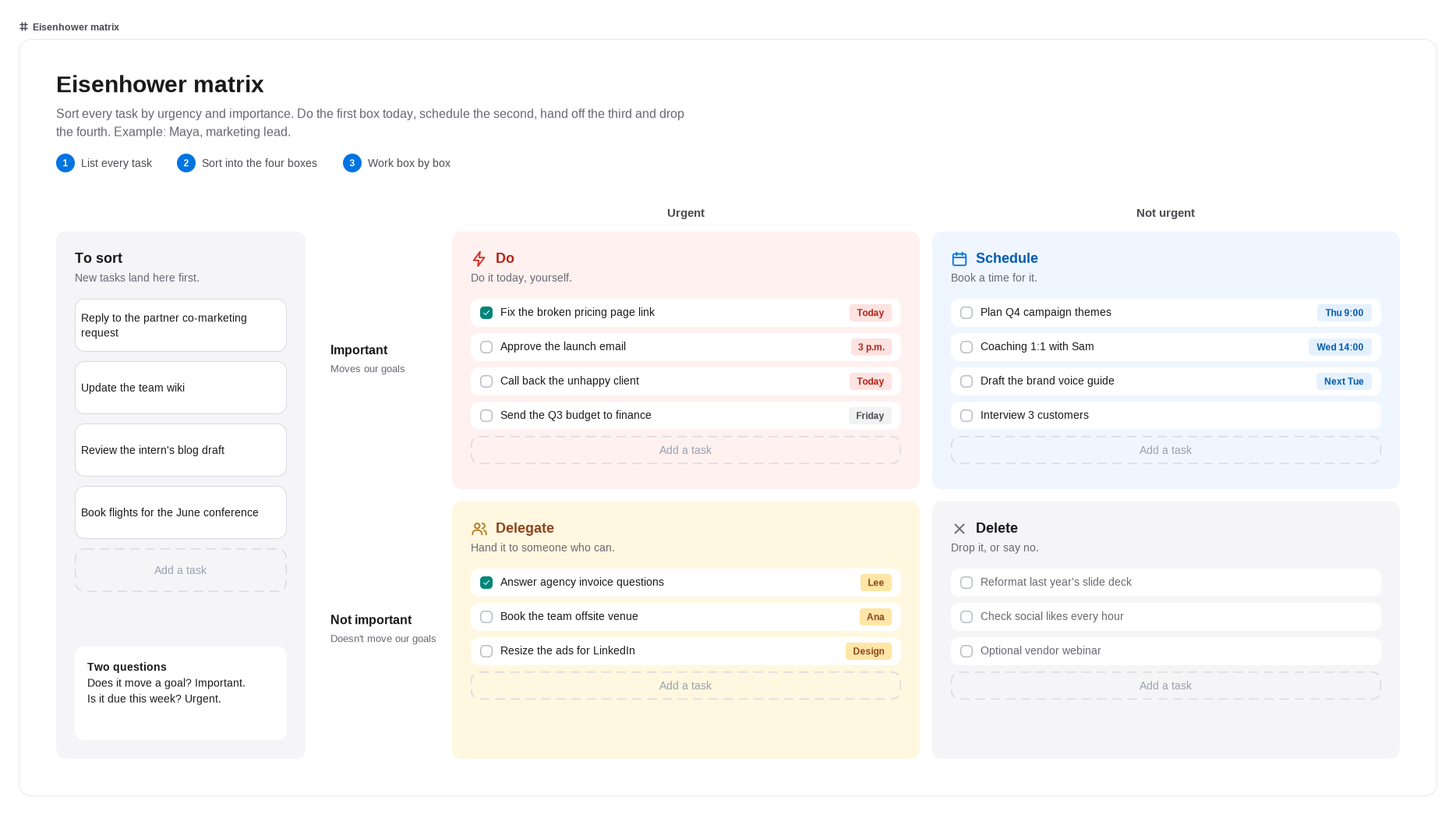
This template adds a holding column on the left where new tasks land before they are sorted. The example is the task list of Maya, a marketing lead, with deadlines, time slots and names already attached.
The four boxes
Columns split tasks into Urgent and Not urgent. Rows split them into Important, which the board glosses as “Moves our goals”, and Not important.
- Do (urgent, important): “Do it today, yourself.”
- Schedule (not urgent, important): “Book a time for it.”
- Delegate (urgent, not important): “Hand it to someone who can.”
- Delete (not urgent, not important): “Drop it, or say no.”
The Schedule box is where long-term work lives. “Plan Q4 campaign themes” and “Draft the brand voice guide” will never be due today, which is exactly why they need a slot.
Start in the To sort column
Sorting works better as a separate step from collecting. The column on the left is the inbox: “New tasks land here first.” In the example it holds four that Maya has not placed yet, among them “Update the team wiki” and “Book flights for the June conference”.
A card at the bottom of the column gives the two questions to ask of each one: “Does it move a goal? Important. Is it due this week? Urgent.” Those definitions keep the sort quick. Without them, everything a colleague asks for feels urgent and everything you enjoy feels important.
Try it on “Reply to the partner co-marketing request”. If the reply is due this week but no marketing goal depends on it, the card belongs in Delegate.
Give every task its next step
A task in a box is still only a wish until it has a detail that makes it happen. The example attaches a different kind of detail in each box.
In Do, each task has a deadline: “Fix the broken pricing page link” says Today, “Approve the launch email” says 3 p.m. and “Send the Q3 budget to finance” says Friday. In Schedule, each has a slot: “Plan Q4 campaign themes” on Thu 9:00 and “Coaching 1:1 with Sam” on Wed 14:00. “Interview 3 customers” has no slot yet, which makes it the one most likely to slip.
Keep Do short. Four tasks is a full day for most people. If the box holds ten, some of them are not as urgent as they claim.
Hand off and let go
The bottom row is where time is won back. Every Delegate task names who takes it: “Answer agency invoice questions” goes to Lee, “Book the team offsite venue” to Ana and the ad resizing to Design. A delegated task without a name is still yours.
Delete is the hardest box to fill, because putting a task there is a small admission. Maya’s three are honest ones: “Reformat last year’s slide deck”, “Check social likes every hour” and “Optional vendor webinar”. Each box ends with an “Add a task” slot, including this one.
How to use the Eisenhower matrix template
- Open it as a new board. Clear Maya’s tasks from the boxes, or keep one per box as a model while you fill yours.
- List every task. Put everything on your plate into To sort, one task per card, without judging any of it yet.
- Sort into the four boxes. Ask the two questions of each card and drag it to its box. Aim to empty the column.
- Work box by box. Add a deadline to each Do task, a slot to each Schedule task and a name to each Delegate task, then start at the top of Do.
When the matrix helps, and when to use something else
Use it for a personal or small-team task list that has grown faster than the week: on a Monday morning, after a holiday, or whenever everything feels urgent. It takes ten minutes and needs no numbers.
It sorts tasks, not projects or ideas. To rank ideas by value and cost, use an impact effort matrix. To agree with stakeholders on what a release must contain, use MoSCoW prioritization. Once the Schedule box is sorted, a weekly planner gives those tasks their days.
Questions about the Eisenhower matrix template
What is the difference between urgent and important?
Urgent is about time: the board’s test is whether the task is due this week. Important is about goals: does it move one? A ringing phone is urgent. Planning next quarter is important. Only tasks that are both belong in Do.
What if most of my tasks land in Do?
Then test them again. Ask what happens if each one waits a week, and whether someone else could do it. Tasks that survive both questions stay. The rest move to Schedule or Delegate, and the Do box gets back to a size one person can finish.
Do I really delete the tasks in the Delete box?
Yes, or you say no to whoever asked. Writing them in the box first is useful: it makes the choice visible, and if a dropped task turns out to matter, you know it was a decision and not an oversight.
Can a team use one matrix together?
It works for a small team with shared goals. Delegate then means handing a task to another team or person, and the names on the cards show who has what. On the Team plan several people can sort the same board at once.