What is a family tree?
A family tree is a diagram of how the people in a family are related. Each person is a box. A line joins a couple, and another line runs down from the couple to their children. Read from top to bottom, it shows the generations in order.
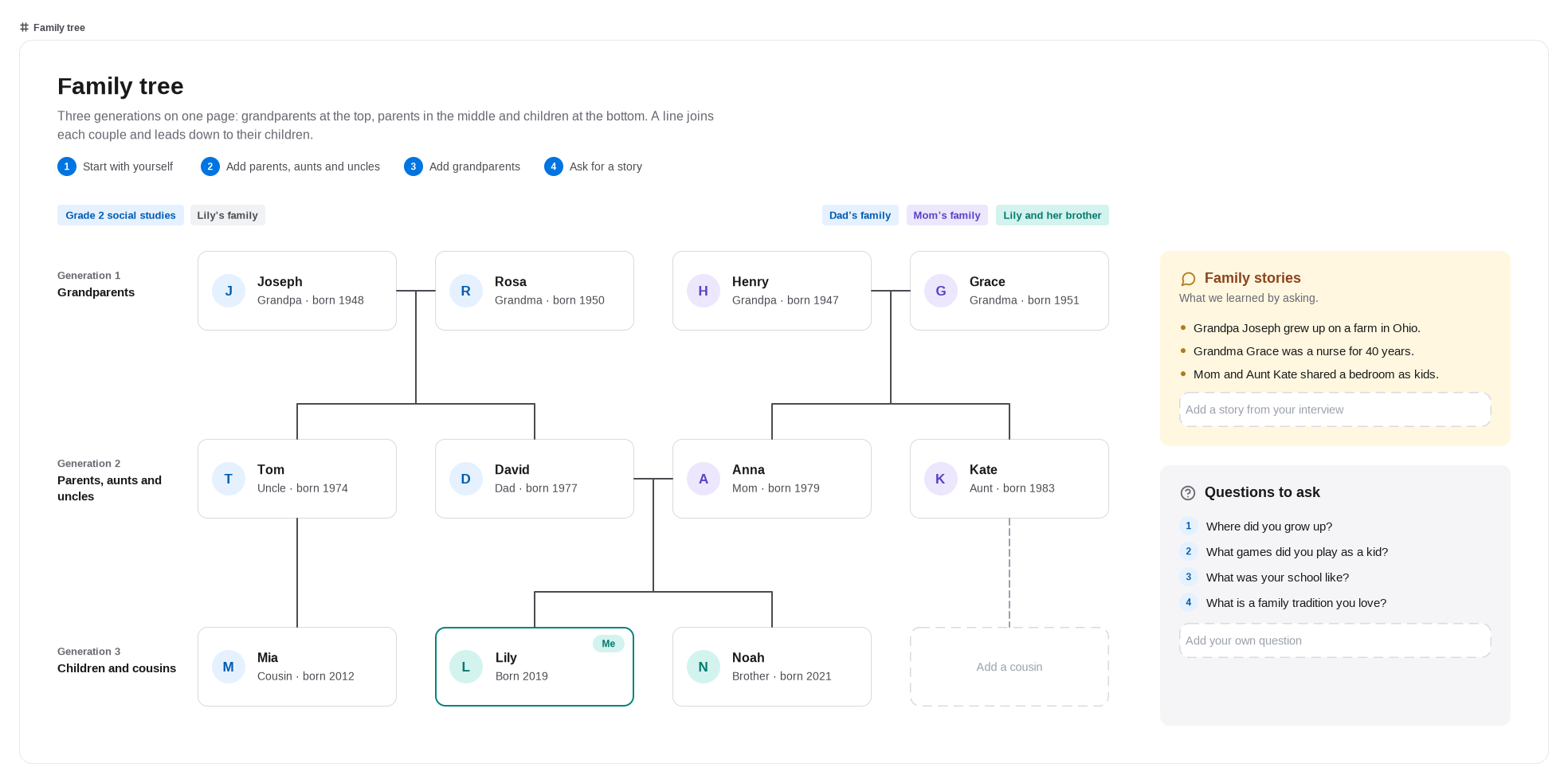
This template covers three generations and is built for a classroom project. The example belongs to Lily, a second grader, and is labelled “Grade 2 social studies” and “Lily’s family”. To the right of the tree are two cards that make it more than a chart of names: stories the family told, and questions to ask at home.
Grandparents and parents: two families meet
Labels down the left side name the rows: Generation 1, grandparents; Generation 2, parents, aunts and uncles; Generation 3, children and cousins. Every card has the same three parts: a circle with the person’s initial, their name, and a line saying who they are to Lily and when they were born.
The top row holds two couples. Joseph and Rosa, born 1948 and 1950, are on the left. Henry and Grace, born 1947 and 1951, are on the right. A short line joins each pair, and a line drops from each to their two children in the row below.
So the middle row reads: Tom, “Uncle · born 1974”, and David, “Dad · born 1977”, under Joseph and Rosa. Then Anna, “Mom · born 1979”, and Kate, “Aunt · born 1983”, under Henry and Grace. David and Anna stand next to each other in the center with a line between them. That is the point where the two sides of the family meet. Colors mark the sides, and a legend at the top right names them: “Dad’s family”, “Mom’s family”, “Lily and her brother”.
Children and cousins, and a tag that says Me
The bottom row is the child’s own generation. A line runs down from David and Anna to two cards: Lily, “Born 2019”, and Noah, “Brother · born 2021”. Lily’s card wears a small tag reading “Me”. For a young child this tag is the anchor of the whole tree. Every other label, Dad, Aunt, Grandma, Cousin, is written from where she stands.
On the left, a line leads from Uncle Tom down to Mia, “Cousin · born 2012”. On the right, under Aunt Kate, is a dashed card reading “Add a cousin”. It shows where the tree can grow, and it reminds students that a tree does not have to be symmetrical. Real families are not.
Family stories and questions to ask
Names and dates are the skeleton. The two cards on the right add the rest. Family stories, subtitled “What we learned by asking”, has three lines in the example:
- Grandpa Joseph grew up on a farm in Ohio.
- Grandma Grace was a nurse for 40 years.
- Mom and Aunt Kate shared a bedroom as kids.
Below them is a dashed slot, “Add a story from your interview”.
Questions to ask gives students four openers to take home: “Where did you grow up?”, “What games did you play as a kid?”, “What was your school like?” and “What is a family tradition you love?”, with space to add a question of their own. These work because they ask for a memory, not a fact. “When were you born?” gets a number. “What games did you play?” gets a story worth sharing with the class.
How to use the family tree template
- Start with yourself. Open the template as a new board. Type your name on the card tagged “Me”, then add brothers and sisters beside it.
- Add parents, aunts and uncles. Fill the middle row. Write each person’s label the way you call them: Dad, Aunt, Uncle.
- Add grandparents. Fill the top row, one couple above each parent. Birth years can wait until you have asked.
- Ask for a story. Take the four questions home, talk to one relative and write down the best thing you hear in the stories card.
Teachers: remind the class that families come in many shapes. Cards and lines can be deleted, copied and moved, so a tree with one parent, two homes, step-parents or guardians is drawn the same way, with the people who are there.
When this layout fits, and when to switch
The template suits school heritage projects, a first genealogy sketch, and language classes practicing family vocabulary. Three generations fit on one screen and one printed page.
For five or six generations, the rows get long. A top-down tree diagram handles deeper branching. To place the family’s big moments in order, such as moves, weddings and births, use a history timeline. For the family of a character in a novel, the character map has room for traits as well as relatives.
Questions about the Family tree template
How many generations should a family tree show?
For a school project, three is enough: the child, their parents and their grandparents. That is what this template shows. You can add a fourth row above for great-grandparents by copying the top row and its lines.
How do I show step-parents or half-siblings?
Add a card for each person and join partners with a line, the same way the template joins a couple. Draw each child’s line down from the parents they share. Use the label under the name to say who the person is to you.
What if a student does not know part of their family?
Then the tree shows the family they do know. Delete the cards that do not apply, or relabel them for the adults who raise the child. The project is about the people in a student’s life and their stories, not about filling every box.
Is the family tree template free?
Yes. It opens on the Free plan, and each student can make a copy in their own workspace. The finished tree exports as PNG, SVG or PDF for printing or a class display.