What is Gitflow?
Gitflow is a branching model for Git, described by Vincent Driessen in 2010. It gives every branch a fixed role. Two branches live forever: main holds what shipped and develop holds what is next. Three kinds of short-lived branch, features, releases and hotfixes, branch off, merge back and are deleted.
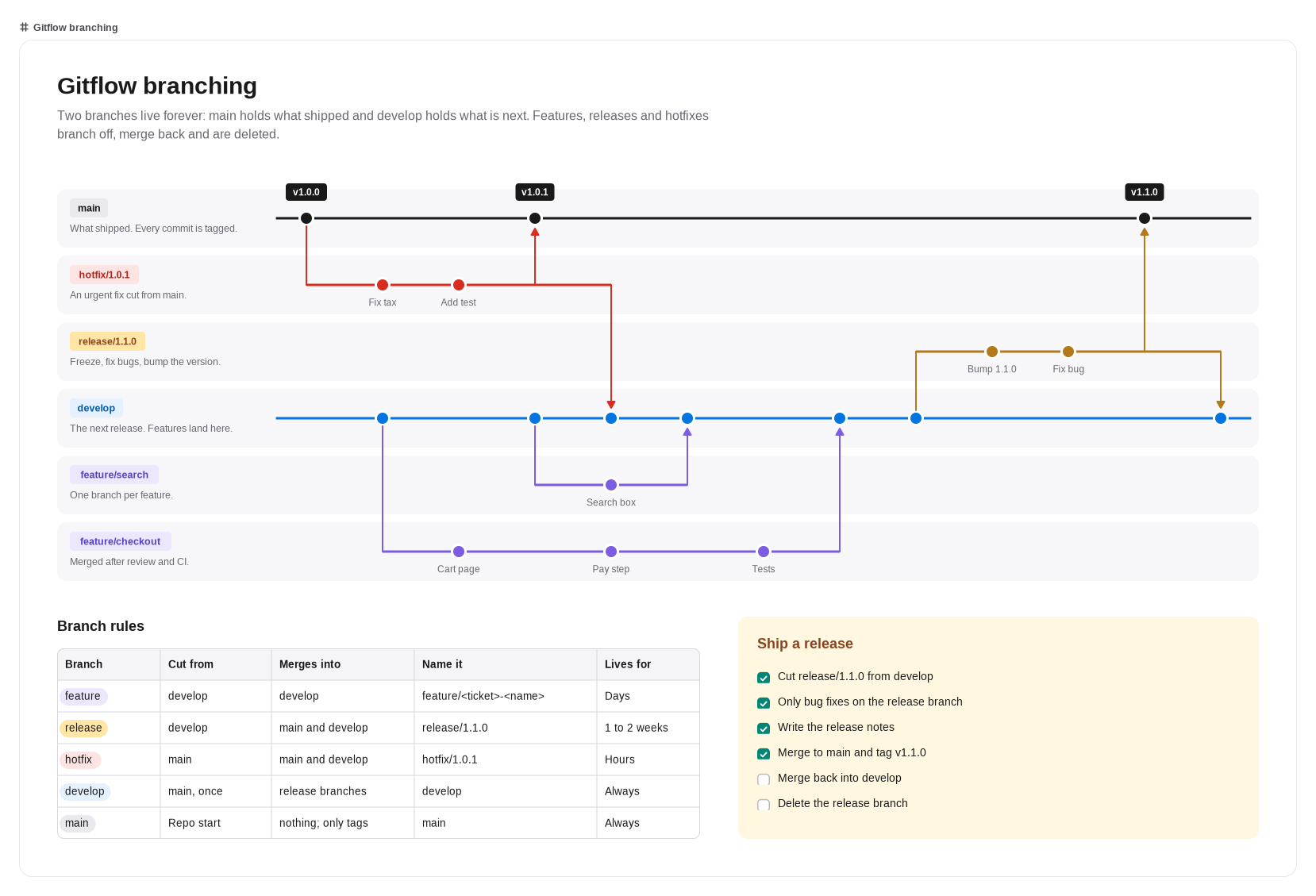
This template draws the model as six horizontal lanes, one per branch, with commits as dots and merges as arrows between lanes. The example is a shop that ships v1.0.0, patches it as v1.0.1 and then releases v1.1.0. A rules table and a release checklist sit under the graph.
Develop and the feature branches
Start in the fourth lane, develop: “The next release. Features land here.” Two feature lanes hang below it. feature/search leaves develop, gets one commit labeled “Search box” and merges back. feature/checkout is longer: three commits, “Cart page”, “Pay step” and “Tests”, before it merges.
The two captions carry the working rules: “One branch per feature” and “Merged after review and CI”. Note what the picture shows about timing. The checkout branch started before the search branch and merged after it. In Gitflow features do not wait for each other; each one returns to develop when it is ready.
Releases, hotfixes and tags on main
The top lane is main: “What shipped. Every commit is tagged.” It carries only three dots in the whole example, labeled v1.0.0, v1.0.1 and v1.1.0.
hotfix/1.0.1 is “An urgent fix cut from main”. It branches right after v1.0.0, gets the commits “Fix tax” and “Add test”, and then merges twice: up into main, where it becomes v1.0.1, and down into develop so the fix is not lost in the next release.
release/1.1.0 is cut from develop when the features are in. Its caption reads “Freeze, fix bugs, bump the version”, and its two commits are “Bump 1.1.0” and “Fix bug”. It also merges twice: into main as v1.1.0 and back into develop.
The branch rules table
The graph shows one history. The Branch rules table states the rule behind it, in five columns: Branch, Cut from, Merges into, Name it, and Lives for.
- feature: cut from develop, merges into develop, named after its ticket, lives for days.
- release: cut from develop, merges into main and develop, lives 1 to 2 weeks.
- hotfix: cut from main, merges into main and develop, lives for hours.
- develop: cut from main, once; merges into release branches.
- main: merges into nothing; only tags.
The “Lives for” column is the one to argue about as a team. A feature branch that lives for weeks instead of days is where merge conflicts come from, whatever the model says.
The release checklist
Next to the table, Ship a release turns the release lane into six boxes to tick:
- Cut release/1.1.0 from develop
- Only bug fixes on the release branch
- Write the release notes
- Merge to main and tag v1.1.0
- Merge back into develop
- Delete the release branch
The fifth item is the one teams forget. If the release branch is not merged back, the bug fixes made during the freeze exist on main but not on develop, and they return as regressions in the next version.
How to use the Gitflow branching template
- Open it as a new board and change the version numbers to your next real release.
- Rename the feature lanes to two branches your team has open now, and relabel the commit dots with their actual work.
- Edit the rules table. Put your ticket format into the “Name it” column and your real freeze length into “Lives for”.
- Adapt the checklist. Add the steps your release needs between the notes and the tag, such as a sign-off.
- Pin it where reviews happen. Export the board as PNG or SVG for the contributing guide.
When Gitflow fits, and when it is too much
Gitflow suits software with numbered versions and planned releases: mobile apps, desktop apps, libraries, anything where v1.0 needs patches while v1.1 is being made. A web service that deploys many times a day usually does better with one main branch and short-lived branches, because the release lane adds waiting without adding safety.
If you deploy continuously, map the path of a change with the CI/CD pipeline template instead. To plan what goes into each version, use a release plan, and tick off launch day with the release checklist.
Questions about the Gitflow branching template
Why does a hotfix merge into both main and develop?
Main needs the fix so it can ship at once: in the example it becomes v1.0.1. Develop needs it too, or the next release would be cut from code that still has the bug. The hotfix lane on the board shows both merge arrows.
What is the difference between Gitflow and trunk-based development?
Gitflow keeps two permanent branches and uses release branches to stabilize a version. Trunk-based development keeps one, and everyone merges small changes into it at least daily. Gitflow fits scheduled, versioned releases. Trunk-based fits teams that deploy continuously.
How long should a release branch live?
The rules table on the template says 1 to 2 weeks. The branch exists only to freeze features, fix bugs and bump the version. If it lives longer, develop drifts away from it and merging back becomes painful.
Can I edit the lanes and add more branches?
Yes. Use this template copies the board into your workspace, where every lane, dot, arrow and table cell can be changed. The board has 94 elements, so on the Free plan there is room for a few more lanes before the limit of 150.