What is a hackathon planner?
A hackathon gives a small team a day or a weekend to build something and show it to judges. Most teams lose hours in the first evening to questions that a plan would have answered: what exactly are we solving, who does what, and what will we show at the end? A hackathon planner puts those answers on one board before the clock starts.
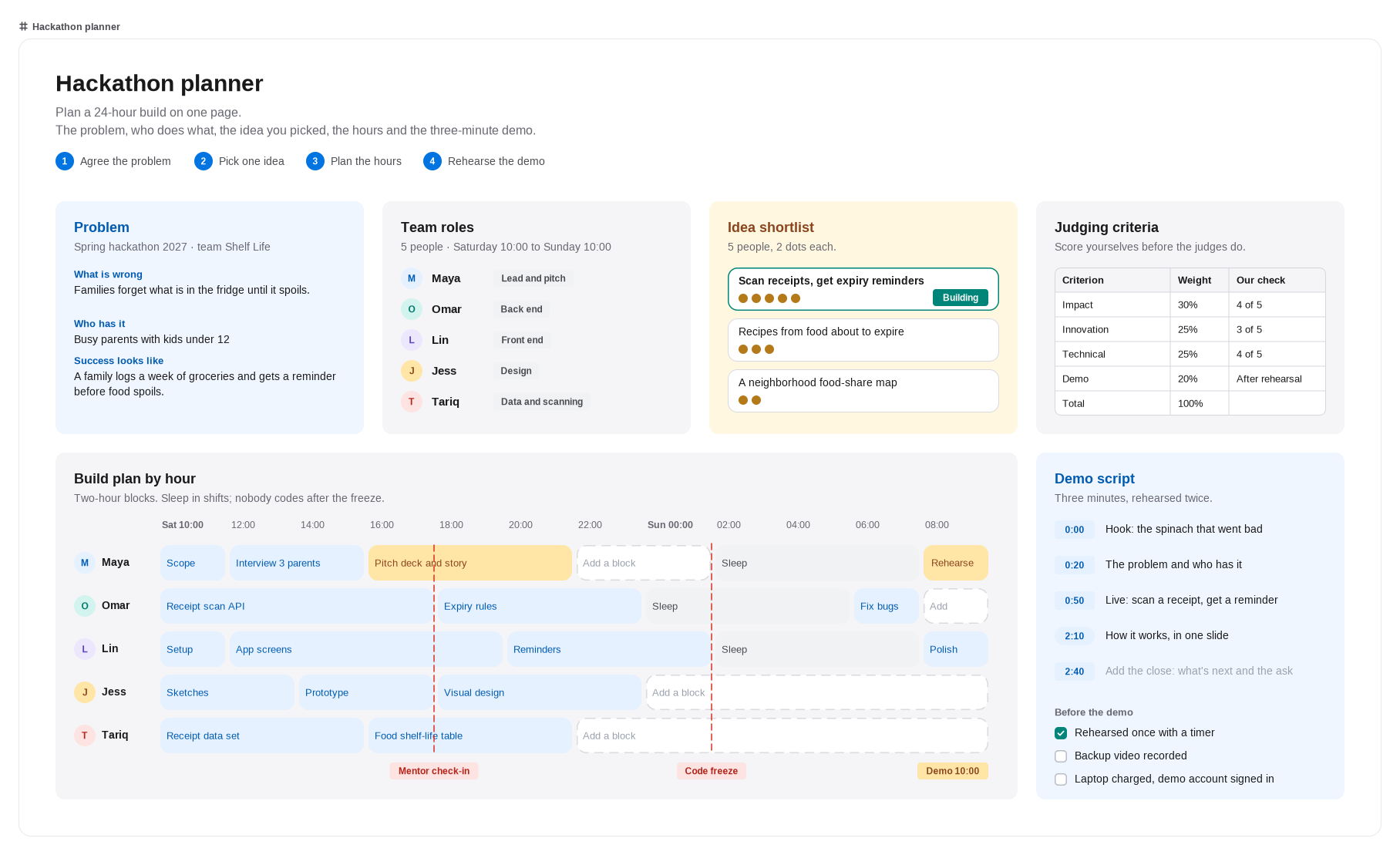
This template has six panels. Four sit in a row on top: Problem, Team roles, Idea shortlist and Judging criteria. Below them are a wide Build plan by hour and a Demo script. The example follows a five-person team called Shelf Life through a spring hackathon that runs from Saturday 10:00 to Sunday 10:00.
The problem and who does what
The Problem panel has three short fields, and each is one sentence. What is wrong: families forget what is in the fridge until it spoils. Who has it: busy parents with kids under 12. Success looks like: a family logs a week of groceries and gets a reminder before food spoils.
That third field is the one teams skip. It describes the smallest thing that would count as working, which is what you can realistically reach in a day and what the demo will show.
Next to it, Team roles lists five people with one job each: Maya leads and pitches, Omar takes the back end, Lin the front end, Jess the design, and Tariq data and scanning. One name per job means nobody waits for a meeting at 3 am to learn who is fixing the scanner.
Pick one idea and score it like a judge
The Idea shortlist records a vote: 5 people, 2 dots each. “Scan receipts, get expiry reminders” took five dots and carries a tag that says Building. “Recipes from food about to expire” got three and “A neighborhood food-share map” two. The losing ideas stay on the board. If the scanner fails at midnight, the team can see its fallback without reopening the debate.
Judging criteria is a table with three columns: Criterion, Weight and Our check. The example weights Impact at 30%, Innovation and Technical at 25% each and Demo at 20%. The team rated itself 4 of 5 on impact, 3 of 5 on innovation and 4 of 5 on technical. The demo row says “After rehearsal”. The line above the table explains the point: score yourselves before the judges do. A 3 on innovation at noon is a hint about where the pitch needs help.
Plan the 24 hours in two-hour blocks
The build plan is a grid with a row for each person and a column for every two hours, from Sat 10:00 to Sun 08:00. Work is drawn as blocks whose width is their length. Omar's row opens with “Receipt scan API”, four columns wide, followed by “Expiry rules”. Lin starts with a short “Setup” block and then “App screens”. Jess moves from “Sketches” to “Prototype” to “Visual design”. Maya's row is not code at all: “Scope”, “Interview 3 parents”, “Pitch deck and story”.
Two details make this plan better than a task list. First, sleep is on it. Three rows have a gray “Sleep” block, and Omar's starts two hours before the others. Second, three markers sit under the grid: Mentor check-in, Code freeze and Demo 10:00. The panel's subtitle states the rule that goes with them: sleep in shifts, and nobody codes after the freeze.
Dashed “Add a block” cells show the open hours, so spare capacity is visible when something overruns.
Script the three-minute demo
Judges see many teams in a row, and a demo that wanders loses them. The Demo script panel breaks three minutes into five timed beats:
- 0:00 Hook: the spinach that went bad
- 0:20 The problem and who has it
- 0:50 Live: scan a receipt, get a reminder
- 2:10 How it works, in one slide
- 2:40 The close: what's next and the ask
The live part gets 80 seconds, more than any other beat, and it shows exactly the sentence from “Success looks like”. Under the script is a short checklist titled Before the demo: rehearsed once with a timer, backup video recorded, laptop charged and demo account signed in. The backup video is the cheapest insurance a team can buy.
How to use the hackathon planner template
- Open it as a new board the evening before, and change the event line and team name in the Problem panel.
- Agree the problem. Fill the three fields together. Do not go on until “Success looks like” fits in one sentence.
- Pick one idea. List up to three candidates, give each person two dots, and tag the winner. Copy the event's real criteria and weights into the judging table.
- Plan the hours. Rename the rows, then stretch and relabel the blocks. Put every person's sleep on the grid first and place the freeze marker before you add work.
- Rehearse the demo. Rewrite the five beats for your product, run it against a clock, and fill in the last judging row afterwards.
Need the system drawn as well? FlowDraw AI can sketch a diagram of your build from a short description, on a second board.
When this planner fits, and when to use something else
It is built for a team of three to six in a timed event of one or two days: company hack days, student hackathons, game jams, weekend prototypes. Change the column labels and the same grid covers 48 hours.
The board holds 136 elements, close to the 150 a Free board allows, so a much larger team will need a paid plan or a second board. For work that runs longer than a weekend, a sprint planning board or a project timeline suits better. And if the team has not found its idea yet, run Crazy 8s first and bring the three best sketches to the shortlist.
Questions about the Hackathon planner template
When should a team fill in the planner?
Before the event if the theme is known, or in the first hour if it is not. Spending 45 minutes on the problem, the vote and the hour plan feels slow when others are already coding, but it is usually won back by midnight.
Why is sleep part of the build plan?
Because tired people write bugs and give flat demos. The example puts a six-hour sleep block in three rows, one starting earlier than the other two, so nobody on those rows presents after 24 hours awake.
What is a code freeze in a hackathon?
It is a time after which nobody adds features. The hours between the freeze and the demo go to fixing, polishing and rehearsing what already works. Without one, teams tend to break a working build twenty minutes before they present.
Can the whole team edit the planner at once?
On the Team plan, yes: several people edit the same board together. On Free and Pro one person edits and the others can view and comment, which works if the lead keeps the plan up to date.