What is sprint planning?
Sprint planning is the meeting that opens a sprint. The team agrees on one goal, works out how much it can really do in the days it has, and commits to the stories that reach the goal and fit. It ends with a list everyone believes in.
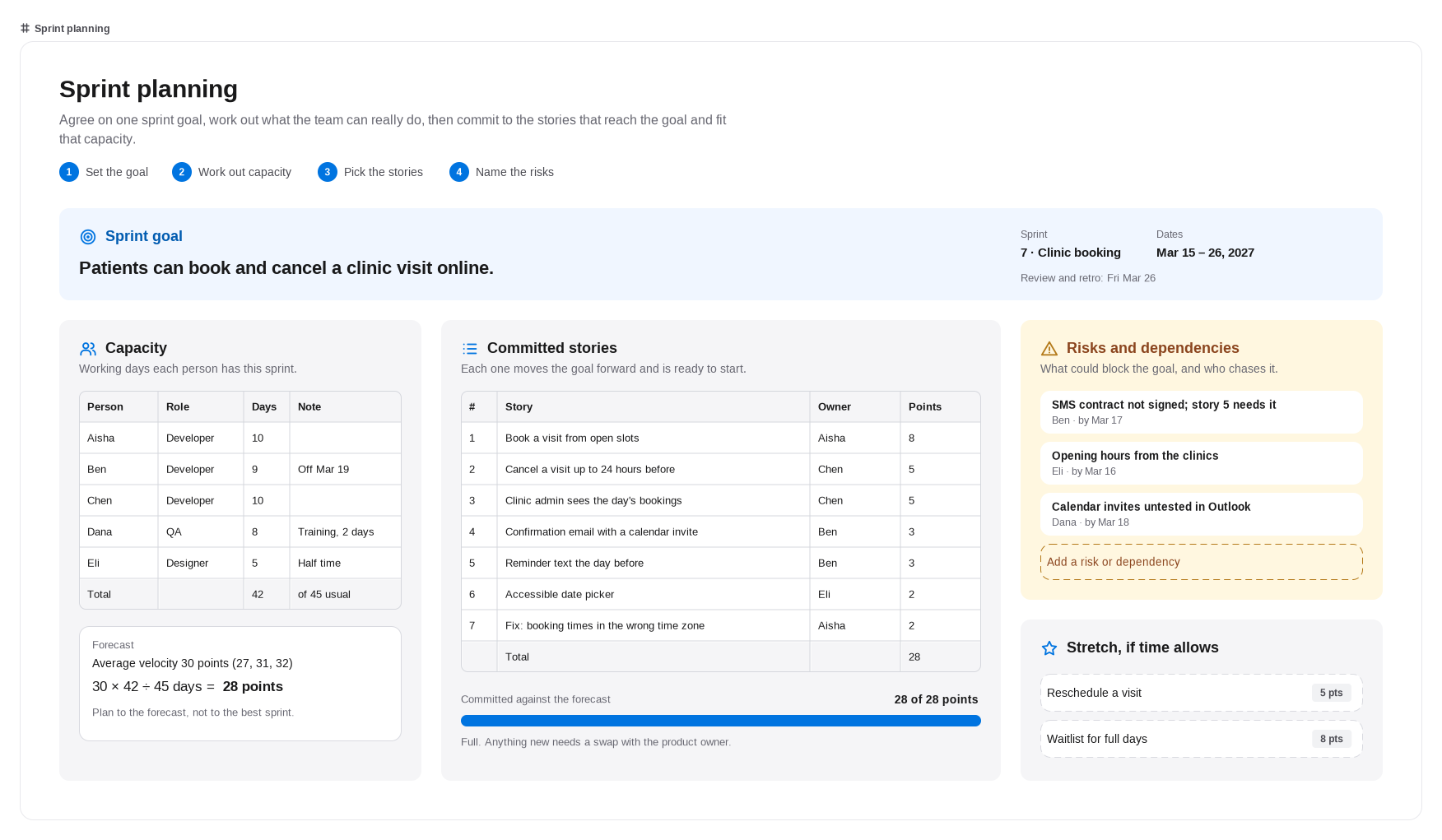
This template gives that meeting a board with four panels: the sprint goal across the top, capacity on the left, committed stories in the middle, and risks with a stretch list on the right. The example is Sprint 7 of a made-up clinic booking product, planned for Mar 15 to 26, 2027.
One goal before any story
The strip at the top holds a single sentence: “Patients can book and cancel a clinic visit online.” It describes what will be true for a user at the end of the sprint. It does not list tasks.
Write the goal first and the choice of stories gets easier. A story that does not move the goal has to argue for its place.
Capacity: count days, then forecast points
The left panel is a table with one row per person: role, working days this sprint and a note. Aisha and Chen have all 10 days. Ben has 9, with the note “Off Mar 19”. Dana has 8 because of two days of training, and Eli, the designer, is half time with 5. The total row reads 42 days “of 45 usual”.
Under the table the forecast turns days into points. The last three sprints delivered 27, 31 and 32 points, an average of 30. The board shows the sum the team did by hand: 30 × 42 ÷ 45 days = 28 points. The line below it is the rule to keep: “Plan to the forecast, not to the best sprint.”
The template is a drawing, so it does not add anything up for you. Type the days, do the sum together, and write the result where everyone sees it.
Commit only what fits the forecast
The middle panel lists the committed stories with an owner and an estimate. The biggest is “Book a visit from open slots” at 8 points, owned by Aisha. The smallest are an accessible date picker and a fix for booking times in the wrong time zone, 2 points each. Seven rows add up to 28.
The bar under the table compares the commitment with the forecast: “28 of 28 points”. The note beside it says what a full sprint means: “Full. Anything new needs a swap with the product owner.” That sentence is worth keeping on your own board. It turns “can you also squeeze this in?” into a trade.
Risks, owners and a stretch list
The right column answers the question “what could block the goal?” Each risk is one line with a name and a date under it. In the example the SMS contract is not signed and story 5 needs it, so Ben chases it by Mar 17. Eli collects opening hours from the clinics by Mar 16. Dana tests the calendar invites in a mail client the team has not tried yet, by Mar 18.
Below the risks sits “Stretch, if time allows”: rescheduling a visit at 5 points and a waitlist for full days at 8. These are not promised. They are ranked and estimated so that a team that finishes early does not have to hold a second planning meeting.
How to use the sprint planning template
- Open it as a new board. Use this template puts a copy in your workspace with the clinic sprint filled in.
- Set the goal. Replace the sentence in the top strip. If the team cannot agree on one sentence, the sprint is trying to do two things.
- Work out capacity. Ask each person for their days off before the meeting, fill in the Days column, and redo the forecast sum with your own last three sprints.
- Pick the stories. Add rows from the top of the backlog until the total reaches the forecast. Put the next two in the stretch list.
- Name the risks. Go through the committed rows and ask what each one waits for. Every answer gets a person and a date.
Where this board sits in a sprint
Planning needs input and produces output. The input is a ranked product backlog whose top stories are small and estimated. The output is the set of cards the team moves across a scrum board for the next two weeks. Keep the planning board as the record of what was promised, and compare it with what was shown at the sprint review.
If the team does not work in sprints, capacity per sprint means little. A plan by week on a resource plan answers the same question, who has time, without points.
Questions about the Sprint planning template
How do you calculate sprint capacity?
Add up the working days each person has in the sprint, minus leave, training and other projects. Divide by the days of a usual sprint and multiply by your average velocity. In the example, 42 of 45 days and an average of 30 points give a forecast of 28.
How long should a sprint planning meeting take?
A common rule is up to two hours for each week of the sprint, so four hours at most for a two-week sprint. A team with a refined backlog and the capacity table filled in beforehand usually needs far less.
What makes a good sprint goal?
It names a change a user or the business will see, fits in one sentence, and can be judged as met or not met at the review. “Patients can book and cancel a clinic visit online” passes all three. “Finish the booking tickets” does not.
What if a new request arrives after planning?
Treat the sprint as full. The product owner decides whether the new request is worth more than a committed story of the same size, and the two are swapped. The total stays at the forecast.