What is a project timeline?
A project timeline puts the whole project on one line that runs from the first day to the last. Phases sit on it as bands and the dates that matter sit on it as markers. It leaves out the task list on purpose: the reader is someone who wants the big picture in half a minute, such as a sponsor, a client or a new team member.
This template draws that line across eight months, January to August 2027, and fills it in for a company moving to a new office. Under the line, one card for each phase says what the phase delivers.
Phases as bands on one line
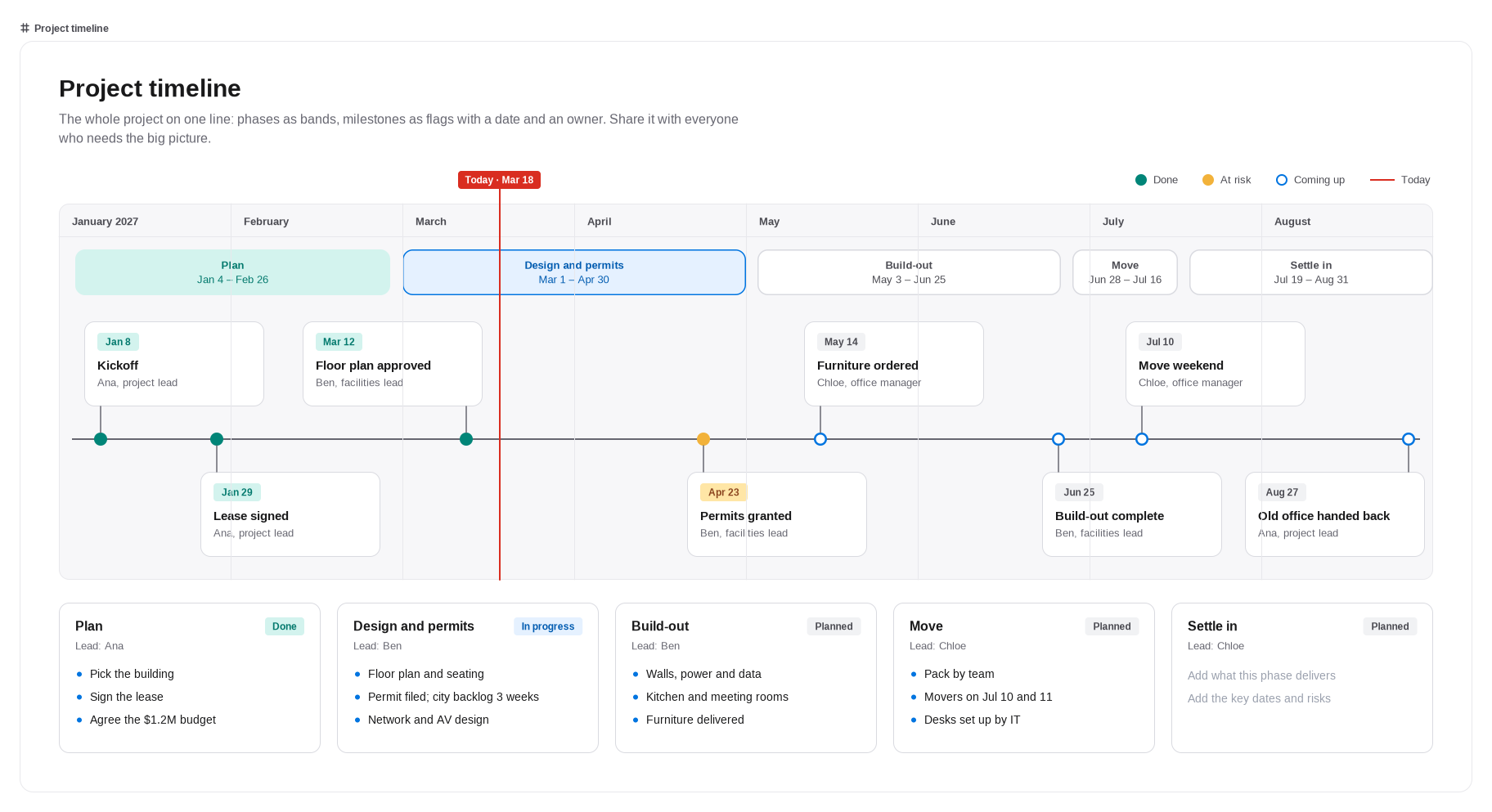
The months run across the top of the panel. Below them, five bands show the phases end to end: Plan from Jan 4 to Feb 26, Design and permits from Mar 1 to Apr 30, Build-out from May 3 to Jun 25, Move from Jun 28 to Jul 16 and Settle in from Jul 19 to Aug 31. Each band is as wide as its phase is long, so you can see that the move itself is the shortest part.
The bands also carry status by color. Plan is green because it is done, Design and permits is blue because it is in progress, and the three phases after it are still outlines. A marker labelled “Today · Mar 18” shows where the project stands.
Milestones as flags
Eight flags hang on the line, alternating above and below it so they do not crowd each other. Every flag has the same three lines: the date, the milestone and the person who owns it. The first reads “Jan 8, Kickoff, Ana, project lead”. Another reads “Mar 12, Floor plan approved, Ben, facilities lead”.
Notice how the milestones are worded. “Lease signed”, “Permits granted”, “Build-out complete”: each is a finished state that is either true or not on its date. Avoid milestones like “Work on permits”, which nobody can check.
A card for each phase
The line tells when. The cards under it tell what. Each card names the phase, its status, its lead and up to three things the phase delivers. The Plan card is marked Done and lists “Pick the building”, “Sign the lease” and “Agree the $1.2M budget”.
The cards are also where a short warning fits. Design and permits is in progress, and its second line says “Permit filed; city backlog 3 weeks”. That one note explains why a later milestone is in doubt, without a separate report. The last card, Settle in, is left open with “Add what this phase delivers” so you can see where your own text goes.
How to use the project timeline template
- Start from a copy. Use this template puts the office move on a new board in your workspace.
- Rename the bands. Write your phases and their dates, then stretch each band to cover its months. Four to six phases keep the line readable.
- Move the flags. Keep one flag for each date an outsider would ask about, write it as a finished state and name its owner.
- Color the dots. Green for done, amber for at risk, a blue ring for coming up. In the example, “Permits granted” on Apr 23 is amber because of the city backlog.
- Slide the today marker. Update it before every review so the reader sees what is behind it and what is ahead.
For the thinking behind each step, read How to make a project timeline.
When a timeline is enough, and when it is not
Use a timeline to explain a plan, in a kickoff, a steering meeting or a client update. It works because it hides the tasks.
That is also its limit. To run the work week by week, with owners, durations and the order of tasks, use a Gantt chart. To follow several teams over a year, each in its own lane, use a project roadmap. And if what you need is a list of dates with planned against forecast, the milestone tracker shows slip more precisely than flags can.
Questions about the Project timeline template
What is the difference between a project timeline and a Gantt chart?
A timeline shows phases and milestones on a single line for people who need the overview. A Gantt chart gives every task its own row and bar and shows which task waits for which. Many projects keep both: the Gantt chart for the team, the timeline for everyone else.
How many milestones should a timeline show?
Six to ten for a project of several months. The example has eight across eight months. If you need more, the reader probably needs a different chart, or the timeline should cover only one phase.
Can I use the timeline for a shorter project?
Yes. Replace the month labels with weeks or days and resize the bands. The structure stays the same: bands for phases, flags for dates, cards for what each phase delivers.
Does the timeline template fit the Free plan?
It does. The board has 140 elements, under the 150 a Free board can hold, so there is room to add one more flag. Export the finished line as PNG, SVG or PDF to put it in a deck or an email.