What is a bug triage workflow?
Bug triage is the routine of looking at new bug reports and deciding three things: is it real, how bad is it, and who fixes it when. A triage workflow writes that routine down, so a report from support gets the same treatment as one from the CEO, and nothing sits unowned.
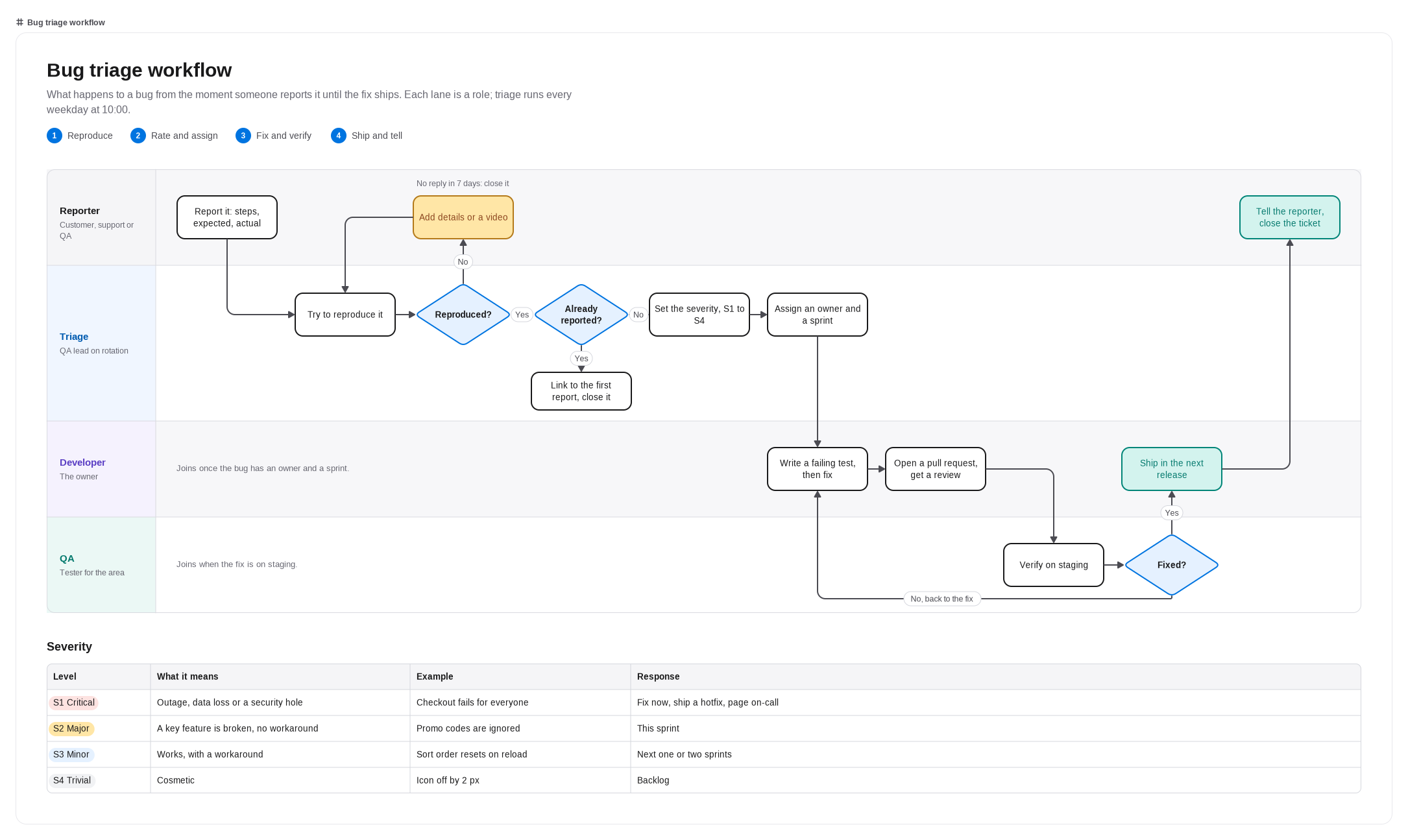
This template draws the workflow as a swimlane diagram. Each lane is a role, and the steps move left to right from “Report it” to “Tell the reporter, close the ticket”. The subtitle fixes the rhythm: triage runs every weekday at 10:00. Below the lanes, a table defines four severity levels with an example and a response time for each.
Four lanes, one for each role
The lane titles say who acts, and a second line says who that usually is:
- Reporter: a customer, support or QA.
- Triage: the QA lead on rotation.
- Developer: the owner of the fix.
- QA: the tester for the area.
Two lanes start empty, and a note explains why. The developer “joins once the bug has an owner and a sprint”, and QA “joins when the fix is on staging”. Those notes keep people from being pulled into a bug before there is anything for them to do, which is one of the main costs of an unclear process.
Reproduce before you rate
The report itself has a required shape: steps, expected, actual. Triage then tries to reproduce it and meets the first diamond, Reproduced? If not, the bug goes back up to the reporter with a request to add details or a video. A small note sets a limit on the wait: no reply in 7 days, close it.
The second diamond asks Already reported? A duplicate is linked to the first report and closed. Only a bug that is both real and new moves on. These two filters come first on purpose. Rating a bug that cannot be reproduced, or assigning the same bug twice, wastes more time than any other triage mistake.
From an owner to a release
Once the severity is set, triage assigns an owner and a sprint, and the line drops into the Developer lane. The first developer step is worded with care: write a failing test, then fix. The test proves the bug exists and stops it from coming back.
After a pull request and a review, QA verifies the fix on staging. The diamond “Fixed?” has a line labelled “No, back to the fix” that returns to the developer. On “Yes” the fix ships in the next release, and the flow climbs back to the top lane, where the reporter is told and the ticket is closed. The process ends with the person it started with.
Define severity with examples
The step “Set the severity, S1 to S4” only works if everyone reads the scale the same way. The table gives each level a meaning, an example and a response:
- S1 Critical: an outage, data loss or a security hole, such as “Checkout fails for everyone”. Fix now, ship a hotfix, page on-call.
- S2 Major: a key feature is broken with no workaround. “Promo codes are ignored.” Fixed this sprint.
- S3 Minor: it works, with a workaround. “Sort order resets on reload.”
- S4 Trivial: cosmetic, like an icon off by 2 px. It goes to the backlog.
The examples do the work. Replace them with real bugs from your own product, one per level, and arguments about severity get shorter.
How to use the bug triage workflow template
- Make your copy of the board. The four numbered phases under the title, Reproduce, Rate and assign, Fix and verify, Ship and tell, stay as a summary.
- Rename the lanes to your roles. If nobody has a triage rotation, write the name of the person who does it today.
- Set your own limits. Change the meeting time, the 7 days of waiting for a reporter, and the response for each severity.
- Swap the examples in the table. Use bugs your team remembers.
- Test it on last week's bugs. Trace three real tickets through the lanes and fix any step where they would have stalled.
If your process has extra branches, such as a security review, the AI flowchart tool can draft them from a sentence or two.
When this workflow helps, and what else to reach for
Use it when bug reports arrive from several places, when the same bug gets filed three times, or when nobody can say how fast a serious bug should be fixed. It also makes a good onboarding page for new support and QA staff.
It is for ordinary bugs. A production outage needs faster roles and customer updates, which the incident response template covers. To track the bugs themselves through columns, use a kanban board, and to dig into why a bug happened, a five whys board.
Questions about the Bug triage workflow template
What is the difference between severity and priority?
Severity is how much damage the bug does, and it is a fact about the bug. Priority is how soon the team will fix it, and it is a decision. The table links the two by giving each severity level a default response, which a product owner can still override.
How often should a team triage bugs?
Often enough that no new report waits more than a day or two. The example runs triage every weekday at 10:00. A small team with few reports can do it twice a week, as long as S1 bugs skip the meeting and go straight to on-call.
Who should run triage?
One person with the authority to rate and assign, not a committee. The template puts a QA lead on rotation in that lane. A product manager or an engineering lead works too. Rotating the role spreads knowledge of the product's weak spots.
What should a good bug report contain?
The first step on the board names the minimum: the steps to trigger it, what the reporter expected, and what actually happened. Add the device or browser and a screenshot or video when you can. Reports with those parts are rarely sent back.