What is a KWL chart?
A KWL chart is a three-column organizer for a unit of study. Before the unit, the class lists what it already Knows and what it Wants to know. As the unit goes on, it records what it has Learned. The method is credited to the educator Donna Ogle, and it works because it starts from the students’ own ideas and questions.
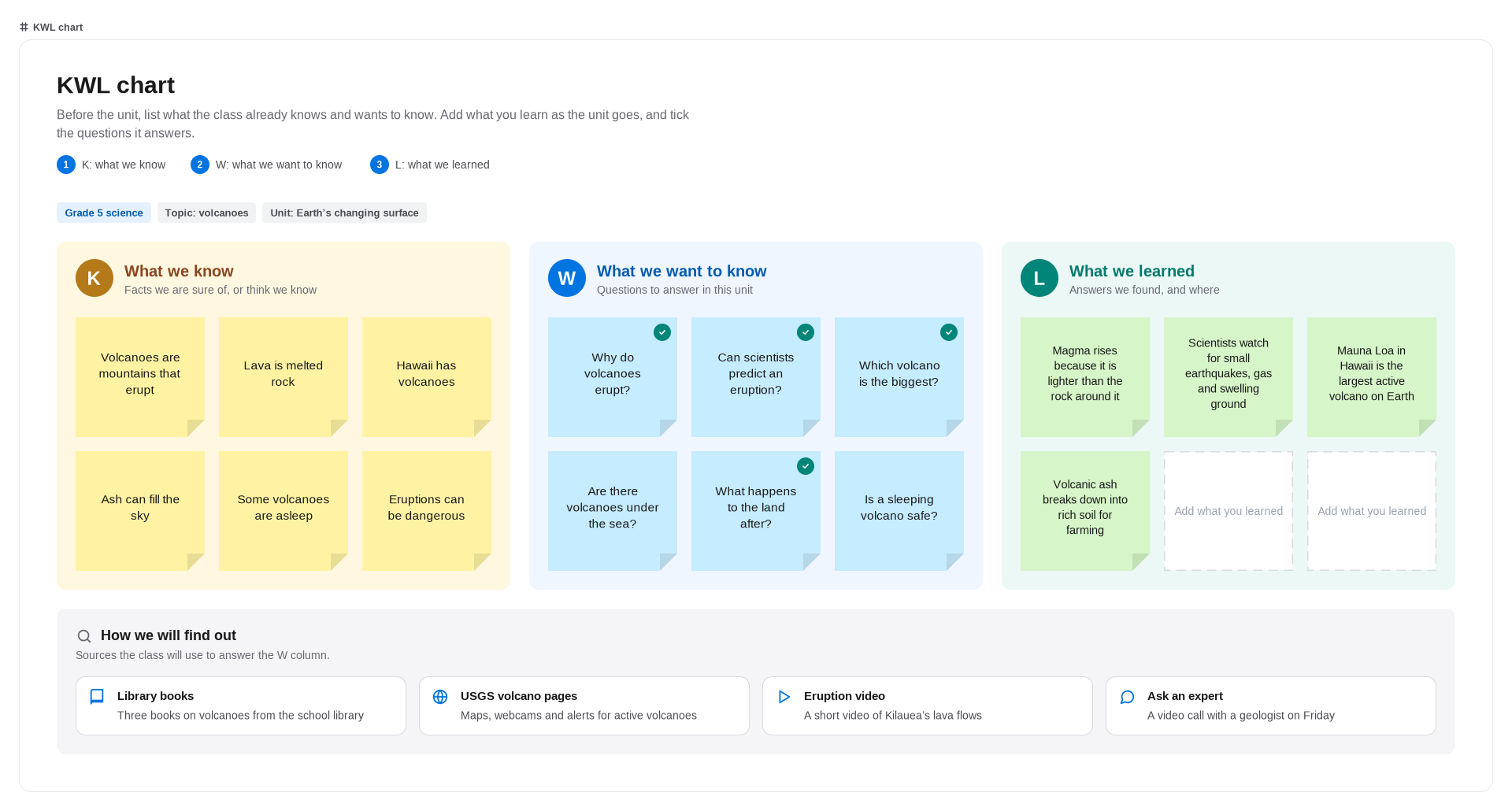
This template draws the three columns as panels of sticky notes and adds a fourth area below them: the sources the class will use. Chips under the title set the scene for the example: Grade 5 science, topic volcanoes, from a unit called “Earth’s changing surface”.
K and W: what the class brings to the unit
The K panel is subtitled “Facts we are sure of, or think we know”. The second half of that line matters. Students should feel free to post things that are only half right. The example has six notes, among them “Lava is melted rock”, “Hawaii has volcanoes” and “Some volcanoes are asleep”. That last one is loose wording, and it is useful: it tells the teacher the word “dormant” is not in the room yet.
The W panel holds “Questions to answer in this unit”. Good W notes are real questions with a question mark, one per note:
- “Why do volcanoes erupt?”
- “Can scientists predict an eruption?”
- “Are there volcanoes under the sea?”
- “Is a sleeping volcano safe?”
Notice how the W notes grow out of the K notes. A class that knows volcanoes can be asleep will ask whether a sleeping one is safe. Read the K panel aloud before asking for questions and the W panel fills faster.
L: answers, and ticks on the questions they settle
The L panel is subtitled “Answers we found, and where”. Each note answers one question from the middle column in a full sentence. “Why do volcanoes erupt?” becomes “Magma rises because it is lighter than the rock around it”. “Which volcano is the biggest?” becomes “Mauna Loa in Hawaii is the largest active volcano on Earth”.
When a question is answered, it gets a small check mark in its corner. In the example four of the six W notes are ticked. The two about undersea volcanoes and sleeping volcanoes are still open, and the two dashed cards in the L panel, each reading “Add what you learned”, are waiting for them. At any point in the unit the class can see how far it has come and what is left.
An answer can also correct the K column. If the class learns that a K note was wrong, do not delete it. Move it next to the L note that fixes it, so students can see their thinking change.
How we will find out
Many KWL charts stop at three columns and leave the hardest part unsaid: where the answers come from. The band at the bottom of this board names the sources the class will use to answer the W column. The example lists four:
- Library books. Three books on volcanoes from the school library.
- A geological survey’s volcano pages. Maps, webcams and alerts for active volcanoes.
- Eruption video. A short video of Kilauea’s lava flows.
- Ask an expert. A video call with a geologist on Friday.
Naming sources up front turns the W column into a research plan. It also gives the “and where” in the L subtitle something to point at: students can end an L note with the source that gave them the answer.
How to use the KWL chart template
- Open it as a new board. Use this template makes your own copy. Change the three chips to your grade, topic and unit, and clear the volcano notes.
- K: what we know. On day one, ask the class what it knows about the topic and type one idea per note. Accept everything, including guesses.
- W: what we want to know. Turn curiosity into questions. Aim for five or six, and pick sources for them in the bottom band.
- L: what we learned. Come back to the board after each lesson. Add an answer note, then tick the question it settles.
Display the board at the start of every lesson in the unit. It takes a minute, and it reminds students that the unit is answering their questions, not just the textbook’s.
When a KWL chart helps, and what to use instead
A KWL chart fits the start of any unit where students arrive with some ideas already: animals, weather, a period of history, a novel’s setting. It suits a whole class at a screen, small groups with a copy each, or one student preparing a research project.
It is less useful for a topic nobody has heard of, where the K column stays empty. To teach a single hard word from the unit, use the Frayer model. To show how the ideas connect once the unit is over, draw a concept map. And for a quick check on one lesson, the exit ticket is faster.
Questions about the KWL chart template
What does KWL stand for?
Know, Want to know, Learned. The first two columns are filled in before a unit starts, from what students say. The third is filled in during and after the unit, as the class finds answers to its own questions.
What if students write something wrong in the K column?
Leave it there. The K column records what the class thinks at the start, not what is true. A wrong idea is the best material for the unit: when the class finds the right answer, add it to L and place the old note beside it.
What grades is a KWL chart for?
It is most common in elementary and middle school, like the Grade 5 example, but the structure works at any age. Older students can fill in their own copy before a research paper and use the W column as a list of research questions.
Is the KWL chart template free?
Yes, it opens on the Free plan. One person edits the board, and the students or colleagues you share it with can view it and comment. On the Team plan several people can add notes at the same time.