What are meeting notes for?
Meeting notes are the record a meeting leaves behind. They tell people who were absent what happened, and they tell people who were present what they agreed to. Good notes are short. They hold facts, decisions and who does what next. They are not a transcript.
This template splits that record into four areas, so a reader can find the part they need without reading the rest: notes by agenda topic, decisions, open questions and action items. The example is a weekly check-in on a website relaunch, held on Tuesday, May 4, 2027, with five people in the room and one away.
Take notes by agenda topic
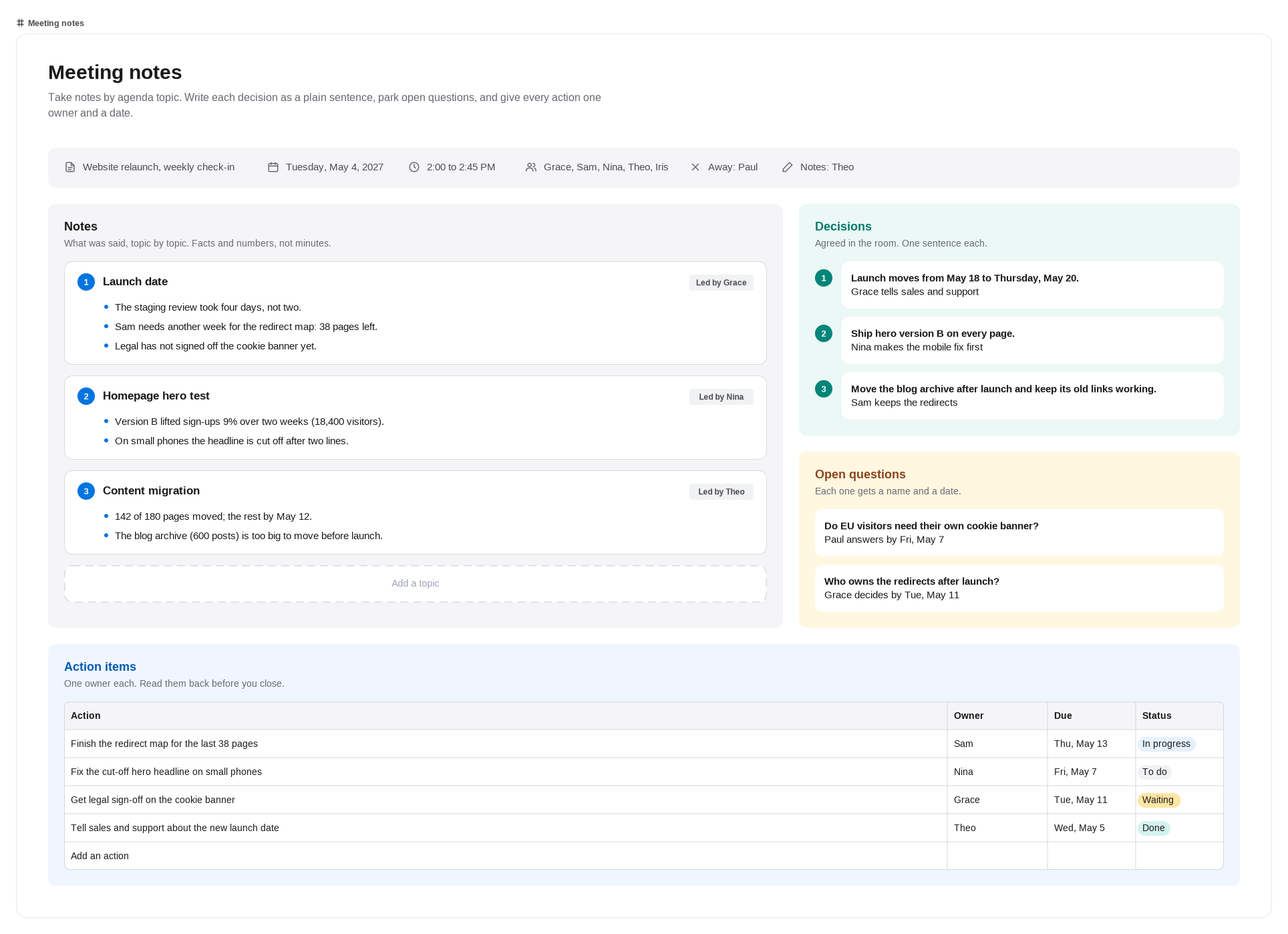
The Notes card describes itself as “What was said, topic by topic. Facts and numbers, not minutes.” Each topic is a numbered block with a title, the name of the person who led it and two or three bullet lines.
Read the bullets in the example and you will see what “facts and numbers” means:
- Under Launch date, led by Grace: “The staging review took four days, not two.”
- Under Homepage hero test, led by Nina: “Version B lifted sign-ups 9% over two weeks (18,400 visitors).”
- Under Content migration, led by Theo: “142 of 180 pages moved; the rest by May 12.”
None of them says who argued what. Each one is something a person who missed the meeting needs to know, in a line they can read in five seconds. The “Add a topic” line at the bottom takes the next block.
Write each decision as one plain sentence
Decisions get their own card, top right, because they are what people search old notes for. The card’s rule is “Agreed in the room. One sentence each.”
The three in the example can each be read alone, without the discussion behind them: “Launch moves from May 18 to Thursday, May 20.” “Ship hero version B on every page.” “Move the blog archive after launch and keep its old links working.” Under each sentence a second, smaller line names the person who carries it out, such as “Nina makes the mobile fix first”.
Compare a decision with the notes that led to it. The notes say the blog archive, 600 posts, is too big to move before launch. The decision says what the team will do about that. Keep the two apart and the decision stays easy to find.
Park open questions with a name and a date
Some points cannot be settled in the room. The person who knows is away, or a fact is missing. The Open questions card stops them from taking over the meeting, and from being forgotten. Its rule: “Each one gets a name and a date.”
The example has two. “Do EU visitors need their own cookie banner?” goes to Paul, who is away, with “Paul answers by Fri, May 7”. “Who owns the redirects after launch?” has “Grace decides by Tue, May 11”. A question written this way is a small commitment. Next week’s meeting can open by checking both.
Action items: one owner each
The table along the bottom has four columns: Action, Owner, Due and Status. Its subtitle gives two rules: “One owner each. Read them back before you close.”
Each action starts with a verb and is specific enough to check. “Finish the redirect map for the last 38 pages” belongs to Sam and is In progress. “Fix the cut-off hero headline on small phones” belongs to Nina, due Fri, May 7. “Get legal sign-off on the cookie banner” shows the status Waiting, which tells the reader the delay sits outside the team. The Status column turns the notes into something the team can open again mid-week.
How to use the meeting notes template
- Open it as a new board. Use this template adds an editable copy to your workspace. Fill in the strip at the top: meeting name, date, time, who came, who was away and who takes notes.
- Set up the topics before the meeting. Copy the titles and leaders from the agenda into the Notes card, so you only type bullets while people talk.
- Move decisions and questions out as they happen. When the room agrees, write the sentence on the Decisions card at once and read it back.
- Fill the action table in the last minutes. Read every row aloud with its owner and date before people leave.
- Share the board the same day. Send the link, or export a PDF for people who want a file.
When to use it, and what to use beside it
Use this template for any meeting whose outcome other people depend on: project check-ins, client calls, planning sessions. For a recurring meeting, keep one board and clear the bullets each week, so the open questions and unfinished actions carry over.
Notes follow a plan, so write the plan first with the meeting agenda template. If a meeting exists to make one choice between options, the decision meeting template gives that choice more room. And when side topics keep interrupting, collect them in a parking lot.
Questions about the Meeting notes template
What is the difference between meeting notes and minutes?
Minutes are a formal record, often approved at the next meeting, of who said and voted what. Notes are a working record: the facts raised, the decisions, the open questions and the actions. This template is for notes, and says so on the board.
Who should take the notes?
One named person, written in the strip at the top. It should not be the person running the meeting, who has enough to do. Rotating the job from meeting to meeting spreads the work and the skill.
How soon should notes go out?
The same day, while people remember what they agreed to. Because decisions and actions are written during the meeting on this board, there is little left to tidy afterwards. Sharing the link is enough.
Can I export the notes?
Yes. Export the board as a PDF, PNG or SVG to attach to an email or a project page, or as JSON. People you share the board with can also open it and comment on any line.