What is a meeting agenda?
A meeting agenda is the plan for a meeting, sent before it starts. It says why people are meeting, what they will cover, in what order and for how long. With it, people arrive prepared, and the person running the meeting has a reason to cut a topic that runs over.
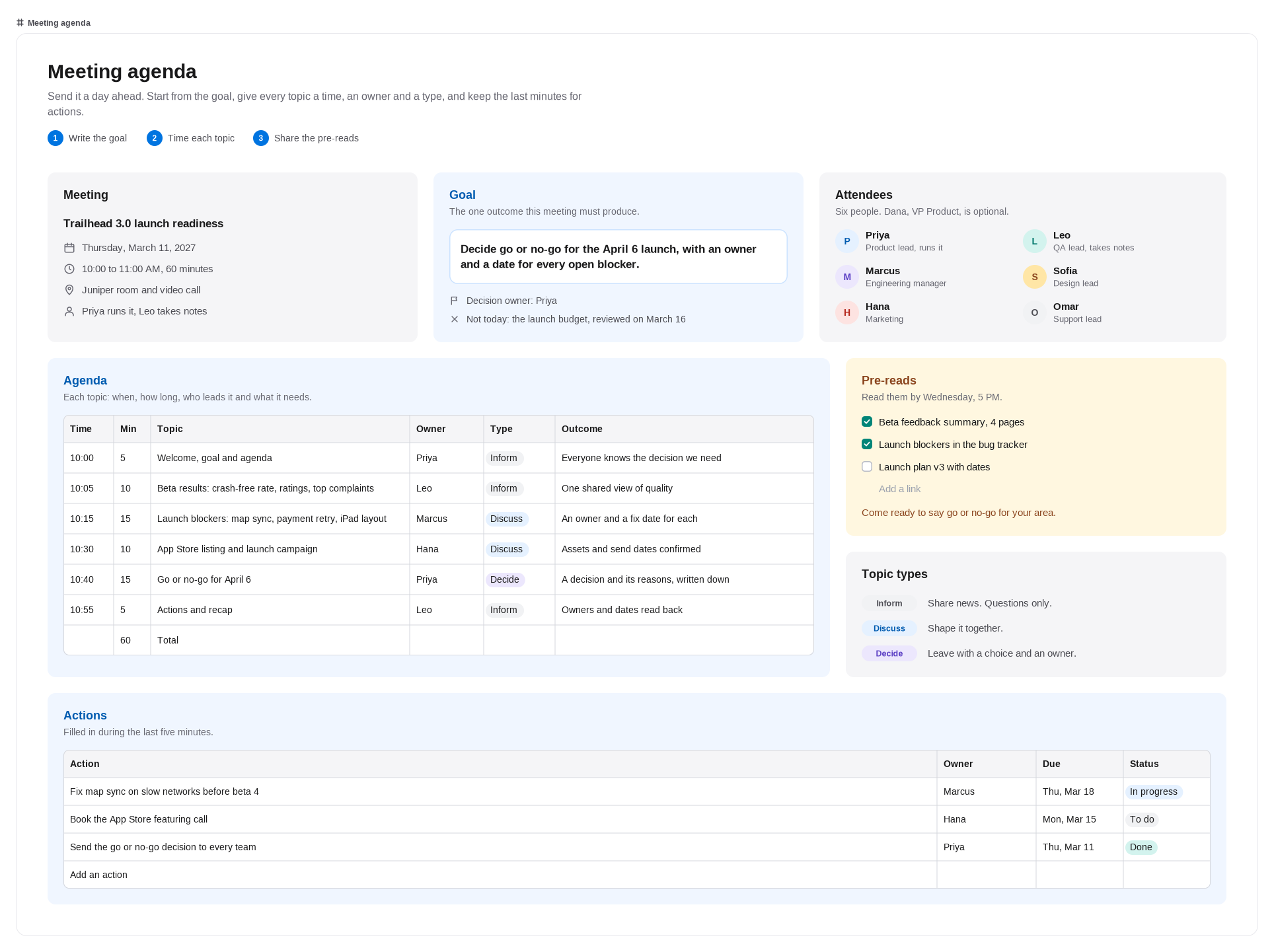
This template puts that plan on one board: the meeting’s details, its goal, the attendees, a timed table of topics, the pre-reads and a table for actions. The example is a 60-minute launch readiness meeting for an app release, held on Thursday, March 11, 2027, where the team has to decide go or no-go.
Start from the goal
The Goal card sits before the agenda for a reason. It holds one sentence: “Decide go or no-go for the April 6 launch, with an owner and a date for every open blocker.” That sentence names a result, not a subject. Anyone who reads it knows what must exist when the hour ends.
Two short lines under it do more work than they seem to. “Decision owner: Priya” says who makes the call if the room splits. “Not today: the launch budget, reviewed on March 16” parks a subject that would otherwise eat the hour, and tells people when it will be heard.
The Meeting card on the left carries the facts people look up twice: the date, 10:00 to 11:00 AM, the room and the video call, and “Priya runs it, Leo takes notes”.
Give every topic a time, an owner and a type
The Agenda table has six columns: Time, Min, Topic, Owner, Type and Outcome. The example has six rows, and its Total row adds up to 60 minutes, the length of the slot.
- Facts come first. At 10:05 Leo spends 10 minutes on the beta results, so there is “One shared view of quality” before anyone argues.
- The hard topic gets the most time. Marcus leads 15 minutes on the launch blockers. Its outcome: “An owner and a fix date for each”.
- The decision has its own row. “Go or no-go for April 6” starts at 10:40 with 15 minutes, and must end with “A decision and its reasons, written down”.
- The last five minutes are booked. “Actions and recap” closes the meeting, so owners and dates are read back.
The Outcome column is the one most agendas skip. A topic with no outcome is a chat, and a chat can take any amount of time.
Pre-reads and topic types
The Pre-reads card lists three documents, among them “Beta feedback summary, 4 pages” and “Launch plan v3 with dates”. It gives a deadline, “Read them by Wednesday, 5 PM”, and one instruction: “Come ready to say go or no-go for your area.” Reading happens before the meeting, so the hour is spent on judgment.
Under it, Topic types explains the three labels used in the table:
- Inform: “Share news. Questions only.”
- Discuss: “Shape it together.”
- Decide: “Leave with a choice and an owner.”
Add up the minutes by type. In the example Inform takes 20 minutes, Discuss 25 and Decide 15. If Inform takes most of your slot, send that news in writing and shorten the meeting.
Close with actions
The Actions table at the bottom is “Filled in during the last five minutes.” It has four columns: Action, Owner, Due and Status. In the example Marcus will “Fix map sync on slow networks before beta 4” by Thu, Mar 18, and Priya has already sent the decision to every team, so her row reads Done.
Keep one name in the Owner cell. The empty row marked “Add an action” is there for the next one.
How to use the meeting agenda template
- Open it as a new board. Use this template copies the board into your workspace with the launch example in place.
- Write the goal before any topic. If you cannot put the meeting’s result in one sentence, the meeting is not ready to be booked.
- Time each topic. Fill the Min column until the Total row equals your slot. When it goes over, remove a topic. Do not shave two minutes off each.
- Trim the attendee list. The example invites six people, each with a role, and marks one more as optional. A person with no topic and no decision can read the notes.
- Share the pre-reads. Send the board a day ahead, with a reading deadline.
When an agenda helps, and when another template fits
Use this template for any meeting that has to produce something: a launch call, a planning session, a review with people from several teams. The more people in the room, the more a timed table saves.
Short recurring meetings need less. A daily stand-up has the same three questions every day, and a weekly team sync repeats one fixed order. To record what was said and agreed once the meeting is under way, use meeting notes.
Questions about the Meeting agenda template
How far ahead should I send a meeting agenda?
A day ahead is the rule printed on this template. In the example the meeting is on Thursday at 10:00 AM and the pre-reads are due by Wednesday, 5 PM. Send it earlier when the pre-reads are long.
How many topics fit in a one-hour meeting?
The example has six rows, but two of them are the welcome and the recap. That leaves four real topics in 50 minutes. If you need more than five, some of them are news that can be sent in writing.
What do I do when a topic runs over its time?
Say so out loud and choose: take the minutes from a later topic, or stop and write the open point in the Actions table with an owner and a date. Do not let the last five minutes for actions pay for it.
Is the meeting agenda template free?
Yes. The agenda board fits the Free plan, which comes with three boards. You can edit every cell and card, then export the agenda as a PDF or PNG to attach to the invite.