What is a meeting parking lot?
A parking lot is a visible list of things that come up in a meeting and deserve an answer, just not now. Someone raises a point that is off the topic or needs people who are not in the room. You write it down where everyone can see it, and the meeting moves on. The person who raised it can let go, because the point is not lost.
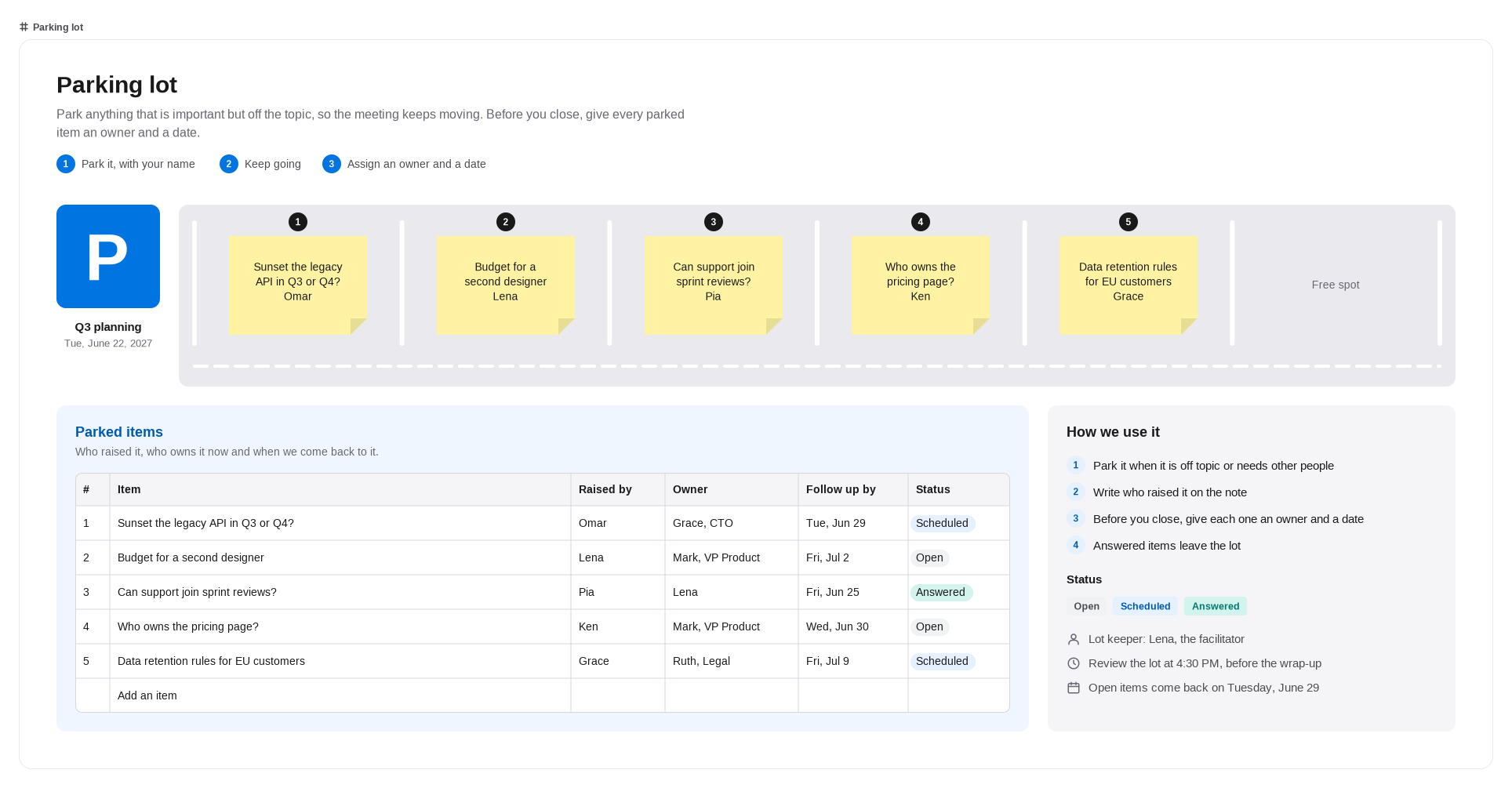
This template draws the lot as a row of numbered bays under a big P sign, with a table below that tracks each parked item to an answer. The example comes from a Q3 planning meeting on Tuesday, June 22, 2027.
The bays
The top of the board is the lot itself. A blue P sign carries the meeting’s name and date, and lines divide the strip into bays. Each parked item takes one bay and gets the bay’s number, which is how the table below refers to it.
The example has five cars in the lot. Bay 1 holds “Sunset the legacy API in Q3 or Q4?”, bay 2 “Budget for a second designer”, bay 3 “Can support join sprint reviews?” and bay 4 “Who owns the pricing page?”. None of them is a planning question for this quarter’s goals, and all of them would have eaten twenty minutes each if the group had started to answer.
Park it with your name on it
Every note in the lot ends with a name: Omar, Lena, Pia, Ken, Grace. That is step 1 on the board, “Park it, with your name”. The name matters a week later, when the owner of the item needs to ask what exactly was meant by “Data retention rules for EU customers”.
Write the item as the question or request it is, in the words of the person who raised it, and keep it to one line. Then stop talking about it. The bay marked “Free spot” at the end of the row is the invitation: there is always room for one more, so no one has to fight to be heard now.
The table that empties the lot
A parking lot with no follow-up is where questions go to be forgotten. The Parked items table prevents that. Each row repeats the bay number and the item, then adds who raised it, who owns it now, a follow-up date and a status.
Notice that the owner is often not the person who asked. Omar raised the legacy API question, and Grace, the CTO, owns it, with a follow-up on Tuesday, June 29. Lena’s budget request went to Mark, the VP Product. Pia’s question about sprint reviews took so little effort that it is already marked Answered. The last row, “Add an item”, is ready for bay 6.
Rules, statuses and a lot keeper
The panel on the right explains how this team uses its lot, in four lines. Park an item when it is off topic or needs other people. Write who raised it on the note. Before you close, give each one an owner and a date. Answered items leave the lot.
Three status tags follow: Open, Scheduled and Answered. In the example two items are open, two are scheduled and one is answered. The panel also names a lot keeper, Lena, the facilitator, and sets two fixed moments: the lot is reviewed at 4:30 PM, before the wrap-up, and open items come back on Tuesday, June 29.
How to use the parking lot template
- Open it as a new board. Type your meeting’s name and date under the P sign and clear the five example notes.
- Park it, with your name. When a point drifts off topic, the lot keeper writes it on a note with the speaker’s name and drops it in the next free bay.
- Keep going. Return to the agenda at once. Resist answering “just quickly”.
- Assign an owner and a date. Ten minutes before the end, copy each note into the table and fill in every column. Delete the rows of items the group answered on the spot.
Share the board after the meeting, so owners can update the status themselves.
When a parking lot helps, and when it is the wrong tool
Keep one next to any meeting with a tight agenda: planning sessions, workshops, steering groups, long reviews. It is most useful in groups that like to talk, where one tangent can cost half the hour.
Do not use it to dodge hard questions. If the same item is parked three meetings in a row, it needs a meeting of its own, such as a decision meeting. The lot also sits beside other boards, not in place of them: plan the session on a meeting agenda and record what was decided in meeting notes.
Questions about the Parking lot template
What goes in a parking lot?
Anything that is important but off the topic, or that cannot be settled by the people present. The example parks a budget request, an ownership question and a legal question during a planning meeting. Small clarifications that take ten seconds should simply be answered.
Who manages the parking lot during a meeting?
One named person, usually the facilitator. On the example board it is Lena. The lot keeper decides when a point gets parked, writes the note and makes sure the review before the wrap-up happens.
How do you stop parked items from being forgotten?
Reserve the last ten minutes to give each one an owner and a follow-up date, and open the next meeting with the items still marked Open. An item with no owner should be deleted on the spot; that is more honest than leaving it.
Can I export the list after the meeting?
Yes. Export the board as PNG, SVG, PDF or JSON and attach it to the meeting summary. People you share the board with can also open it and comment on any parked item.